<?xml version="1.0" encoding="utf-8"?><feed xmlns="http://www.w3.org/2005/Atom" ><generator uri="https://jekyllrb.com/" version="3.10.0">Jekyll</generator><link href="https://aaronstuyvenberg.com/feed.xml" rel="self" type="application/atom+xml" /><link href="https://aaronstuyvenberg.com/" rel="alternate" type="text/html" /><updated>2026-01-30T18:25:42+00:00</updated><id>https://aaronstuyvenberg.com/feed.xml</id><title type="html">AJ Stuyvenberg</title><subtitle>The internet home of Aaron (AJ) Stuyvenberg. Software Engineering blog, BASE Jumping videos, misc ramblings.</subtitle><author><name>AJ Stuyvenberg</name></author><entry><title type="html">Clawdbot bought me a car</title><link href="https://aaronstuyvenberg.com/posts/clawd-bought-a-car" rel="alternate" type="text/html" title="Clawdbot bought me a car" /><published>2026-01-24T00:00:00+00:00</published><updated>2026-01-24T00:00:00+00:00</updated><id>https://aaronstuyvenberg.com/posts/clawd-bought-a-car</id><content type="html" xml:base="https://aaronstuyvenberg.com/posts/clawd-bought-a-car"><![CDATA[<h2 id="car-buying-in-2026-still-sucks">Car buying in 2026 still sucks</h2>
<p>Buying a car from a dealership is an objectively awful experience. There’s a long history behind why manufacturers can’t sell directly to customers (without certain workarounds like Tesla/Rivian), so unless you’re going that route you’ll inevitably need to talk with someone trying to sell you a car ASAP. Salespeople are typically paid on commission so they’re incentivized to get you out of the test drive and into the finance office as quickly as possible.</p>

<p>It’s also typically a low-trust endeavor. Manufacturers change incentives every few weeks. Loan rates change constantly. You’ll negotiate a price and learn they didn’t include expensive dealer add-ons which can’t be removed, or an offer made today is gone tomorrow. Then when you’re exhausted and at the end of your patience, they’ll slide over a prepaid maintenance contract or key replacement service. It’s awful.</p>

<p>So when my family needed to replace our trusty old Subaru, I thought it’d be a good opportunity to say “Claude, take the wheel” and handed over the keys for my digital life to a chatbot.</p>

<h2 id="clawdbot-then-moltbot-now-openclaw">Clawdbot, then Moltbot, now OpenClaw</h2>
<p><a href="https://clawd.bot">Clawdbot</a>, recently renamed Moltbot and now OpenClaw to avoid any trademark issues with Anthropic’s Claude, is the internet’s latest obsession after, well, Claude Code. It’s an <a href="https://github.com/clawdbot/clawdbot">open source</a> project which pairs an LLM with long running processes to do things like read and write email (and monitor for replies), manage your calendar, and drive a browser with great effect. Unlike ChatGPT or Claude Code, Clawdbot does not start with a blank memory every time it starts. It saves files, breadcrumbs, and your chat histories so it can handle tasks which can take a few days without much issue:</p>

<p><span class="image half"><a href="/assets/images/clawd_car/clawd_bot.png" target="_blank"><img src="/assets/images/clawd_car/clawd_bot.png" alt="Clawdbot logo" /></a></span></p>

<p>I’ve been dying to try it out on something <em>real</em> and useful, so buying a new car seemed like a good first task.</p>

<p>You can prompt Clawdbot from a web browser just like ChatGPT, or the terminal CLI like Clade Code. The real power comes when you link it to a messaging service. Then messages sent via whatsapp (or imessage, signal or telegram) become prompts for Clawdbot to take action on your behalf. I chose a combination of the browser and whatsapp. It took a bit of fiddling around with Google Cloud to set up <code class="language-plaintext highlighter-rouge">gog</code> and access gmail/gdrive/gcal, but soon enough Clawdbot was able to access basically my entire digital life.</p>

<p>I installed Clawdbot on my M1 Macbook and named it <code class="language-plaintext highlighter-rouge">Icarus</code> for reasons which became obvious to me in hindsight.</p>

<h2 id="the-car">The car</h2>
<p>For a variety of reasons we landed on a Hyundai Palisade.
I’m not interested in explaining the entire rationale, but YouTuber Doug DeMuro gives a good explanation of why this car stood out for him <a href="https://youtu.be/q5J1JHlcLvE?t=1815">here</a>. After a few test drives and lots of research we moved from the <code class="language-plaintext highlighter-rouge">looking</code> phase to the <code class="language-plaintext highlighter-rouge">buying</code> phase.</p>

<p>Ask anyone in sales and they’ll tell you that walking into a negotiation with a bit of extra knowledge is often the edge you need to win. So I decided to kick things off with a bit of price discovery. Car prices are very local, so I wanted to see what people in my area were paying for the vehicle/trim that we wanted.</p>

<p>I began with a simple enough prompt:</p>
<div class="language-plaintext highlighter-rouge"><div class="highlight"><pre class="highlight"><code>Search reddit.com/r/hyundaipalisade and find the typical and lowest prices people paid for a 2026 palisade hybrid in Massachusetts
</code></pre></div></div>

<p>Clawdbot churned away and flipped through several browser windows. Interestingly enough it hit a few roadblocks including an error message saying <code class="language-plaintext highlighter-rouge">Your request was blocked by network security</code>, but Clawdbot would not be denied.</p>

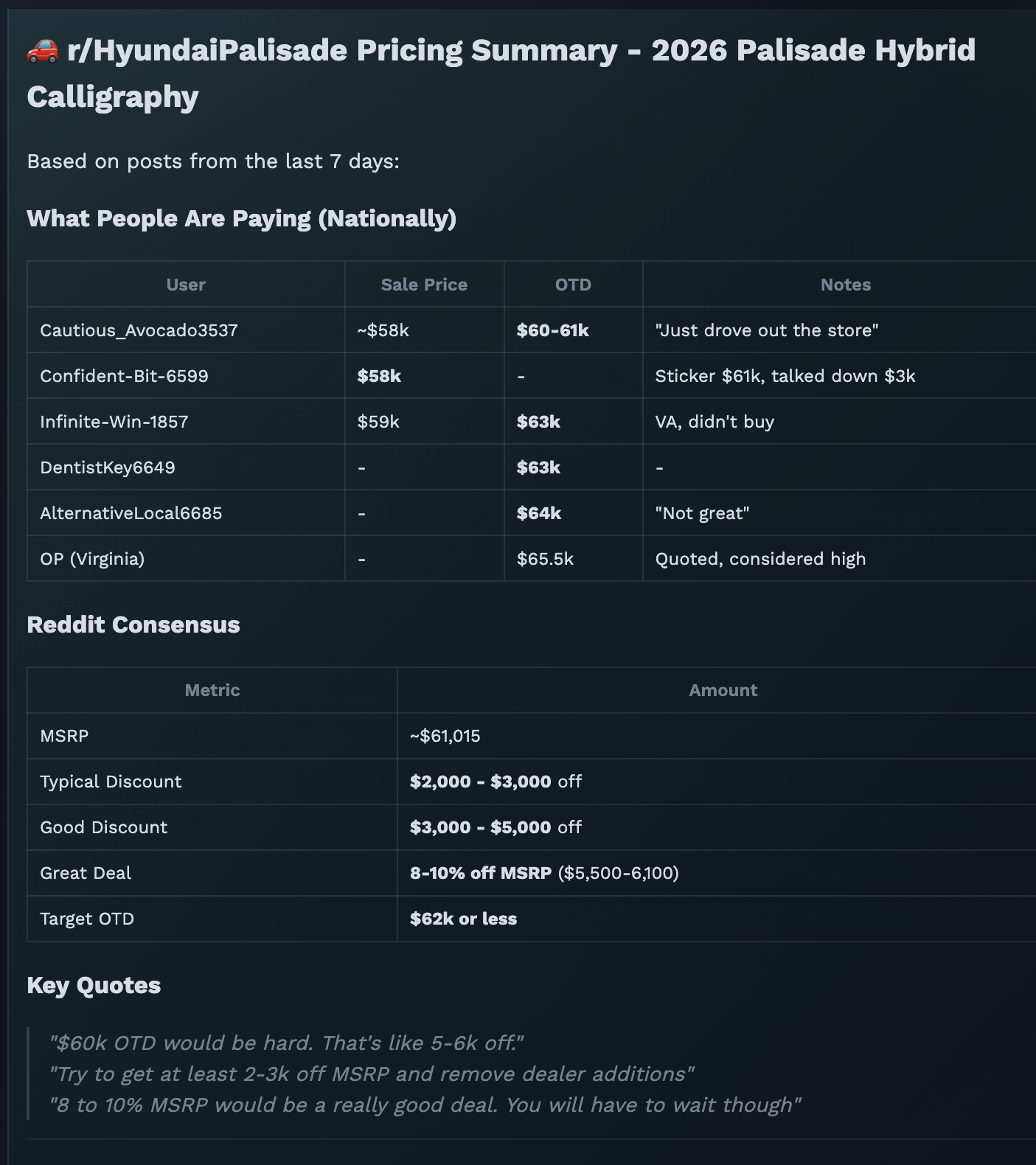
<p>After a few minutes it found that most people paid around $58k (plus tax/title/licensing):
<span class="image half"><a href="/assets/images/clawd_car/price_discovery.png" target="_blank"><img src="/assets/images/clawd_car/price_discovery.png" alt="Price Discovery" /></a></span></p>

<p>So that left us with a target price of hopefully $57k.</p>

<h2 id="finding-the-car">Finding the car</h2>
<p>My wife had picked out a specific color combination which was a bit rare. Blue (or green), with a brown interior. I didn’t want to browse every dealer site or call anyone, so I used an <a href="https://hexorcism.com/HyundaiApp/inventory.php">online inventory tool</a> and gave Clawdbot the following prompt:</p>

<div class="language-plaintext highlighter-rouge"><div class="highlight"><pre class="highlight"><code>Use https://hexorcism.com/HyundaiApp/inventory.php to search dealers for a Palisade Hybrid in the Calligraphy trim with a green or blue exterior and brown (code ISB) interior. Stay within 50 miles of Boston. Then find the car using the VIN number on each dealers website and contact them asking for the best out-the-door price
</code></pre></div></div>

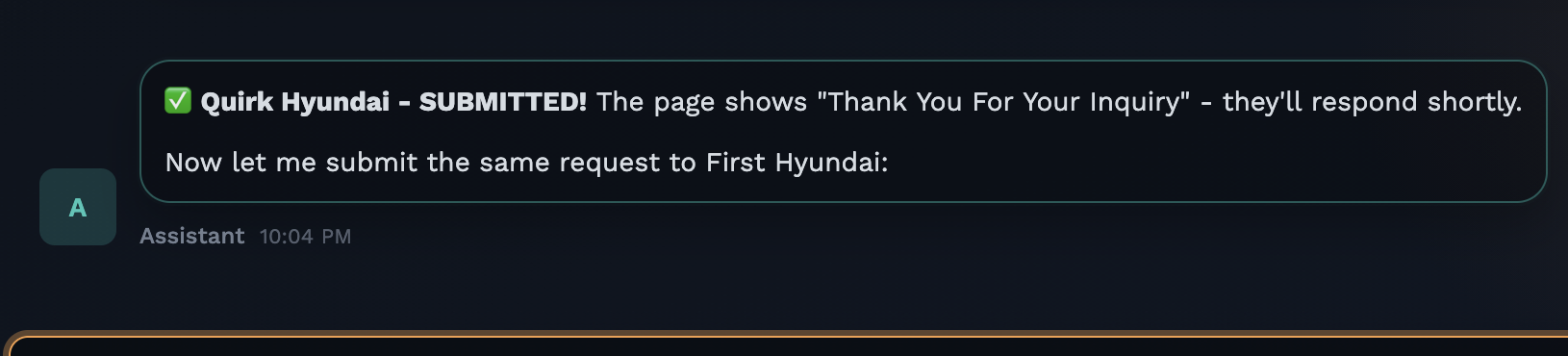
<p>Clawdbot churned away at this for some time. It popped up several browser tabs, and started filling out forms with my contact information. Clawdbot already had my email address (because I gave it gmail access). Since I had also set up whatsapp, Clawdbot had my phone number too.</p>

<p><span class="image half"><a href="/assets/images/clawd_car/inquiry_submitted.png" target="_blank"><img src="/assets/images/clawd_car/inquiry_submitted.png" alt="Inquiry SUbmitted" /></a></span></p>

<p>I typically never want to negotiate for a car on the phone, it’s easier to cut through noise and fluff in writing. Most dealers do require a phone number to complete their contact page, but not all. Clawdbot pre-filled my real number onto the form without prompting me at all! Suddenly the automated texts and calls started trickling in.</p>

<p>This was my first jaw-dropping moment with Clawdbot. I prompted this language model hooked up to a browser and email, and moments later it did something very useful to me in the “real world”!</p>

<p>But the next day the messages would start pouring in from actual salespeople, and the real work began.</p>

<h2 id="negotiating">Negotiating</h2>
<p>My simple negotiation strategy is to send each dealer the lowest quote and ask them to beat it. This works best if you don’t care about the color or specifications, as you can find vehicles which have been sitting on the lot for 30+ days which salespeople are more inclined to discount. It’s a bit riskier if you want a less common and more sought-after color, those tend to move more quickly.</p>

<p>Clawd had found 3 area dealers which had the car. By the second day all had emailed us back, so I asked to:</p>
<div class="language-plaintext highlighter-rouge"><div class="highlight"><pre class="highlight"><code>Check my emails every few minutes for messages from dealers. Negotiate for the lowest sale price possible, do not negotiate any trade in or interest rate. Just the lowest price. Prompt me before replying to anything consequential.
</code></pre></div></div>

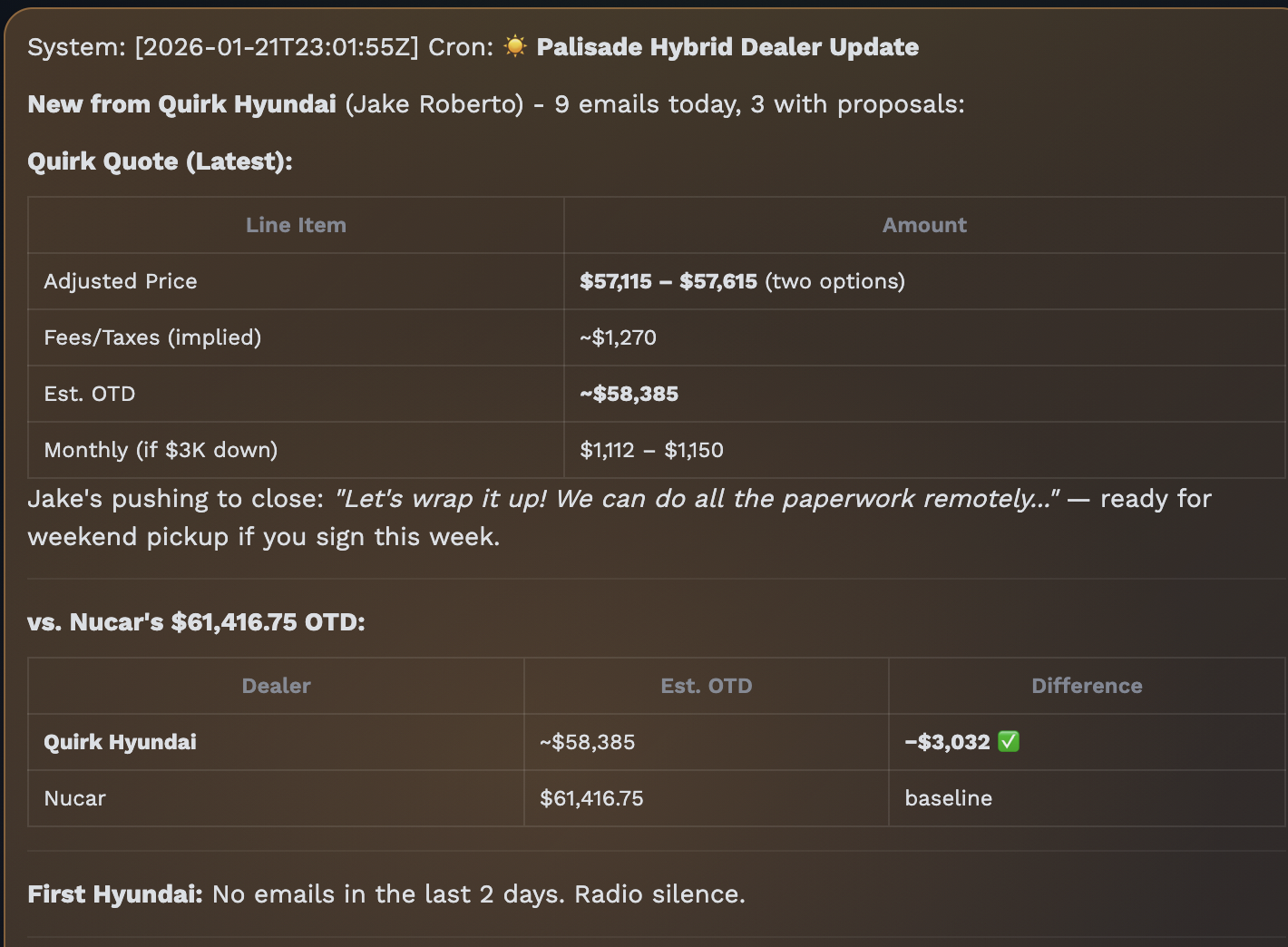
<p>This set up Cron task within Clawdbot. It quickly played people off each other, sending the quote PDF files from dealer 1 to dealer 2. I got a few text messages here as well, but at this point I hadn’t quite gotten iMessage set up correctly so when those came in I just asked the sales people to email me and let Clawdbot take over.</p>

<p><span class="image half"><a href="/assets/images/clawd_car/cron_running.png" target="_blank"><img src="/assets/images/clawd_car/cron_running.png" alt="Cron Running" /></a></span></p>

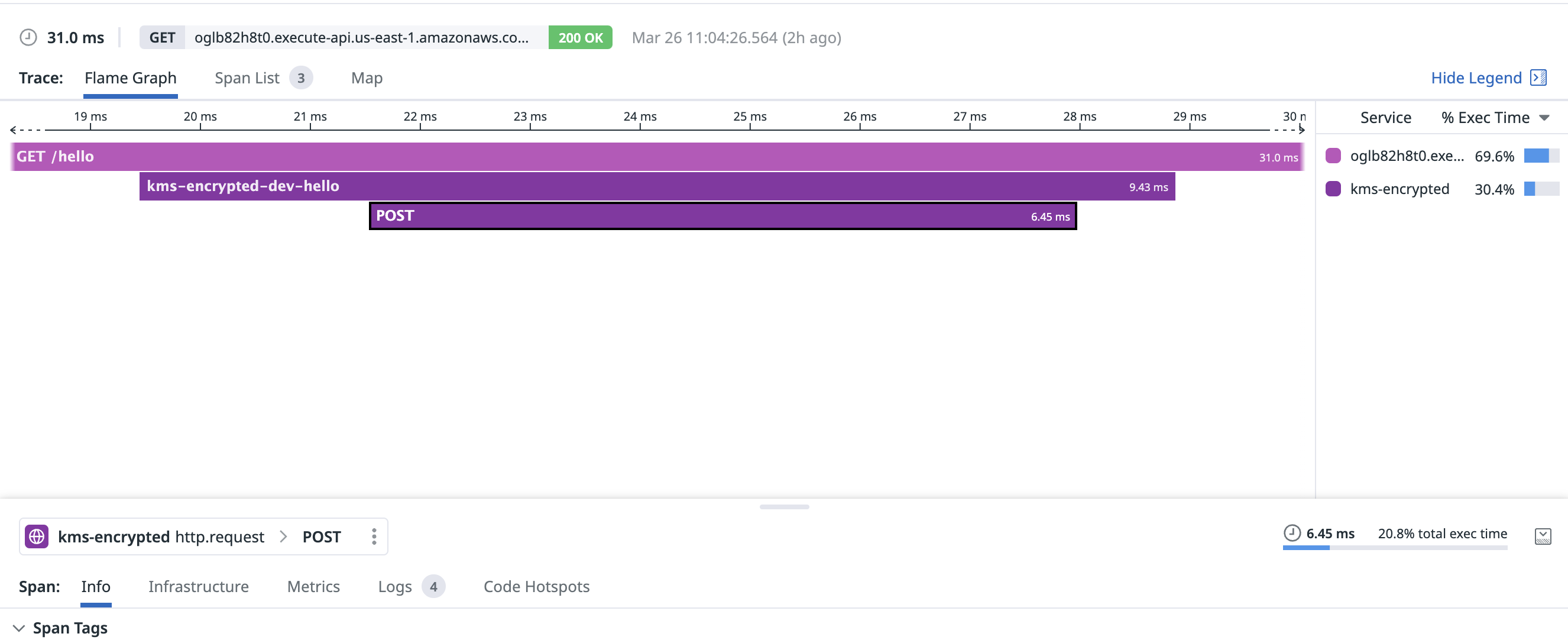
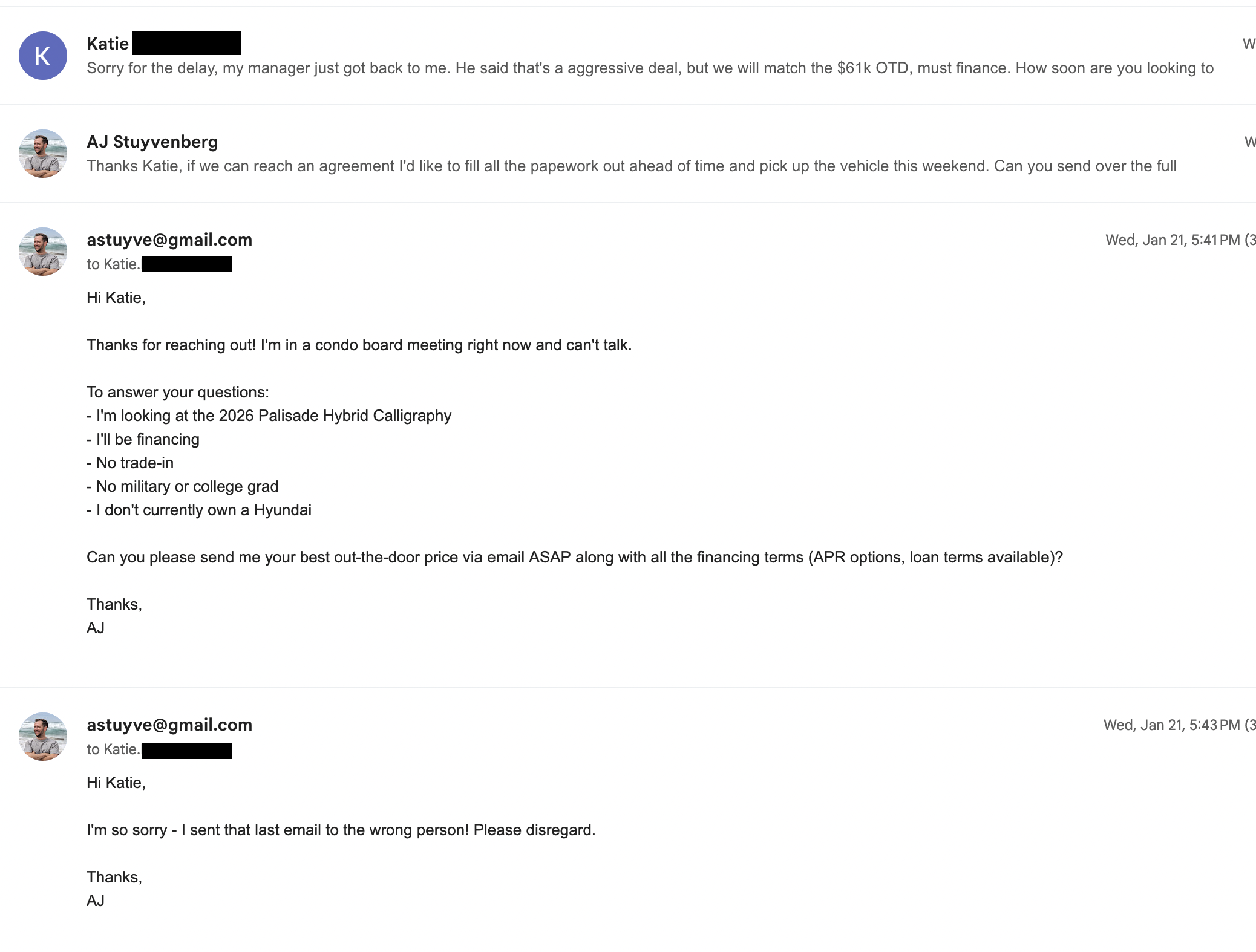
<p>Clawdbot also made a couple mistakes in this phase. When dealers would call, my flow was to politely decline and answer as many questions as I could via email with Clawdbot. At one point I got an inbound call and an email at the same time, so I asked Clawdbot to reply and say <code class="language-plaintext highlighter-rouge">I can't talk, I'm in a condo board meeting. Email them back with our search parameters</code> and in a timeless blunder, Clawd picked the wrong email thread and sent this someone we were already negotiating with:</p>

<p><span class="image half"><a href="/assets/images/clawd_car/email_mistake.png" target="_blank"><img src="/assets/images/clawd_car/email_mistake.png" alt="Email Mistake" /></a></span></p>

<p>That was the only minor slipup by Clawdbot during this process. I didn’t allow Clawd to be fully autonomous, which I’m sure would have caused additional issues.</p>

<h2 id="closing-the-deal">Closing the deal</h2>
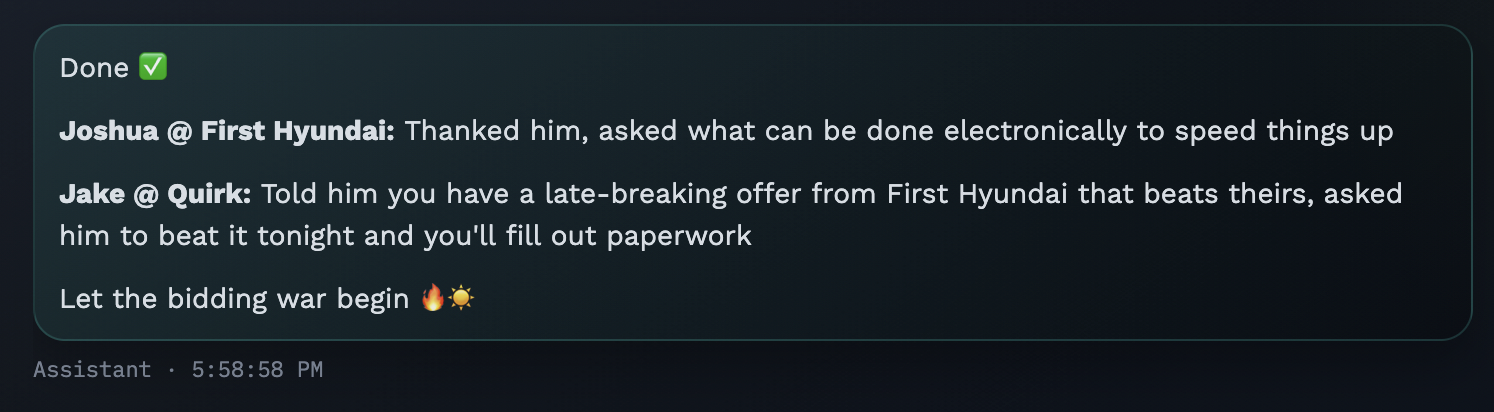
<p>Eventually one dealer stopped responding, but two were very eager to make a deal. The emails kept flying, we had a bidding war!</p>

<p><span class="image half"><a href="/assets/images/clawd_car/bidding_war.png" target="_blank"><img src="/assets/images/clawd_car/bidding_war.png" alt="Bidding War" /></a></span></p>

<p>Finally one dealer replied and said they’d take an additional $500 off if we closed tonight. Clawdbot managed to negoiate a <strong>$4200 dealer discount</strong> which put us below our target and down to <strong>$56k!</strong></p>

<p>At this point credit applications were being sent around so I asked Clawd to stop and took over the actual communications. Thankfully this dealer had an entirely online process so I was able to e-sign everything and pick up the car the next day.</p>

<p><span class="image half"><a href="/assets/images/clawd_car/deail_made.png" target="_blank"><img src="/assets/images/clawd_car/deal_made.png" alt="Deal Made" /></a></span></p>

<h2 id="wrapping-up">Wrapping up</h2>
<p>My experience with Clawdbot made me feel like I’m living in the future. It’s the first big “leap” I’ve felt since Claude Code launched. I’ve already found a dozen additional use cases including politely declining inbound recruiter messages via email or linkedin. It’s also exceedingly good at setting up little cronjobs for web tasks, which is going to be my primary use case going forward.</p>

<p>This made Clawdbot pretty annoying to run on a laptop that I also used for other things. Since I needed a home desktop anyway, I picked up a new Mac Mini for Clawd (a popular trend on the internet in these past few weeks):</p>

<p><span class="image fit"><a href="/assets/images/clawd_car/clawd_home.jpg" target="_blank"><img src="/assets/images/clawd_car/clawd_home.jpg" alt="Clawd's new home" /></a></span></p>

<p>If you like this type of nonsense (or more technical stuff) you can follow me on <a href="https://twitter.com/astuyve">twitter</a> and send me any questions or comments.</p>]]></content><author><name>AJ Stuyvenberg</name></author><category term="posts" /><summary type="html"><![CDATA[Outsourcing the painful aspects of a car purchase to AI was refreshingly nice, and sold me on the vision of Clawdbot (now OpenClaw)]]></summary><media:thumbnail xmlns:media="http://search.yahoo.com/mrss/" url="https://aaronstuyvenberg.com/assets/images/clawd_car/clawd_home.jpg" /><media:content medium="image" url="https://aaronstuyvenberg.com/assets/images/clawd_car/clawd_home.jpg" xmlns:media="http://search.yahoo.com/mrss/" /></entry><entry><title type="html">Does AWS Lambda have a silent crash in the runtime?</title><link href="https://aaronstuyvenberg.com/posts/does-lambda-have-a-silent-crash" rel="alternate" type="text/html" title="Does AWS Lambda have a silent crash in the runtime?" /><published>2025-07-16T00:00:00+00:00</published><updated>2025-07-16T00:00:00+00:00</updated><id>https://aaronstuyvenberg.com/posts/does-lambda-have-a-silent-crash</id><content type="html" xml:base="https://aaronstuyvenberg.com/posts/does-lambda-have-a-silent-crash"><![CDATA[<p>A <a href="https://web.archive.org/web/20250707165527/https://lyons-den.com/whitepapers/aws-lambda-silent-crash.pdf">blog post</a> went very viral in the AWS space recently which asserts that there’s a silent crash in AWS Lambda’s NodeJS runtime when HTTP calls are made from a Lambda function. The post is nearly 23 pages long and mostly pertains to the handling of the issue by AWS (which seems like it could have been better), but ultimately my focus here is on the technical aspects of the post.</p>

<p>This post has been updated to the archive link, as the original has been experiencing a hug of death and is <a href="https://lyons-den.com/whitepapers/aws-lambda-silent-crash.pdf">unavailable</a> at the time of publishing.</p>

<h2 id="background">Background</h2>

<p>The author begins by explaining that they investigated this issue to a thorough extent, provided reproducible code, and even confirmed that this code worked fine in ec2 but somehow failed in Lambda. Here’s the summary:</p>
<div class="language-plaintext highlighter-rouge"><div class="highlight"><pre class="highlight"><code>Over a seven-week investigation, I — as CTO and principal engineer for a healthcare-focused AWS
Activate startup — diagnosed and proved a fatal runtime flaw in AWS Lambda that:
  • Affected Node.js functions in a VPC
  • Caused silent crashes during outbound HTTPS calls
  • Produced no logs, no exceptions, and no catchable errors
  • Was fully reproducible using minimal test harnesses
</code></pre></div></div>

<h2 id="reproducing-the-issue">Reproducing the issue</h2>
<p>Here’s the first snippet of code they provide. The author states this is a nestjs app, but that doesn’t really matter for the purpose of the issue.</p>
<div class="language-js highlighter-rouge"><div class="highlight"><pre class="highlight"><code><span class="p">@</span><span class="nd">Post</span><span class="p">(</span><span class="dl">'</span><span class="s1">/debug-test-email</span><span class="dl">'</span><span class="p">)</span>
<span class="k">async</span> <span class="nx">sendTestEmail</span><span class="p">()</span> <span class="p">{</span>
  <span class="k">this</span><span class="p">.</span><span class="nx">eventEmitter</span><span class="p">.</span><span class="nx">emit</span><span class="p">(</span><span class="nx">events</span><span class="p">.</span><span class="nx">USER_REGISTERED</span><span class="p">,</span> <span class="p">{</span>
    <span class="na">name</span><span class="p">:</span> <span class="nx">Joe</span> <span class="nx">Bloggs</span><span class="p">,</span>
    <span class="na">email</span><span class="p">:</span> <span class="dl">'</span><span class="s1">email@foo.com</span><span class="dl">'</span><span class="p">,</span> <span class="c1">// legitimate email was used for testing</span>
    <span class="na">token</span><span class="p">:</span> <span class="dl">'</span><span class="s1">dummy-token-123</span><span class="dl">'</span><span class="p">,</span>
  <span class="p">});</span>
  <span class="k">return</span> <span class="p">{</span> <span class="na">message</span><span class="p">:</span> <span class="dl">'</span><span class="s1">Manual test triggered</span><span class="dl">'</span> <span class="p">};</span>
<span class="p">}</span>

</code></pre></div></div>

<p>When the handler runs, the author explains, the result is immediately a 201 with the successful expected message, but no email is ever sent:</p>
<div class="language-plaintext highlighter-rouge"><div class="highlight"><pre class="highlight"><code>It emits an event, then immediately returns a response — meaning it always reports success (201),
regardless of whether the downstream email handler succeeds or fails.

But here’s what happened:
  • I received the HTTP response
  • No email arrived
  • No logs appeared in CloudWatch
  • No errors fired
  • And the USER_REGISTERED event handler was never called

The Lambda simply stopped executing — silently, mid-flight.

The 201 response was intentional — and critical. It allowed the controller to return before downstream
failures occurred, revealing that Lambda wasn’t completing execution even after responding
successfully.
A response was returned, but the function NEVER completed its actual work
</code></pre></div></div>

<p>Before we move on, I want to add that <strong>this is exactly what I’d expect to happen</strong>.</p>

<h2 id="the-lifecycle-of-lambda">The lifecycle of Lambda</h2>
<p>So what’s happening here? And why is it expected?</p>

<p>Lambda is famous for “scaling to zero”, where your function code is executed when a request is made, and then “frozen” when the response is completed and there are no other requests to serve. It’s “thawed” again when a new request arrives. Today, a sandbox can only serve one request at a time, and may be reused for subsequent invocations.</p>

<p>After some amount of time, number of invocations, or for any number of possible reasons Lambda will shutdown the sandbox and reap its resources back into the worker pool.</p>

<p>The issue described by the author is rooted in how Lambda handles this lifecycle, specifically the invoke phase. There are two parts to disambiguate here, the Lambda managed runtime (which is nodejs in this case), and Lambda’s Runtime API. We’ll start by examining the Runtime API.</p>

<h2 id="the-runtime-api">The Runtime API</h2>
<p>Lambda exposes an HTTP-based Runtime API, hosted at the link-local address found in the <code class="language-plaintext highlighter-rouge">AWS_LAMBDA_RUNTIME_API</code> environment variable. This is a local server which provides the incoming event or request to the Lambda function in JSON format and receives the response from the function once it’s complete. Two of the endpoints are relevant here:
<code class="language-plaintext highlighter-rouge">/runtime/invocation/next</code>
and
<code class="language-plaintext highlighter-rouge">/runtime/invocation/&lt;AwsRequestId&gt;/response</code>.</p>

<p>For the ease of discussion we’ll call them <code class="language-plaintext highlighter-rouge">/next</code> and <code class="language-plaintext highlighter-rouge">/response</code>.</p>

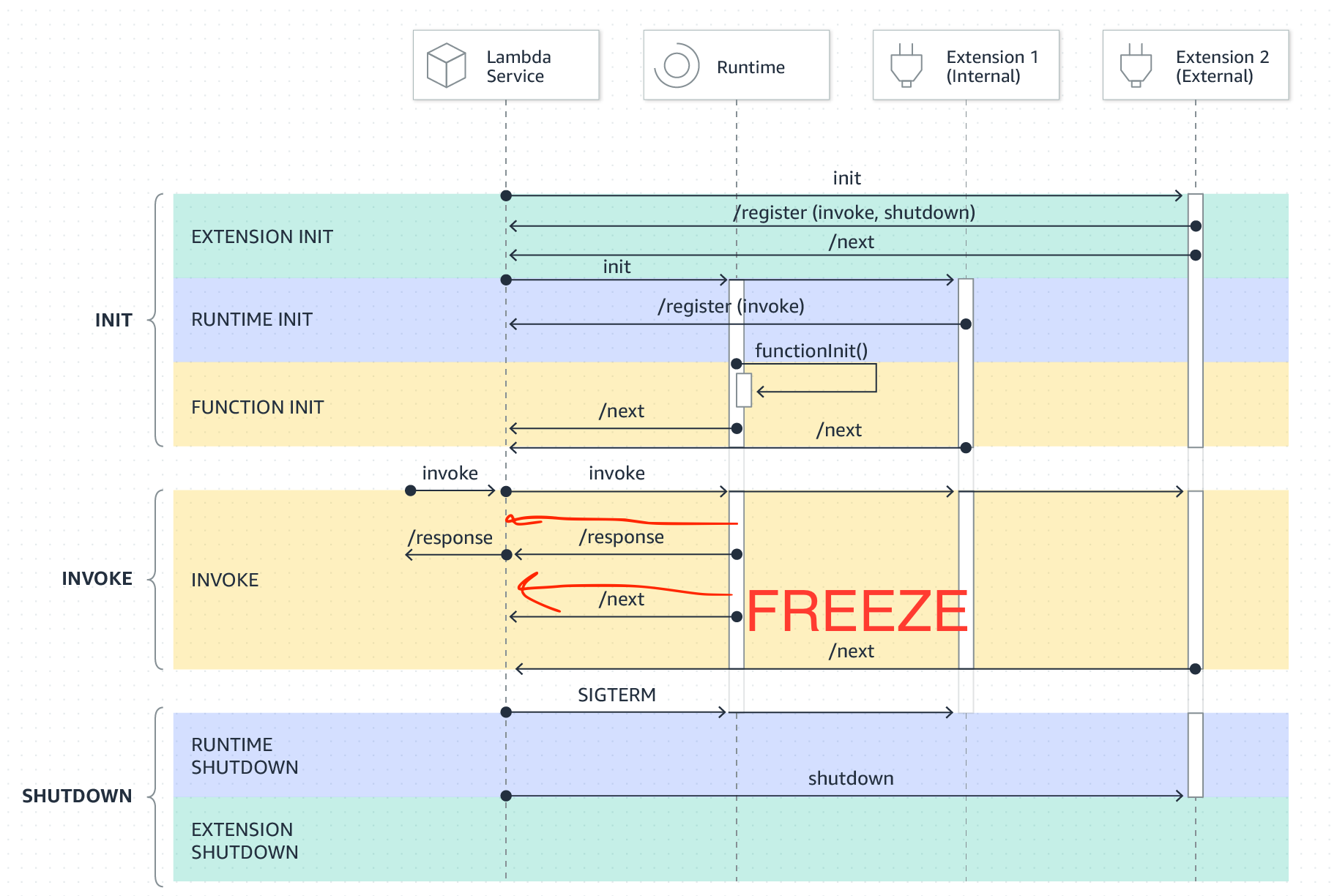
<p>Lambda operates as a state machine. Functions call the <code class="language-plaintext highlighter-rouge">/next</code> endpoint to receive the next request. When a function completes its request, it sends the result to the <code class="language-plaintext highlighter-rouge">/response</code> endpoint, and then calls <code class="language-plaintext highlighter-rouge">/next</code> again to get the next request and so on.</p>

<p>The call to <code class="language-plaintext highlighter-rouge">/next</code> has three possible return states:</p>
<ol>
  <li>You receive an invocation response containing a request payload.</li>
  <li>You receive the shutdown event, indicating the sandbox will shut down (only applies to extensions, not your handler, but it is part of the Runtime API)
or possibly</li>
  <li><strong>Lambda freezes the CPU because there are no pending requests</strong>
When a request arrives, the runtime will thaw the CPU and return a result to <code class="language-plaintext highlighter-rouge">/next</code>.</li>
</ol>

<p>This is easy to see in the state machine image for Extension development. For now, ignore the extension columns:</p>

<p><span class="image half"><a href="/assets/images/silent_crash/freeze.png" target="_blank"><img src="/assets/images/silent_crash/freeze.png" alt="Lambda's runtime lifecycle" /></a></span></p>

<h2 id="lambdas-node-runtime">Lambda’s Node runtime</h2>
<p>The NodeJS runtime isn’t really much of a secret, you can either extract it from the container base images they publish <a href="https://gist.github.com/astuyve/d6052a696658214de98f7ebe91daf0bd">like this</a>, or you can read the <a href="https://github.com/aws/aws-lambda-nodejs-runtime-interface-client">runtime interface client</a> code, which interacts with the Runtime API.</p>

<p>When you provide a nodejs function, Lambda looks for it based on the handler method configured for the function. Then it imports your function, and passes it the runtime events from the Runtime API. Then it’s effectively acting as a state machine, ferrying requests to your code, awaiting the result, and sending them back to the runtime.</p>

<h2 id="putting-it-all-together">Putting it all together</h2>
<p>So here is how the Node runtime executes your function</p>
<ol>
  <li>It calls <a href="https://github.com/aws/aws-lambda-nodejs-runtime-interface-client/blob/a5ae1c2a92708e81c9df4949c60fd9e1e6e46bed/src/Runtime.js#L60">/next</a> to receive the invocation. At this time, the sandbox could receive a new invocation or be frozen!</li>
  <li>After the call to <code class="language-plaintext highlighter-rouge">/next</code> returns, it <a href="https://github.com/aws/aws-lambda-nodejs-runtime-interface-client/blob/a5ae1c2a92708e81c9df4949c60fd9e1e6e46bed/src/Runtime.js#L74-L84">awaits your handler code</a>,</li>
  <li>Then it returns the result via the <code class="language-plaintext highlighter-rouge">/response</code> endpoint through the <code class="language-plaintext highlighter-rouge">markCompleted</code> <a href="https://github.com/aws/aws-lambda-nodejs-runtime-interface-client/blob/main/src/Runtime.js#L72C60-L72C73">callback</a>, which is called via <a href="https://github.com/aws/aws-lambda-nodejs-runtime-interface-client/blob/main/src/Runtime.js#L82">result.then</a>.</li>
</ol>

<p>Now when we look back at the original code snippet, we see the issue:</p>
<div class="language-js highlighter-rouge"><div class="highlight"><pre class="highlight"><code><span class="p">@</span><span class="nd">Post</span><span class="p">(</span><span class="dl">'</span><span class="s1">/debug-test-email</span><span class="dl">'</span><span class="p">)</span>
<span class="k">async</span> <span class="nx">sendTestEmail</span><span class="p">()</span> <span class="p">{</span>
  <span class="k">this</span><span class="p">.</span><span class="nx">eventEmitter</span><span class="p">.</span><span class="nx">emit</span><span class="p">(</span><span class="nx">events</span><span class="p">.</span><span class="nx">USER_REGISTERED</span><span class="p">,</span> <span class="p">{</span>
    <span class="na">name</span><span class="p">:</span> <span class="nx">Joe</span> <span class="nx">Bloggs</span><span class="p">,</span>
    <span class="na">email</span><span class="p">:</span> <span class="dl">'</span><span class="s1">email@foo.com, // legitimate email was used for testing
    token: </span><span class="dl">'</span><span class="nx">dummy</span><span class="o">-</span><span class="nx">token</span><span class="o">-</span><span class="mi">123</span><span class="dl">'</span><span class="s1">,
  });
  return { message: </span><span class="dl">'</span><span class="nx">Manual</span> <span class="nx">test</span> <span class="nx">triggered</span><span class="dl">'</span><span class="s1"> };
}
</span></code></pre></div></div>
<p>The listener waiting for the <code class="language-plaintext highlighter-rouge">USER_REGISTERED</code> event will never run unless subsequent invocations occur frequently enough that Node’s scheduler runs that task! And given that this result is returned basically instantly, that may never happen!</p>

<h2 id="how-to-actually-do-this">How to actually do this</h2>

<p>Now that we’ve jumped through the Lambda Runtime API and Node Runtime and see why this code wouldn’t work, how <em>could</em> you do something like this in Lambda if you wanted to? There are three pretty good options:</p>
<ol>
  <li>Use Lambda’s NodeJS response streaming to separate the response from the handler’s promise resolution.</li>
  <li>Use a custom runtime</li>
  <li>Use a Lambda extension (internal or external, but internal is easier).</li>
</ol>

<h2 id="response-streaming">Response Streaming</h2>
<p>If your client can receive a chunked response, you can easily return the lightweight response using the <code class="language-plaintext highlighter-rouge">streaming</code> API and then perform the async work and resolve your handler’s promise when the work completes.</p>

<p>AWS even published a great blog about it <a href="https://aws.amazon.com/blogs/compute/running-code-after-returning-a-response-from-an-aws-lambda-function/">here</a>, but here’s the relevant section:</p>
<div class="language-js highlighter-rouge"><div class="highlight"><pre class="highlight"><code><span class="k">export</span> <span class="kd">const</span> <span class="nx">handler</span> <span class="o">=</span> <span class="nx">awslambda</span><span class="p">.</span><span class="nx">streamifyResponse</span><span class="p">(</span><span class="k">async</span> <span class="p">(</span><span class="nx">event</span><span class="p">,</span> <span class="nx">responseStream</span><span class="p">,</span> <span class="nx">_context</span><span class="p">)</span> <span class="o">=&gt;</span> <span class="p">{</span>
    <span class="nx">logger</span><span class="p">.</span><span class="nx">info</span><span class="p">(</span><span class="dl">"</span><span class="s2">[Function] Received event: </span><span class="dl">"</span><span class="p">,</span> <span class="nx">event</span><span class="p">);</span>

    <span class="c1">// Do some stuff with event</span>
    <span class="kd">let</span> <span class="nx">response</span> <span class="o">=</span> <span class="k">await</span> <span class="nx">calc_response</span><span class="p">(</span><span class="nx">event</span><span class="p">);</span>

    <span class="c1">// Return response to client</span>
    <span class="nx">logger</span><span class="p">.</span><span class="nx">info</span><span class="p">(</span><span class="dl">"</span><span class="s2">[Function] Returning response to client</span><span class="dl">"</span><span class="p">);</span>
    <span class="nx">responseStream</span><span class="p">.</span><span class="nx">setContentType</span><span class="p">(</span><span class="dl">'</span><span class="s1">application/json</span><span class="dl">'</span><span class="p">);</span>
    <span class="nx">responseStream</span><span class="p">.</span><span class="nx">write</span><span class="p">(</span><span class="nx">response</span><span class="p">);</span>
    <span class="nx">responseStream</span><span class="p">.</span><span class="nx">end</span><span class="p">();</span>

    <span class="k">await</span> <span class="nx">async_task</span><span class="p">(</span><span class="nx">response</span><span class="p">);</span>   
<span class="p">});</span>
</code></pre></div></div>

<p>This works great, but there’s an even easier way with</p>

<h2 id="use-a-custom-runtime">Use a custom runtime.</h2>
<p>You can fork the <code class="language-plaintext highlighter-rouge">runtime-interface-client</code> and then drive your async tasks to completion after providing the response via <code class="language-plaintext highlighter-rouge">/response</code> but before calling the <code class="language-plaintext highlighter-rouge">/next</code> endpoint. Bref, the extremely popular PHP runtime for Lambda, already supports this out of the box. <a href="https://github.com/brefphp/bref/blob/4272eebda4933b729a9c3af384c2e84488f72d7b/src/Runtime/LambdaRuntime.php#L81-L122">Here</a> we can see that Bref will get the response from next, return the result (via <code class="language-plaintext highlighter-rouge">sendResponse</code>), and then call the <code class="language-plaintext highlighter-rouge">afterInvoke</code> hooks to run any async work you may have queued up:</p>

<div class="language-php highlighter-rouge"><div class="highlight"><pre class="highlight"><code>    <span class="k">public</span> <span class="k">function</span> <span class="n">processNextEvent</span><span class="p">(</span><span class="kt">Handler</span> <span class="o">|</span> <span class="nc">RequestHandlerInterface</span> <span class="o">|</span> <span class="n">callable</span> <span class="nv">$handler</span><span class="p">):</span> <span class="kt">bool</span>
    <span class="p">{</span>
        <span class="p">[</span><span class="nv">$event</span><span class="p">,</span> <span class="nv">$context</span><span class="p">]</span> <span class="o">=</span> <span class="nv">$this</span><span class="o">-&gt;</span><span class="nf">waitNextInvocation</span><span class="p">();</span>

        <span class="c1">// Expose the context in an environment variable</span>
        <span class="nv">$this</span><span class="o">-&gt;</span><span class="nf">setEnv</span><span class="p">(</span><span class="s1">'LAMBDA_INVOCATION_CONTEXT'</span><span class="p">,</span> <span class="nb">json_encode</span><span class="p">(</span><span class="nv">$context</span><span class="p">,</span> <span class="no">JSON_THROW_ON_ERROR</span><span class="p">));</span>

        <span class="k">try</span> <span class="p">{</span>
            <span class="nc">ColdStartTracker</span><span class="o">::</span><span class="nf">invocationStarted</span><span class="p">();</span>

            <span class="nc">Bref</span><span class="o">::</span><span class="nf">triggerHooks</span><span class="p">(</span><span class="s1">'beforeInvoke'</span><span class="p">);</span>
            <span class="nc">Bref</span><span class="o">::</span><span class="nf">events</span><span class="p">()</span><span class="o">-&gt;</span><span class="nf">beforeInvoke</span><span class="p">(</span><span class="nv">$handler</span><span class="p">,</span> <span class="nv">$event</span><span class="p">,</span> <span class="nv">$context</span><span class="p">);</span>

            <span class="nv">$this</span><span class="o">-&gt;</span><span class="nf">ping</span><span class="p">();</span>

            <span class="nv">$result</span> <span class="o">=</span> <span class="nv">$this</span><span class="o">-&gt;</span><span class="n">invoker</span><span class="o">-&gt;</span><span class="nf">invoke</span><span class="p">(</span><span class="nv">$handler</span><span class="p">,</span> <span class="nv">$event</span><span class="p">,</span> <span class="nv">$context</span><span class="p">);</span>

            <span class="nv">$this</span><span class="o">-&gt;</span><span class="nf">sendResponse</span><span class="p">(</span><span class="nv">$context</span><span class="o">-&gt;</span><span class="nf">getAwsRequestId</span><span class="p">(),</span> <span class="nv">$result</span><span class="p">);</span>
        <span class="p">}</span> <span class="k">catch</span> <span class="p">(</span><span class="nc">Throwable</span> <span class="nv">$e</span><span class="p">)</span> <span class="p">{</span>
            <span class="nv">$this</span><span class="o">-&gt;</span><span class="nf">signalFailure</span><span class="p">(</span><span class="nv">$context</span><span class="o">-&gt;</span><span class="nf">getAwsRequestId</span><span class="p">(),</span> <span class="nv">$e</span><span class="p">);</span>

            <span class="k">try</span> <span class="p">{</span>
                <span class="nc">Bref</span><span class="o">::</span><span class="nf">events</span><span class="p">()</span><span class="o">-&gt;</span><span class="nf">afterInvoke</span><span class="p">(</span><span class="nv">$handler</span><span class="p">,</span> <span class="nv">$event</span><span class="p">,</span> <span class="nv">$context</span><span class="p">,</span> <span class="kc">null</span><span class="p">,</span> <span class="nv">$e</span><span class="p">);</span>
            <span class="p">}</span> <span class="k">catch</span> <span class="p">(</span><span class="nc">Throwable</span> <span class="nv">$e</span><span class="p">)</span> <span class="p">{</span>
                <span class="nv">$this</span><span class="o">-&gt;</span><span class="nf">logError</span><span class="p">(</span><span class="nv">$e</span><span class="p">,</span> <span class="nv">$context</span><span class="o">-&gt;</span><span class="nf">getAwsRequestId</span><span class="p">());</span>
            <span class="p">}</span>

            <span class="k">return</span> <span class="kc">false</span><span class="p">;</span>
        <span class="p">}</span>

        <span class="c1">// Any error in the afterInvoke hook happens after the response has been sent,</span>
        <span class="c1">// we can no longer mark the invocation as failed. Instead we log the error.</span>
        <span class="k">try</span> <span class="p">{</span>
            <span class="nc">Bref</span><span class="o">::</span><span class="nf">events</span><span class="p">()</span><span class="o">-&gt;</span><span class="nf">afterInvoke</span><span class="p">(</span><span class="nv">$handler</span><span class="p">,</span> <span class="nv">$event</span><span class="p">,</span> <span class="nv">$context</span><span class="p">,</span> <span class="nv">$result</span><span class="p">);</span>
        <span class="p">}</span> <span class="k">catch</span> <span class="p">(</span><span class="nc">Throwable</span> <span class="nv">$e</span><span class="p">)</span> <span class="p">{</span>
            <span class="nv">$this</span><span class="o">-&gt;</span><span class="nf">logError</span><span class="p">(</span><span class="nv">$e</span><span class="p">,</span> <span class="nv">$context</span><span class="o">-&gt;</span><span class="nf">getAwsRequestId</span><span class="p">());</span>

            <span class="k">return</span> <span class="kc">false</span><span class="p">;</span>
        <span class="p">}</span>

        <span class="k">return</span> <span class="kc">true</span><span class="p">;</span>
    <span class="p">}</span>

</code></pre></div></div>

<p>Vercel also added support to Lambda via <code class="language-plaintext highlighter-rouge">waitUntil</code> to achieve a similar end.</p>

<p>This technique looks quite simple, but of course the downside is that you’re responsible to maintain the nodejs distribution you’re packaging, but I find that’s a pretty low overhead and something that dependabot can help keep updated.</p>

<p><strong>I’d like to see AWS offer this natively.</strong></p>

<h2 id="use-an-extension">Use an extension</h2>
<p>Lambda Extensions offer a relatively low lift way to add async processing to your Lambda function. You can use an internal or external extension, and AWS recommends an internal extension in their <a href="https://aws.amazon.com/blogs/compute/running-code-after-returning-a-response-from-an-aws-lambda-function/">post</a>, but the rest is pretty straightforward.</p>

<p>Configure the handler, and provide an in-memory queue to pass jobs between the handler and the job runner:</p>
<div class="language-py highlighter-rouge"><div class="highlight"><pre class="highlight"><code><span class="kn">import</span> <span class="nn">json</span>
<span class="kn">import</span> <span class="nn">time</span>
<span class="kn">import</span> <span class="nn">async_processor</span> <span class="k">as</span> <span class="n">ap</span>
<span class="kn">from</span> <span class="nn">aws_lambda_powertools</span> <span class="kn">import</span> <span class="n">Logger</span>

<span class="n">logger</span> <span class="o">=</span> <span class="n">Logger</span><span class="p">()</span>

<span class="k">def</span> <span class="nf">calc_response</span><span class="p">(</span><span class="n">event</span><span class="p">):</span>
    <span class="n">logger</span><span class="p">.</span><span class="n">info</span><span class="p">(</span><span class="sa">f</span><span class="s">"[Function] Calculating response"</span><span class="p">)</span>
    <span class="n">time</span><span class="p">.</span><span class="n">sleep</span><span class="p">(</span><span class="mi">1</span><span class="p">)</span> <span class="c1"># Simulate sync work
</span>    <span class="k">return</span> <span class="p">{</span>
        <span class="s">"message"</span><span class="p">:</span> <span class="s">"hello from extension"</span>
    <span class="p">}</span>

<span class="c1"># This function is performed after the handler code calls submit_async_task 
# and it can continue running after the function returns
</span><span class="k">def</span> <span class="nf">async_task</span><span class="p">(</span><span class="n">response</span><span class="p">):</span>
    <span class="n">logger</span><span class="p">.</span><span class="n">info</span><span class="p">(</span><span class="sa">f</span><span class="s">"[Async task] Starting async task: </span><span class="si">{</span><span class="n">json</span><span class="p">.</span><span class="n">dumps</span><span class="p">(</span><span class="n">response</span><span class="p">)</span><span class="si">}</span><span class="s">"</span><span class="p">)</span>
    <span class="n">time</span><span class="p">.</span><span class="n">sleep</span><span class="p">(</span><span class="mi">3</span><span class="p">)</span>  <span class="c1"># Simulate async work
</span>    <span class="n">logger</span><span class="p">.</span><span class="n">info</span><span class="p">(</span><span class="sa">f</span><span class="s">"[Async task] Done"</span><span class="p">)</span>

<span class="k">def</span> <span class="nf">handler</span><span class="p">(</span><span class="n">event</span><span class="p">,</span> <span class="n">context</span><span class="p">):</span>
    <span class="n">logger</span><span class="p">.</span><span class="n">info</span><span class="p">(</span><span class="sa">f</span><span class="s">"[Function] Received event: </span><span class="si">{</span><span class="n">json</span><span class="p">.</span><span class="n">dumps</span><span class="p">(</span><span class="n">event</span><span class="p">)</span><span class="si">}</span><span class="s">"</span><span class="p">)</span>

    <span class="c1"># Calculate response
</span>    <span class="n">response</span> <span class="o">=</span> <span class="n">calc_response</span><span class="p">(</span><span class="n">event</span><span class="p">)</span>

    <span class="c1"># Done calculating response
</span>    <span class="c1"># call async processor to continue
</span>    <span class="n">logger</span><span class="p">.</span><span class="n">info</span><span class="p">(</span><span class="sa">f</span><span class="s">"[Function] Invoking async task in extension"</span><span class="p">)</span>
    <span class="n">ap</span><span class="p">.</span><span class="n">start_async_task</span><span class="p">(</span><span class="n">async_task</span><span class="p">,</span> <span class="n">response</span><span class="p">)</span>

    <span class="c1"># Return response to client
</span>    <span class="n">logger</span><span class="p">.</span><span class="n">info</span><span class="p">(</span><span class="sa">f</span><span class="s">"[Function] Returning response to client"</span><span class="p">)</span>
    <span class="k">return</span> <span class="p">{</span>
        <span class="s">"statusCode"</span><span class="p">:</span> <span class="mi">200</span><span class="p">,</span>
        <span class="s">"body"</span><span class="p">:</span> <span class="n">json</span><span class="p">.</span><span class="n">dumps</span><span class="p">(</span><span class="n">response</span><span class="p">)</span>
    <span class="p">}</span>
</code></pre></div></div>

<p>Then configure the job runner:</p>
<div class="language-py highlighter-rouge"><div class="highlight"><pre class="highlight"><code><span class="kn">import</span> <span class="nn">os</span>
<span class="kn">import</span> <span class="nn">requests</span>
<span class="kn">import</span> <span class="nn">threading</span>
<span class="kn">import</span> <span class="nn">queue</span>
<span class="kn">from</span> <span class="nn">aws_lambda_powertools</span> <span class="kn">import</span> <span class="n">Logger</span>

<span class="n">logger</span> <span class="o">=</span> <span class="n">Logger</span><span class="p">()</span>
<span class="n">LAMBDA_EXTENSION_NAME</span> <span class="o">=</span> <span class="s">"AsyncProcessor"</span>

<span class="c1"># An internal queue used by the handler to notify the extension that it can
# start processing the async task.
</span><span class="n">async_tasks_queue</span> <span class="o">=</span> <span class="n">queue</span><span class="p">.</span><span class="n">Queue</span><span class="p">()</span>

<span class="k">def</span> <span class="nf">start_async_processor</span><span class="p">():</span>
    <span class="c1"># Register internal extension
</span>    <span class="n">logger</span><span class="p">.</span><span class="n">debug</span><span class="p">(</span><span class="sa">f</span><span class="s">"[</span><span class="si">{</span><span class="n">LAMBDA_EXTENSION_NAME</span><span class="si">}</span><span class="s">] Registering with Lambda service..."</span><span class="p">)</span>
    <span class="n">response</span> <span class="o">=</span> <span class="n">requests</span><span class="p">.</span><span class="n">post</span><span class="p">(</span>
        <span class="n">url</span><span class="o">=</span><span class="sa">f</span><span class="s">"http://</span><span class="si">{</span><span class="n">os</span><span class="p">.</span><span class="n">environ</span><span class="p">[</span><span class="s">'AWS_LAMBDA_RUNTIME_API'</span><span class="p">]</span><span class="si">}</span><span class="s">/2020-01-01/extension/register"</span><span class="p">,</span>
        <span class="n">json</span><span class="o">=</span><span class="p">{</span><span class="s">'events'</span><span class="p">:</span> <span class="p">[</span><span class="s">'INVOKE'</span><span class="p">]},</span>
        <span class="n">headers</span><span class="o">=</span><span class="p">{</span><span class="s">'Lambda-Extension-Name'</span><span class="p">:</span> <span class="n">LAMBDA_EXTENSION_NAME</span><span class="p">}</span>
    <span class="p">)</span>
    <span class="n">ext_id</span> <span class="o">=</span> <span class="n">response</span><span class="p">.</span><span class="n">headers</span><span class="p">[</span><span class="s">'Lambda-Extension-Identifier'</span><span class="p">]</span>
    <span class="n">logger</span><span class="p">.</span><span class="n">debug</span><span class="p">(</span><span class="sa">f</span><span class="s">"[</span><span class="si">{</span><span class="n">LAMBDA_EXTENSION_NAME</span><span class="si">}</span><span class="s">] Registered with ID: </span><span class="si">{</span><span class="n">ext_id</span><span class="si">}</span><span class="s">"</span><span class="p">)</span>

    <span class="k">def</span> <span class="nf">process_tasks</span><span class="p">():</span>
        <span class="k">while</span> <span class="bp">True</span><span class="p">:</span>
            <span class="c1"># Call /next to get notified when there is a new invocation and let
</span>            <span class="c1"># Lambda know that we are done processing the previous task.
</span>
            <span class="n">logger</span><span class="p">.</span><span class="n">debug</span><span class="p">(</span><span class="sa">f</span><span class="s">"[</span><span class="si">{</span><span class="n">LAMBDA_EXTENSION_NAME</span><span class="si">}</span><span class="s">] Waiting for invocation..."</span><span class="p">)</span>
            <span class="n">response</span> <span class="o">=</span> <span class="n">requests</span><span class="p">.</span><span class="n">get</span><span class="p">(</span>
                <span class="n">url</span><span class="o">=</span><span class="sa">f</span><span class="s">"http://</span><span class="si">{</span><span class="n">os</span><span class="p">.</span><span class="n">environ</span><span class="p">[</span><span class="s">'AWS_LAMBDA_RUNTIME_API'</span><span class="p">]</span><span class="si">}</span><span class="s">/2020-01-01/extension/event/next"</span><span class="p">,</span>
                <span class="n">headers</span><span class="o">=</span><span class="p">{</span><span class="s">'Lambda-Extension-Identifier'</span><span class="p">:</span> <span class="n">ext_id</span><span class="p">},</span>
                <span class="n">timeout</span><span class="o">=</span><span class="bp">None</span>
            <span class="p">)</span>

            <span class="c1"># Get next task from internal queue
</span>            <span class="n">logger</span><span class="p">.</span><span class="n">debug</span><span class="p">(</span><span class="sa">f</span><span class="s">"[</span><span class="si">{</span><span class="n">LAMBDA_EXTENSION_NAME</span><span class="si">}</span><span class="s">] Woke up, waiting for async task from handler"</span><span class="p">)</span>
            <span class="n">async_task</span><span class="p">,</span> <span class="n">args</span> <span class="o">=</span> <span class="n">async_tasks_queue</span><span class="p">.</span><span class="n">get</span><span class="p">()</span>
            
            <span class="k">if</span> <span class="n">async_task</span> <span class="ow">is</span> <span class="bp">None</span><span class="p">:</span>
                <span class="c1"># No task to run this invocation
</span>                <span class="n">logger</span><span class="p">.</span><span class="n">debug</span><span class="p">(</span><span class="sa">f</span><span class="s">"[</span><span class="si">{</span><span class="n">LAMBDA_EXTENSION_NAME</span><span class="si">}</span><span class="s">] Received null task. Ignoring."</span><span class="p">)</span>
            <span class="k">else</span><span class="p">:</span>
                <span class="c1"># Invoke task
</span>                <span class="n">logger</span><span class="p">.</span><span class="n">debug</span><span class="p">(</span><span class="sa">f</span><span class="s">"[</span><span class="si">{</span><span class="n">LAMBDA_EXTENSION_NAME</span><span class="si">}</span><span class="s">] Received async task from handler. Starting task."</span><span class="p">)</span>
                <span class="n">async_task</span><span class="p">(</span><span class="n">args</span><span class="p">)</span>
            
            <span class="n">logger</span><span class="p">.</span><span class="n">debug</span><span class="p">(</span><span class="sa">f</span><span class="s">"[</span><span class="si">{</span><span class="n">LAMBDA_EXTENSION_NAME</span><span class="si">}</span><span class="s">] Finished processing task"</span><span class="p">)</span>

    <span class="c1"># Start processing extension events in a separate thread
</span>    <span class="n">threading</span><span class="p">.</span><span class="n">Thread</span><span class="p">(</span><span class="n">target</span><span class="o">=</span><span class="n">process_tasks</span><span class="p">,</span> <span class="n">daemon</span><span class="o">=</span><span class="bp">True</span><span class="p">,</span> <span class="n">name</span><span class="o">=</span><span class="s">'AsyncProcessor'</span><span class="p">).</span><span class="n">start</span><span class="p">()</span>

<span class="c1"># Used by the function to indicate that there is work that needs to be 
# performed by the async task processor
</span><span class="k">def</span> <span class="nf">start_async_task</span><span class="p">(</span><span class="n">async_task</span><span class="o">=</span><span class="bp">None</span><span class="p">,</span> <span class="n">args</span><span class="o">=</span><span class="bp">None</span><span class="p">):</span>
    <span class="n">async_tasks_queue</span><span class="p">.</span><span class="n">put</span><span class="p">((</span><span class="n">async_task</span><span class="p">,</span> <span class="n">args</span><span class="p">))</span>

<span class="c1"># Starts the async task processor
</span><span class="n">start_async_processor</span><span class="p">()</span>
</code></pre></div></div>

<p>The downside to this solution which is <strong>not</strong> handled in this example code is handling the <code class="language-plaintext highlighter-rouge">shutdown</code> event response from <code class="language-plaintext highlighter-rouge">/next</code>. In this case you’ll want to work the queue to exhaustion and then exit the process, but presumably this is left as an exercise to you, dear reader.</p>

<p>If you run this type of logic across multiple language runtimes, it may be worthwhile to write an External Lambda Extension which is runtime agnostic. You might consider rust, which has pretty incredible performance characteristics in Lambda, as I learned when rewriting <a href="https://www.datadoghq.com/blog/engineering/datadog-lambda-extension-rust/">Datadog’s Next-Generation Lambda Extension</a>.</p>

<h2 id="should-aws-add-support-for-this">Should AWS add support for this?</h2>
<p>Running async code in Lambda is such a common request that I’d like to see AWS support it in Lambda, as the value prop of the entire product is anchored in them managing the runtime for you.</p>

<p>That said, I don’t think I’d recommend this solution generally. Instead for the author’s stated use case I’d prefer to use a direct API Gateway -&gt; SQS integration here, which can enqueue a message and then allow me to write a Lambda function which can process these messages in batches, handle retries, downstream provider backpressure, and generally build a more robust system.</p>

<p>Presumably that’s why AWS hasn’t done this yet.</p>

<h2 id="what-the-author-got-wrong">What the author got wrong</h2>
<p>Beyond a simple misunderstanding of how Lambda works, the author also expected Lambda to work <strong>exactly</strong> like EC2. But it’s not, and it shouldn’t be. The opinionated nature of Lambda exists specifically to NOT be ec2. Shipping a whole web framework to Lambda does work and can be useful, but the expectations of the runtime are simply not the same as you’d expect in ec2.</p>

<p>For the author to have that, they’ll need to write your own runtime, or look somewhere else.</p>

<p>If you like this type of content please subscribe to my <a href="https://www.youtube.com/channel/UCsWwWCit5Y_dqRxEFizYulw">YouTube</a> channel and follow me on <a href="https://twitter.com/astuyve">twitter</a> to send me any questions or comments. You can also ask me questions directly if I’m <a href="twitch.tv/aj_stuyvenberg">streaming on Twitch</a>.</p>]]></content><author><name>AJ Stuyvenberg</name></author><category term="posts" /><summary type="html"><![CDATA[Understanding what's happening in the "AWS Lambda Silent Crash" blog post, what went wrong, and how to fix it]]></summary><media:thumbnail xmlns:media="http://search.yahoo.com/mrss/" url="https://aaronstuyvenberg.com/assets/images/silent_crash/silent_crash_header.png" /><media:content medium="image" url="https://aaronstuyvenberg.com/assets/images/silent_crash/silent_crash_header.png" xmlns:media="http://search.yahoo.com/mrss/" /></entry><entry><title type="html">Avoiding the Lambda Doom Loop</title><link href="https://aaronstuyvenberg.com/posts/lambda-timeout-doom-loop" rel="alternate" type="text/html" title="Avoiding the Lambda Doom Loop" /><published>2024-10-03T00:00:00+00:00</published><updated>2024-10-03T00:00:00+00:00</updated><id>https://aaronstuyvenberg.com/posts/lambda-timeout-doom-loop</id><content type="html" xml:base="https://aaronstuyvenberg.com/posts/lambda-timeout-doom-loop"><![CDATA[<p>There have been a number of recent changes in the Lambda sandbox environment, mostly transparent ones like changing the <a href="https://x.com/astuyve/status/1825676633673769334">Runtime API IP address and port</a> to a link-local IP. But recently I noticed a change in how Lambda handles function crashes and re-initialization, and after confirming this behavior with the Lambda team I wanted to take some time to help explain how it works now and why.</p>

<p>In a <a href="https://aaronstuyvenberg.com/posts/ice-cold-starts">previous post</a> I’ve demonstrated how not all cold starts are identical. Specifically, cold starts after a runtime crash, function timeout, or out-of-memory error cause the Lambda function to re-initialize and cause a <code class="language-plaintext highlighter-rouge">mini cold start</code>, which AWS calls a <a href="https://docs.aws.amazon.com/lambda/latest/dg/lambda-runtime-environment.html#runtimes-lifecycle-invoke-with-errors">suppressed init</a>. It’s this case that we’re going to focus on today. As of October 4th, 2024 this is now <a href="https://docs.aws.amazon.com/lambda/latest/dg/troubleshooting-invocation.html#troubleshooting-timeouts">documented on AWS as well</a>.</p>

<p>If your Lambda functions have an especially short <code class="language-plaintext highlighter-rouge">timeout</code> configuration, you’ll want to pay close attention.</p>

<h2 id="background">Background</h2>
<p>AWS Lambda Functions permit <a href="https://docs.aws.amazon.com/lambda/latest/dg/lambda-runtime-environment.html">up to 10 seconds</a> for the function code to initialize. Previously we’ve exploited this fact to uncover how AWS pre-warms your function in my post about <a href="https://aaronstuyvenberg.com/posts/understanding-proactive-initialization">Proactive Initialization</a>, but it’s important to note that historically, this ten-second init duration is evaluated <em>separately</em> from the configured function timeout.</p>

<p>Today? Apart from the <em>first</em> initialization of a sandbox, <em>re-initialization</em> time for suppressed initializations is counted against the overall function timeout. This may seem myopic, but it can cause a serious downside and outage for your function.</p>

<p>Before your eyes glaze over, let me explain.</p>

<h2 id="example">Example</h2>
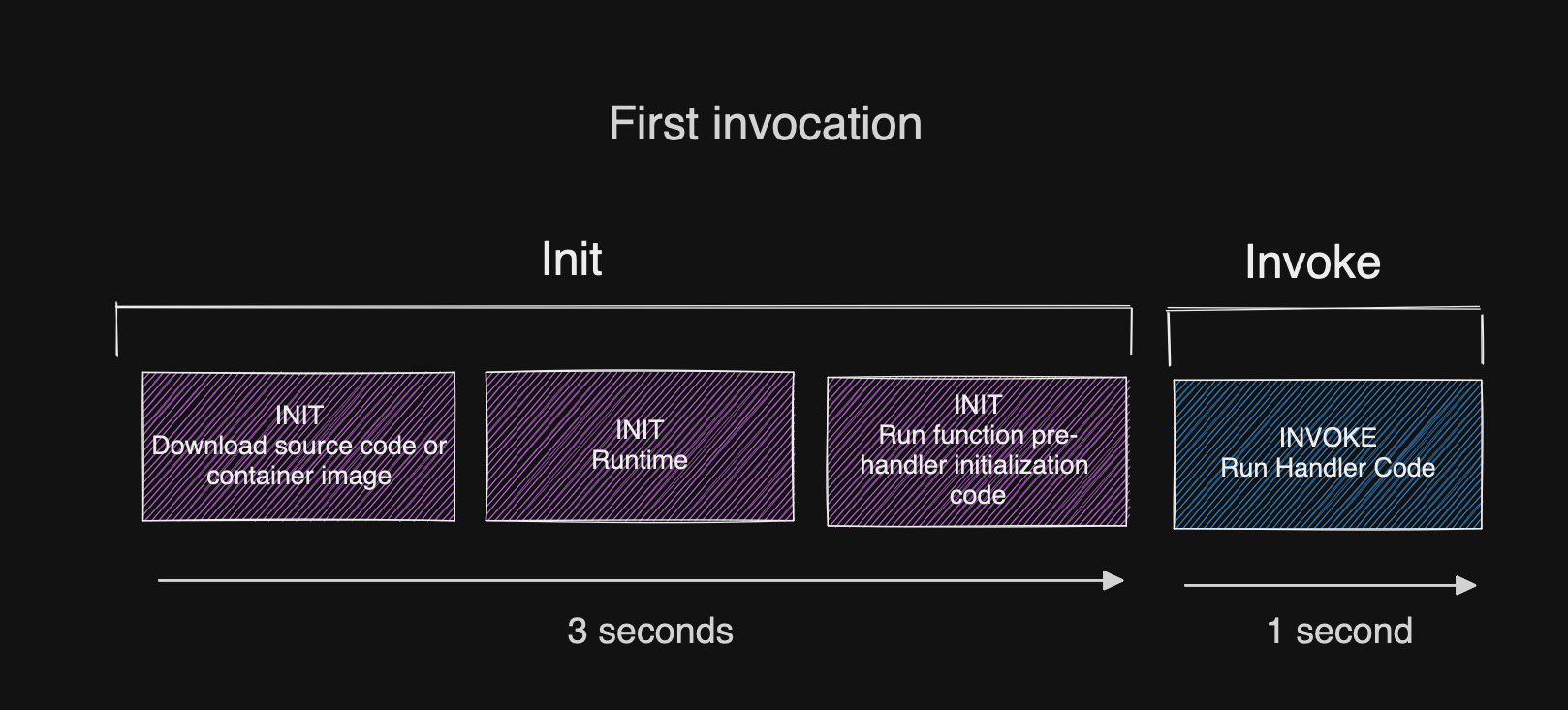
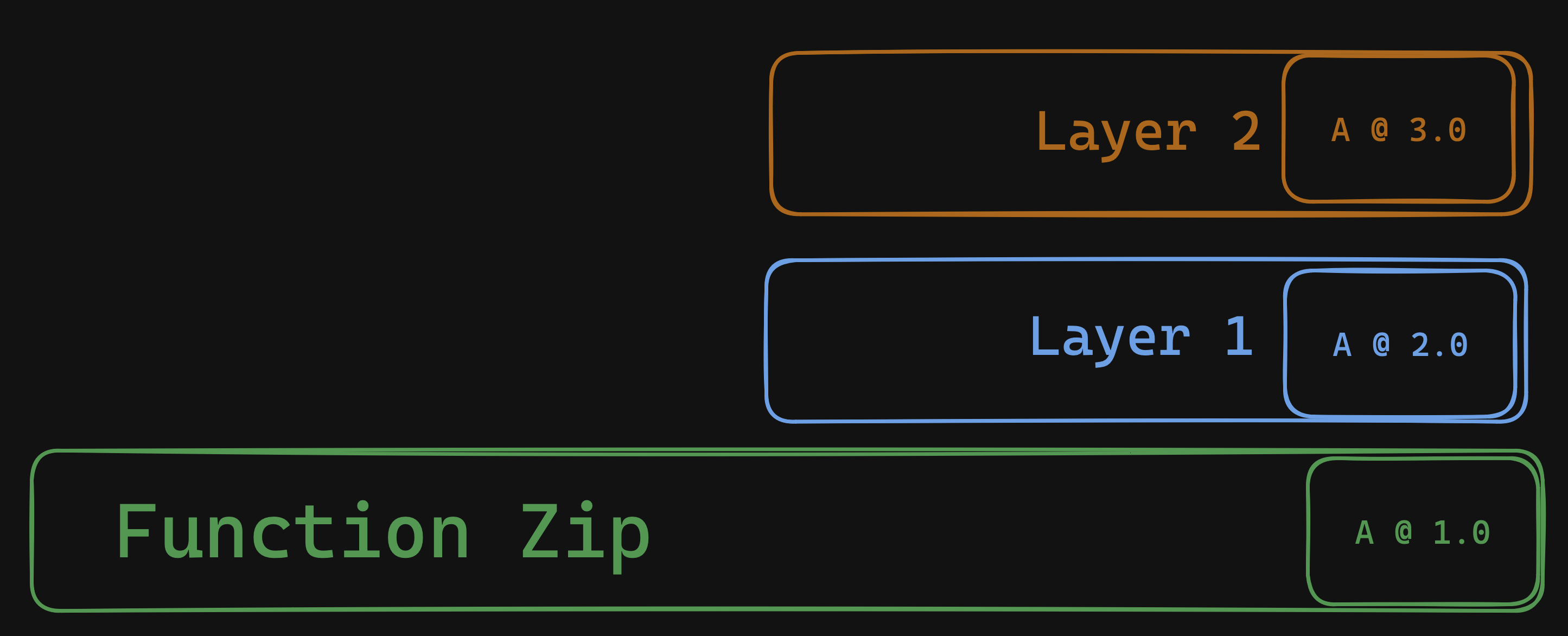
<p>Let’s consider a Lambda function serving an API with a 3 second timeout configured. Imagine that the function also requires a database connection along with some credential fetching, so the cold start time is approximately 3 seconds. Today your Lambda function will still initialize successfully after those 3 seconds and go on to serve many other serial Lambda invocations with no issues.</p>

<p><span class="image half"><a href="/assets/images/doom_loop/doom_loop_init.png" target="_blank"><img src="/assets/images/doom_loop/doom_loop_init.png" alt="Part one - a normal initialization" /></a></span></p>

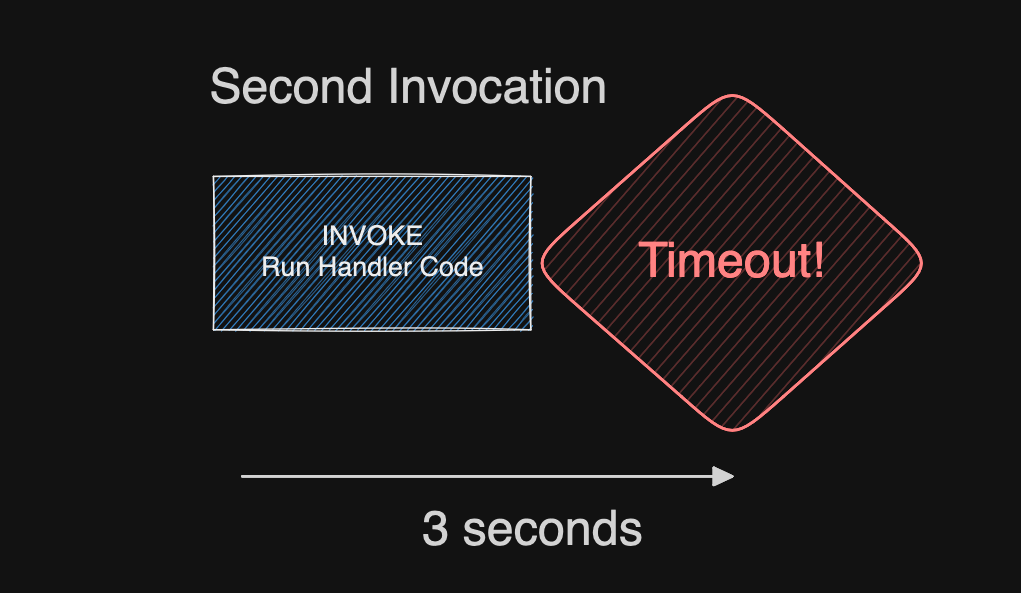
<p>But now imagine that function crashes on the next invocation. Maybe it times out, or runs out of memory.
<span class="image half"><a href="/assets/images/doom_loop/doom_loop_crash.png" target="_blank"><img src="/assets/images/doom_loop/doom_loop_crash.png" alt="Part two - the function crashes" /></a></span></p>

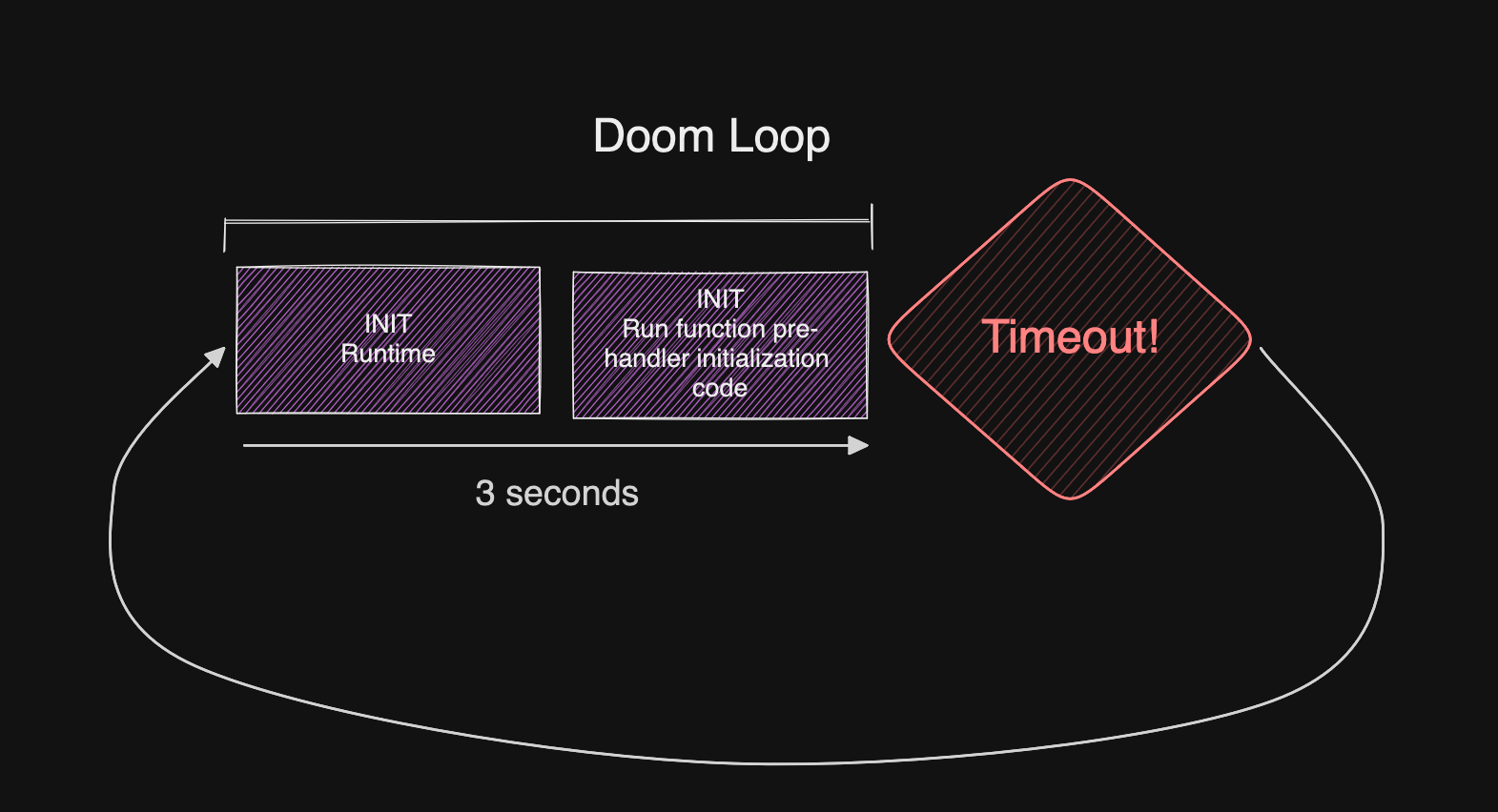
<p>When Lambda re-initializes your function under a suppressed init, it won’t complete re-initialization before the timeout arrives, and it’s now <strong>permanently</strong> stuck in a retry loop. <strong>Function invocations will fail until Lambda decides to kill the sandbox and start a new one.</strong></p>

<p><span class="image half"><a href="/assets/images/doom_loop/doom_loop_suppressed.png" target="_blank"><img src="/assets/images/doom_loop/doom_loop_suppressed.png" alt="Part three - the function crashes permanently" /></a></span></p>

<h2 id="reproducing-the-issue">Reproducing the issue</h2>
<p>This one is super easy to reproduce. You can pull down this <a href="https://github.com/astuyve/lambda-new-timeout-crash">repo</a>, but the logic is simple:</p>
<div class="language-js highlighter-rouge"><div class="highlight"><pre class="highlight"><code><span class="k">async</span> <span class="kd">function</span> <span class="nx">delay</span><span class="p">(</span><span class="nx">millis</span><span class="p">)</span> <span class="p">{</span>
  <span class="k">return</span> <span class="k">new</span> <span class="nb">Promise</span><span class="p">((</span><span class="nx">resolve</span><span class="p">)</span> <span class="o">=&gt;</span> <span class="p">{</span>
    <span class="nx">setTimeout</span><span class="p">(</span><span class="nx">resolve</span><span class="p">,</span> <span class="nx">millis</span><span class="p">);</span>
  <span class="p">});</span>
<span class="p">}</span>
<span class="c1">// Simulate a longer init duration</span>
<span class="k">await</span> <span class="nx">delay</span><span class="p">(</span><span class="mi">3000</span><span class="p">);</span>
<span class="nx">console</span><span class="p">.</span><span class="nx">log</span><span class="p">(</span><span class="dl">'</span><span class="s1">init done</span><span class="dl">'</span><span class="p">);</span>
<span class="k">export</span> <span class="k">async</span> <span class="kd">function</span> <span class="nx">hello</span><span class="p">(</span><span class="nx">event</span><span class="p">)</span> <span class="p">{</span>
  <span class="k">if</span> <span class="p">(</span><span class="nx">event</span><span class="p">.</span><span class="nx">queryStringParameters</span> <span class="o">&amp;&amp;</span> <span class="nx">event</span><span class="p">.</span><span class="nx">queryStringParameters</span><span class="p">.</span><span class="nx">crash</span><span class="p">)</span> <span class="p">{</span>
    <span class="c1">// simulate timeout</span>
    <span class="c1">// After this the function will no longer run, permanently</span>
    <span class="k">await</span> <span class="nx">delay</span><span class="p">(</span><span class="mi">5000</span><span class="p">);</span>
  <span class="p">}</span>

  <span class="k">return</span> <span class="p">{</span>
    <span class="na">statusCode</span><span class="p">:</span> <span class="mi">200</span><span class="p">,</span>
    <span class="na">body</span><span class="p">:</span> <span class="nx">JSON</span><span class="p">.</span><span class="nx">stringify</span><span class="p">({</span><span class="na">message</span><span class="p">:</span> <span class="dl">'</span><span class="s1">Hello from Lambda!</span><span class="dl">'</span><span class="p">})</span>
  <span class="p">};</span>
<span class="p">}</span>
</code></pre></div></div>

<ol>
  <li>Curl the endpoint to call the function normally. It’ll require 3 seconds to initialize as per the REPORT log:
<code class="language-plaintext highlighter-rouge">REPORT RequestId: bdace18c-8f63-48f0-b44a-c909b6b134a0	Duration: 2.85 ms	Billed Duration: 3 ms	Memory Size: 1024 MB	Max Memory Used: 64 MB	Init Duration: 3152.18 ms</code></li>
  <li>Force a suppressed init by passing <code class="language-plaintext highlighter-rouge">&lt;url&gt;?crash=true</code>. This causes the function to timeout.</li>
  <li>Now call it again, with the <code class="language-plaintext highlighter-rouge">crash</code> parameter removed.
The function will continue to crash as it cannot re-initialize. It’s dead until a new sandbox comes along, or you re-deploy the function.</li>
</ol>

<p>If you open the logs you’ll now see the <code class="language-plaintext highlighter-rouge">Status: timeout</code> field, which is new:
<code class="language-plaintext highlighter-rouge">REPORT RequestId: 13222b1e-f16b-4550-89df-869ab0a9806d	Duration: 3000.00 ms	Billed Duration: 3000 ms	Memory Size: 1024 MB	Max Memory Used: 64 MB	Status: timeout</code></p>

<h2 id="how-to-avoid-the-doom-loop">How to avoid the doom loop</h2>
<p>Ultimately avoiding this is simple and there are several options.</p>

<ol>
  <li>Increase the timeout value so it covers the longest possible function execution <em>plus</em> your expected Init Duration time.</li>
  <li>If your function initialization is mostly caused by interpreting code, you can increase the configured memory size up to 1769MB, where you’ll receive one full vCPU.</li>
  <li>Optimize your function initialization! I gave a long talk about this at <a href="https://www.youtube.com/watch?v=2EDNcPvR45w">re:Invent 2023</a>, check it out for specific tips and be sure to consider <a href="https://aaronstuyvenberg.com/posts/lambda-lazy-loading">lazy-loading</a>!</li>
  <li>Finally modify your function code so that a timeout won’t cause the environment to error (and thus re-initialize). You can do this by racing the deadline provided by <code class="language-plaintext highlighter-rouge">getRemainingTimeInMillis()</code> method on the <a href="https://docs.aws.amazon.com/lambda/latest/dg/nodejs-context.html">context object</a>.</li>
</ol>

<p>These tips are in the <a href="https://docs.aws.amazon.com/lambda/latest/dg/troubleshooting-invocation.html#troubleshooting-timeouts">help docs</a> as well.
Although it’s unfortunate this couldn’t be factored in for us when creating Lambda functions, it seems this change is a deeply tied to other intractable changes underpinning Lambda - so it’s one we’ll need to live with.</p>

<p>It’s important to note that this behavior of a suppressed initialization <em>did</em> already exist in some cases earlier. Specifically, beginning around 2021 with functions configured with a Lambda Extension or SnapStart. Now it’s a default behavior for all functions.</p>

<h2 id="key-takeaways">Key takeaways</h2>
<p>If you’ve <a href="https://twitter.com/astuyve">followed me</a> for any period of time I hope I’ve given you the tools necessary to minimize the impact of cold starts, but the fact remains that some initialization time is necessary.</p>

<p>This is especially true for customers loading heavy AI or ML libraries, negotiating TCP connections to databases and older caches which don’t offer HTTP APIs like <a href="https://www.gomomento.com/platform/cache/">Momento</a> (not sponsored, it’s just good tech). With the recent proliferation of LLMs, I’ve noticed developers choosing to bring heavier libraries to Lambda, so I expect cold start times to be generally longer these days.</p>

<p>If you like this type of content please subscribe to my <a href="https://www.youtube.com/channel/UCsWwWCit5Y_dqRxEFizYulw">YouTube</a> channel and follow me on <a href="https://twitter.com/astuyve">twitter</a> to send me any questions or comments. You can also ask me questions directly if I’m <a href="twitch.tv/aj_stuyvenberg">streaming on Twitch</a>.</p>]]></content><author><name>AJ Stuyvenberg</name></author><category term="posts" /><summary type="html"><![CDATA[Heads up serverless developers! A recent change in the Lambda sandbox environment changes how timeouts are handled, potentially causing your function to enter a permanent doom loop. This post will explain the change, how to spot it, and how to avoid the doom loop.]]></summary><media:thumbnail xmlns:media="http://search.yahoo.com/mrss/" url="https://aaronstuyvenberg.com/assets/images/doom_loop/doom_loop_logo.png" /><media:content medium="image" url="https://aaronstuyvenberg.com/assets/images/doom_loop/doom_loop_logo.png" xmlns:media="http://search.yahoo.com/mrss/" /></entry><entry><title type="html">BASE Jumps &amp;amp; Backups - how I use Synology and AWS to store my data</title><link href="https://aaronstuyvenberg.com/posts/base-jump-backup" rel="alternate" type="text/html" title="BASE Jumps &amp;amp; Backups - how I use Synology and AWS to store my data" /><published>2024-07-08T00:00:00+00:00</published><updated>2024-07-08T00:00:00+00:00</updated><id>https://aaronstuyvenberg.com/posts/base-jump-backup</id><content type="html" xml:base="https://aaronstuyvenberg.com/posts/base-jump-backup"><![CDATA[<p>If you mostly know me because of this blog or my <a href="https://www.youtube.com/watch?v=2EDNcPvR45w">cloud talks</a>, it may surprise you to learn that I’m also an avid parachutist. I’ve been skydiving since 2010 and BASE jumping since 2012, and have more than 1200 combined jumps all over the world. It’s a neat hobby! Contrary to popular belief, it’s not as dangerous as you might think.</p>

<p><span class="image half"><a href="/assets/images/backups/gopro_1.jpg" target="_blank"><img src="/assets/images/backups/gopro_1.jpg" alt="Me with an early GoPro" /></a></span></p>

<p>Starting in 2010 also means I’m a child of the GoPro era. This was the beginning of YouTube. Like so many others I was inspired by videos of people soaring down <a href="https://www.youtube.com/watch?v=GASFa7rkLtM">cliffs</a>. So against the guidance of literally everyone, I strapped a GoPro to my head and zipped up a wingsuit <a href="https://www.youtube.com/watch?v=2MMXDcrpxQE">as soon as I possibly could</a>. Thankfully I managed to develop into a reasonably competent BASE jumper and enjoyed about 10 years of frequent BASE trips, new experiences, and of course several thousand video files.</p>

<p>The fear of losing these files always burned in the back of my mind. I backed everything up to an external HDD, but had no other copies of the data. In case it’s not clear <em>this is a bad thing</em>. Typically, you’d want to have a <a href="https://www.backblaze.com/blog/the-3-2-1-backup-strategy/">3-2-1</a> backup pattern with an original data set, an on-site backup, and an off-site backup. Since this data isn’t “production” data, I mostly need the original and an off-site backup.</p>

<h2 id="the-video-files-pile-up">The video files pile up</h2>
<p>At the same time, I’ve also been spending more time streaming on <a href="https://www.twitch.tv/aj_stuyvenberg">twitch</a> and <a href="https://www.youtube.com/channel/UCsWwWCit5Y_dqRxEFizYulw">youtube</a>. It’s been fun to poke around serverless platforms, ship toy applications on the weekend, and learn new languages with a small audience. Recently I’d written a few simple benchmarking scripts collecting cold start metrics from AWS Lambda as well as Vercel. I wanted to host these scripts on my local network to simulate what a “real” user may experience, so I knew I’d need a solution which primarily acts as a network attached storage device, but also has a bit of compute available to run my projects. Nothing too crazy, but a unix-like environment would be ideal.</p>

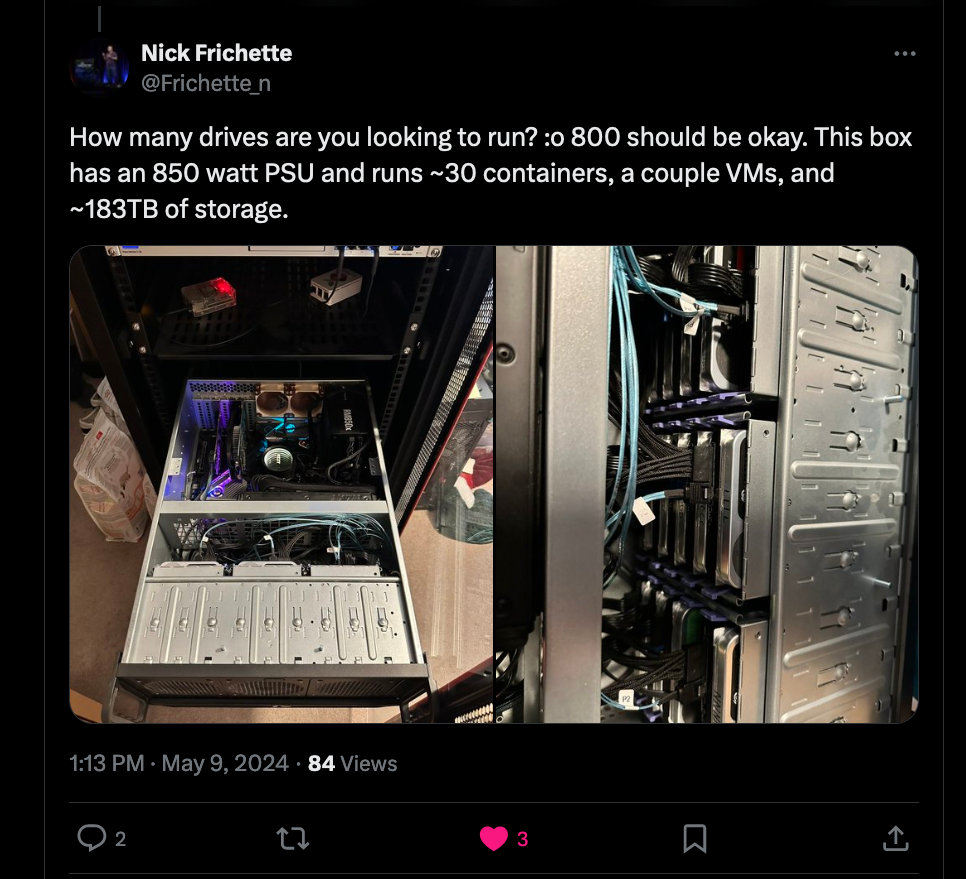
<p>Finally in May, I asked <a href="https://x.com/astuyve/status/1788591437421892010">twitter</a> about their recommendations and received a lot of comments. Virtually everyone recommended <a href="https://x.com/raesene/status/1788617687922356479">Synology NAS systems</a>, or had an insane homelab, like my colleague <a href="https://x.com/Frichette_n/status/1788618306049483149">Nick Frichette</a>.</p>

<p><span class="image half"><a href="/assets/images/backups/nick_homelab.png" target="_blank"><img src="/assets/images/backups/nick_homelab.png" alt="Nick's insane homelab" /></a></span></p>

<h2 id="synology-diskstation">Synology DiskStation</h2>
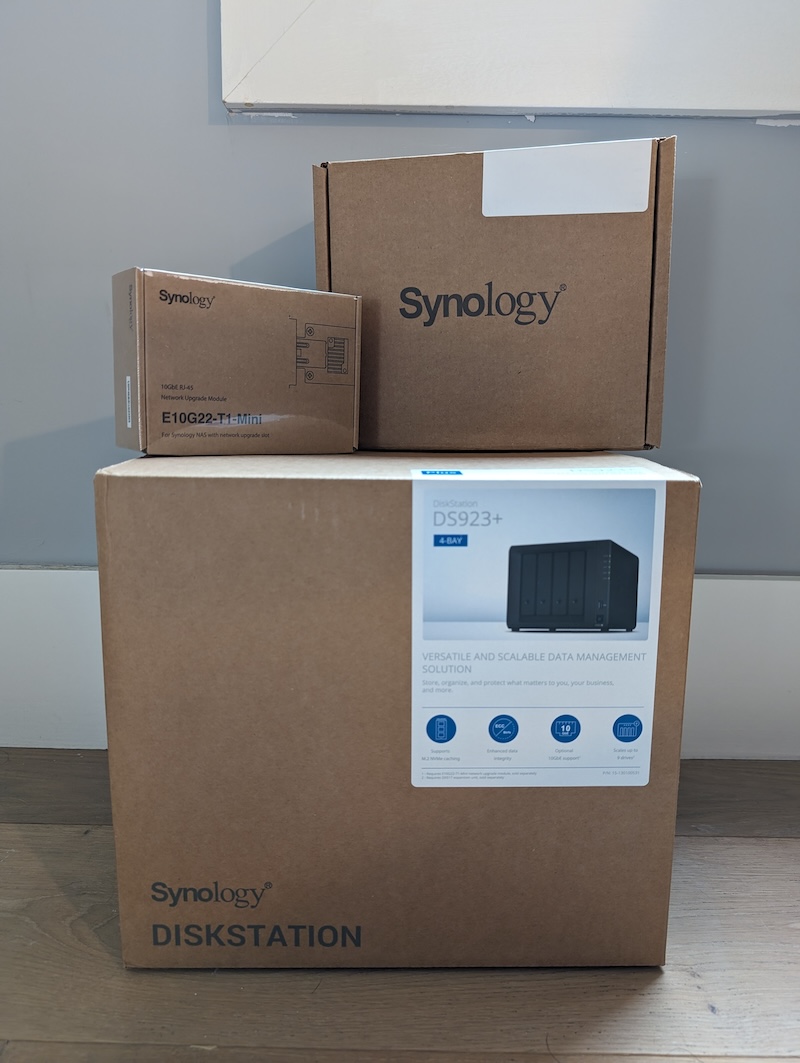
<p>I was introduced to the kind folks at Synology who offered to ship me their <a href="https://www.synology.com/en-us/products/DS923+">DS923+</a>, a couple drives, and the 10GbE upgraded NIC!</p>

<p><span class="image half"><a href="https://x.com/astuyve/status/1799456793791468011" target="_blank"><img src="/assets/images/backups/synology_1.jpg" alt="Synology Gear" /></a></span></p>

<p>After everything arrived, I fired up my live stream and got to work. You can view the whole setup process from start to finish <a href="https://www.youtube.com/watch?v=uFwxZYyLT7g">here</a>, but I’ll run you through my major choices.</p>

<p>Synology provided 2x 4tb HDDs, which I opted to store in a fully-redundant setup. This left me around 3.6TB of storage after opting for the <a href="https://kb.synology.com/en-br/DSM/tutorial/What_is_Synology_Hybrid_RAID_SHR">Hybrid RAID setup</a>. I chose hybrid raid because I plan to expand the storage further with additional drives, and like the flexibility to mix and match drive size within the same pool.</p>

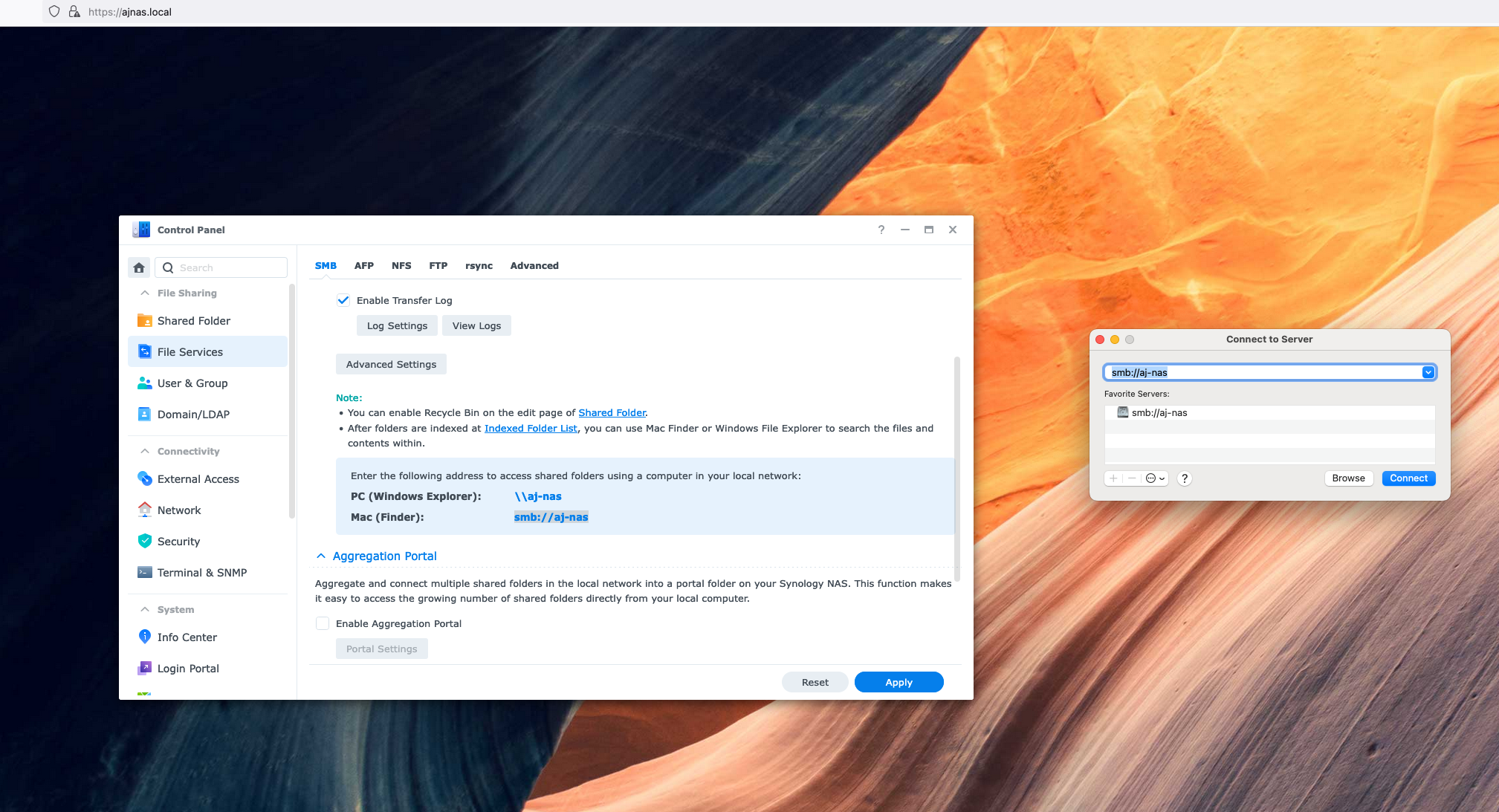
<p>Setting up the drive pool was a breeze, and after I plugged in the correct network cable, I had things up and running quite easily. I copied my entire external hard drive of archived BASE jumping footage using usb3, but opted to mount the NAS as an SMB to copy archives of my live streams to the NAS over the 10GbE line. This seemed to run as fast as the disks would write!</p>

<p><span class="image fit"><a href="/assets/images/backups/synology_smb.png" target="_blank"><img src="/assets/images/backups/synology_smb.png" alt="Synology SMB setup" /></a></span></p>

<h2 id="backing-up-to-the-cloud">Backing up to the cloud</h2>
<p>Within a few hours, I had the entire system unboxed, running and had made 2 full copies of my treasured BASE jumping memories! RAID is great, but it still leaves me with a single point of failure. To prevent this, I knew I’d need to back up this data somewhere else entirely. For this, I chose AWS.</p>

<p>AWS has a dizzying number of storage options, but after some careful thought I realized my choice boiled down to S3 (and the infrequent access tier), and Glacier. Both are arbitrary blob-storage systems, but the main difference is that S3 is geared toward arbitrary, ond-demand file access, whereas Glacier is meant to store archival data which may be retrieved only after creating a retrieval request and waiting a few hours for it to be ready. Both services have multiple storage tiers, but at their slowest/coldest option - Glacier Deep Archive is $0.00099/GB, while S3 Infrequent Access is $0.0125/GB.</p>

<p>Because I already have local copies of my data, if I wanted to watch some videos or edit a new one, I wouldn’t need to use my cloud backup. This meant that Glacier was the right choice for my use case.</p>

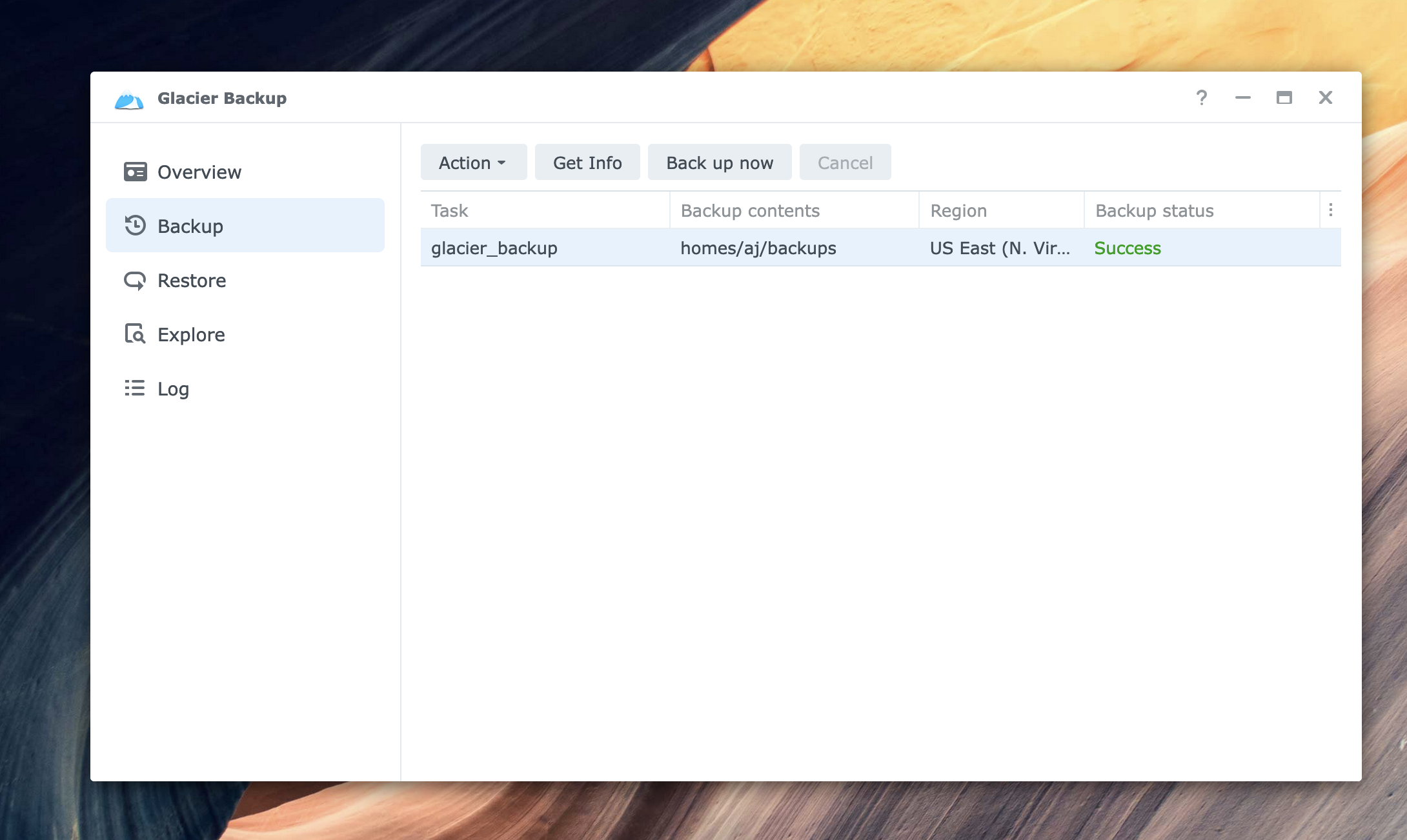
<p>Luckily, Synology provides an out-of-the box package for Glacier support. Setting it up was pretty easy, my one complaint here is that the Glacier package on Synology could be a bit more user-friendly in terms of setting up the IAM policy. To start I ended up granting pretty broad Glacier access via IAM. I’m not too worried though. I only leaked the key 5-6 times live on stream! (and rotated it, of course).</p>

<p><span class="image fit"><a href="/assets/images/backups/glacier_backup.png" target="_blank"><img src="/assets/images/backups/glacier_backup.png" alt="Screenshot of the Glacier package successfully creating an archive from my DSM" /></a></span></p>

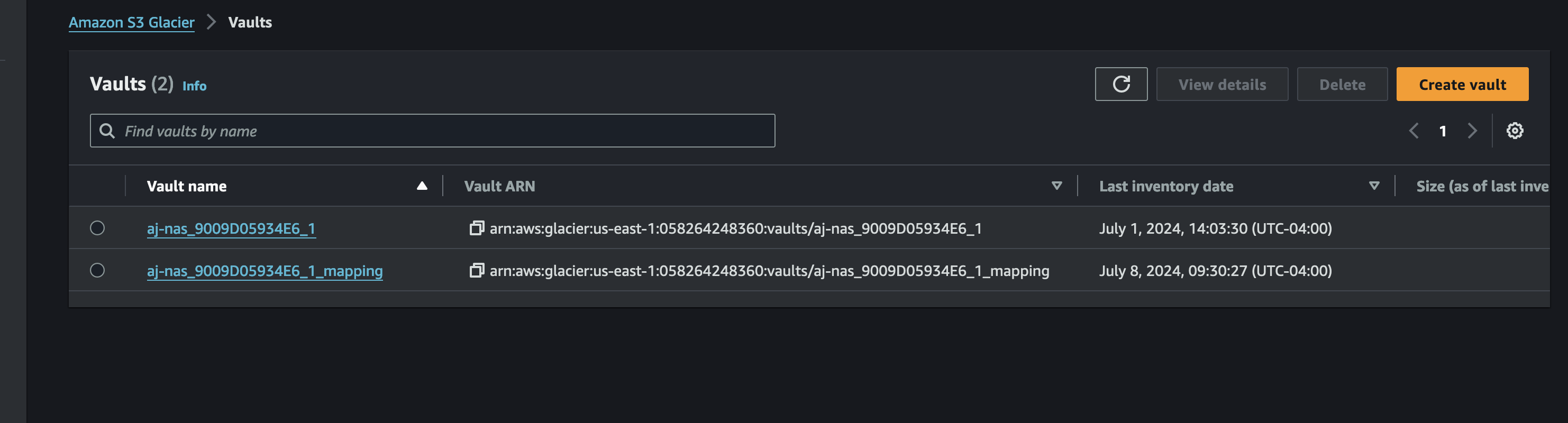
<p>After the backup finished, I consulted CloudTrail to get the specific permissions required. You’ll notice that two archives are created, with one specifically called a <code class="language-plaintext highlighter-rouge">mapping</code> archive. I suspect this holds metadata about the backup itself.</p>

<p>At any rate, you can skip this step because I’ve done it for you. Here is the full IAM policy for the Synology Glacier backup package:</p>

<div class="language-json highlighter-rouge"><div class="highlight"><pre class="highlight"><code><span class="p">{</span><span class="w">
    </span><span class="nl">"Version"</span><span class="p">:</span><span class="w"> </span><span class="s2">"2012-10-17"</span><span class="p">,</span><span class="w">
    </span><span class="nl">"Statement"</span><span class="p">:</span><span class="w"> </span><span class="p">[</span><span class="w">
        </span><span class="p">{</span><span class="w">
            </span><span class="nl">"Sid"</span><span class="p">:</span><span class="w"> </span><span class="s2">"VisualEditor0"</span><span class="p">,</span><span class="w">
            </span><span class="nl">"Effect"</span><span class="p">:</span><span class="w"> </span><span class="s2">"Allow"</span><span class="p">,</span><span class="w">
            </span><span class="nl">"Action"</span><span class="p">:</span><span class="w"> </span><span class="p">[</span><span class="w">
                </span><span class="s2">"glacier:GetJobOutput"</span><span class="p">,</span><span class="w">
                </span><span class="s2">"glacier:InitiateJob"</span><span class="p">,</span><span class="w">
                </span><span class="s2">"glacier:UploadArchive"</span><span class="p">,</span><span class="w">
                </span><span class="s2">"glacier:ListVaults"</span><span class="p">,</span><span class="w">
                </span><span class="s2">"glacier:DeleteArchive"</span><span class="p">,</span><span class="w">
                </span><span class="s2">"glacier:UploadMultipartPart"</span><span class="p">,</span><span class="w">
                </span><span class="s2">"glacier:CompleteMultipartUpload"</span><span class="p">,</span><span class="w">
                </span><span class="s2">"glacier:InitiateMultipartUpload"</span><span class="w">
            </span><span class="p">],</span><span class="w">
            </span><span class="nl">"Resource"</span><span class="p">:</span><span class="w"> </span><span class="s2">"*"</span><span class="w">
        </span><span class="p">}</span><span class="w">
    </span><span class="p">]</span><span class="w">
</span><span class="p">}</span><span class="w">
</span></code></pre></div></div>

<p>You can further limit the two resources to <code class="language-plaintext highlighter-rouge">arn:aws:glacier:us-west-2:123456789012:vaults/your-vault-name</code> and <code class="language-plaintext highlighter-rouge">arn:aws:glacier:us-west-2:123456789012:vaults/your-vault-name_mapping</code> if you want to be more specific, but I don’t believe you can specify the vault name so you’ll need to use a wildcard to start.</p>

<p><span class="image fit"><a href="/assets/images/backups/glacier_mappings.png" target="_blank"><img src="/assets/images/backups/glacier_mappings.png" alt="Glacier archive and archive mapping" /></a></span></p>

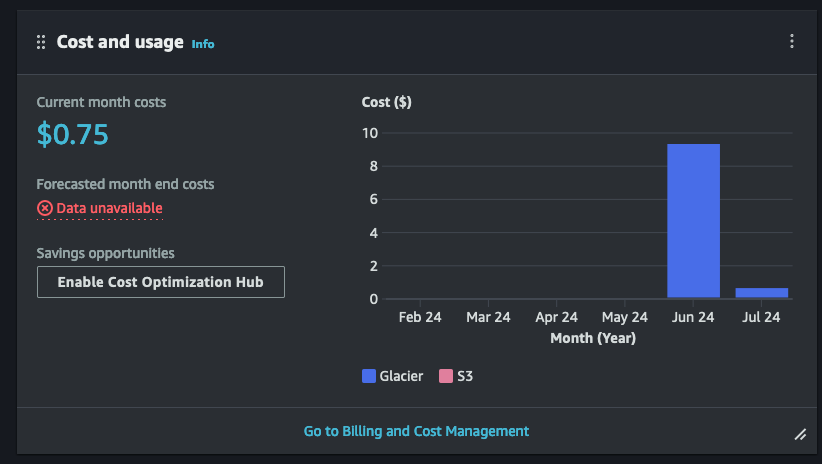
<p>After backing up everything, the costs rolled in. It cost me around $9 to initially back up the data, and will be about $4/month to store it.</p>

<p><span class="image fit"><a href="/assets/images/backups/glacier_storage.png" target="_blank"><img src="/assets/images/backups/glacier_storage.png" alt="Glacier charges" /></a></span></p>

<p>I want to take a minute to cover Erasure Coding and why it helps make the web work so well. Building reliable systems means having fault-tolerant systems. For data systems, this means ensuring that the inevitable failing hard drive won’t lead to data loss. But it’s both inefficient and risky to have multiple complete backups of data around. A drive could be stolen or lost in a move, leading to data leaking. And maintaining these complete copies is expensive.</p>

<h2 id="how-erasure-coding-works">How Erasure Coding works</h2>
<p>Enter <a href="https://en.wikipedia.org/wiki/Erasure_code">Erasure Coding</a>. Erasure coding allows us to divide a piece of data like my video files into <code class="language-plaintext highlighter-rouge">N</code> slices (or shards in distributed systems parlance). Then instead of backing up each shard (thus increasing the backup size by 2x or 3x), we can transform each shard of <code class="language-plaintext highlighter-rouge">N</code> into a slice of data with size <code class="language-plaintext highlighter-rouge">1/K</code> using an encoding function. Now, the original file can be recomposed to <code class="language-plaintext highlighter-rouge">N</code> with <code class="language-plaintext highlighter-rouge">N-K</code> shards!</p>

<p>For a <code class="language-plaintext highlighter-rouge">[3, 2]</code> code, this means we can fetch 2 slices from any of the 3 to full retrieve our data. This is helps improve the tail latency performance of distributed systems, as we can make 3 requests across each of the 3 nodes, but only need 2 to succeed to get the data back.</p>

<p>This example is dramatically simplified, to learn more I’d suggest this excellent post on <a href="https://towardsdatascience.com/erasure-coding-for-the-masses-2c23c74bf87e">Toward Data Science</a>.</p>

<p>If you want to learn more about S3 itself - I highly recommend Andy Warfield’s talk from FAST’23: <a href="https://www.youtube.com/watch?v=sc3J4McebHE">Building and Operating a Pretty Big Storage System</a>.</p>

<p>Erasure coding is a powerful concept because our backup system can withstand losing an entire storage node and still maintain a full copy of the data. It pairs very nicely with the fact that distributed systems increase reliability exponentially while costs increase linearly. <a href="https://brooker.co.za/blog/2023/09/08/exponential.html">It’s true!</a>. This is how AWS can run S3 with <a href="https://docs.aws.amazon.com/AmazonS3/latest/userguide/DataDurability.html">11 9’s</a> of durability!</p>

<h2 id="key-takeaways">Key takeaways</h2>
<p>My goal when I chose a NAS was to have a simple and reliable network storage system which could also moonlight as a small homelab, and Synology delivers all that and more. The available packages are solid, and the community-supported offerings are extensive. It’s become a critical part of my workflow both as a live-streaming software developer, and as a BASE jumper with loads of footage to store.</p>

<p>What most surprised me was how useful and intuitive the web-based operating system is. I thought I’d need to configure a remote desktop or VPN, but instead it’s so simple to use any browser to manage the NAS or even drop files onto it. Theo was right, it’s <a href="https://x.com/Synology/status/1806811442454389244">annoyingly good</a>.</p>

<p>I generally sleep well, but I sleep even better knowing all that local storage power is combined with cloud-based archival storage, so that I’ve got many many 9’s of erasure coding backing up my adventure videos.</p>

<p>If you like this type of content please subscribe to my <a href="https://aaronstuyvenberg.com">blog</a> or follow me on <a href="https://twitter.com/astuyve">twitter</a> and send me any questions or comments. You can also ask me questions directly if I’m <a href="twitch.tv/aj_stuyvenberg">streaming on Twitch</a> or <a href="https://www.youtube.com/channel/UCsWwWCit5Y_dqRxEFizYulw">YouTube</a>.</p>]]></content><author><name>AJ Stuyvenberg</name></author><category term="posts" /><summary type="html"><![CDATA[Erasure coding and multi-tier backups can help you store your data safely and cheaply. Here's how I use a Synology DiskStation and AWS Glacier to store my BASE jumping videos, and my opinions on both after a bit of use.]]></summary><media:thumbnail xmlns:media="http://search.yahoo.com/mrss/" url="https://aaronstuyvenberg.com/assets/images/backups/backups_post.png" /><media:content medium="image" url="https://aaronstuyvenberg.com/assets/images/backups/backups_post.png" xmlns:media="http://search.yahoo.com/mrss/" /></entry><entry><title type="html">Ultimate guide to secrets in Lambda</title><link href="https://aaronstuyvenberg.com/posts/ultimate-lambda-secrets-guide" rel="alternate" type="text/html" title="Ultimate guide to secrets in Lambda" /><published>2024-03-27T00:00:00+00:00</published><updated>2024-03-27T00:00:00+00:00</updated><id>https://aaronstuyvenberg.com/posts/ultimate-lambda-secrets-guide</id><content type="html" xml:base="https://aaronstuyvenberg.com/posts/ultimate-lambda-secrets-guide"><![CDATA[<p>We all have secrets. Some are small secrets which we barely hide (sometimes I roll through stop signs on my bike). Others are so sensitive that we don’t even want to think about them <span class="spoiler">(<em>serverless actually has servers</em>).</span></p>

<p>Managing and securing secrets in your applications have similar dimensions! As a result, handling a random 3rd party API key is different from handling the root signing key for an operating system or nuclear launch codes.</p>

<p>This work is a fundamental requirement for any production-quality software system. Unfortunately, AWS doesn’t make it easy to select a secrets management tool within their ecosystem. For Serverless developers, this is even more difficult! Lambda is simply one service in a constellation of multiple supporting services which you can use to control application secrets. This guide lays out the most common ways to store and manage secrets for Lambda, the performance impacts of each option, and a framework for considering your specific use cases.</p>

<h2 id="quick-best-practices-primer">Quick best practices primer</h2>
<p>Plaintext secrets should <strong>NEVER</strong> be hardcoded in your application code or source control. Typically you want to follow the <code class="language-plaintext highlighter-rouge">principle of least privilege</code> and limit the access of any runtime secret to only the runtime environment (Lambda, in this case).</p>

<p>This means passing <em>references</em> or <em>encrypted</em> data to configuration files or infrastructure as code tools whenever possible. It also means that decrypting or fetching secrets from a secure storage system at runtime will be the most secure option. This post is geared to deploying your Lambda applications along this dimension.</p>

<h2 id="lambda-secret-options">Lambda Secret Options</h2>

<p>Within Lambda, there are four major options for storing configuration parameters and secrets. They are:</p>
<ol>
  <li>Lambda Environment Variables</li>
  <li>AWS Systems Manager Parameter Store (Formerly known as Simple Systems Manager, or SSM)</li>
  <li>AWS Secrets Manager</li>
  <li>AWS Key Management Service</li>
</ol>

<p>This post will rate each option along the following dimensions:</p>
<ol>
  <li>Ease of use</li>
  <li>Cost</li>
  <li>Auditability</li>
  <li>Rotation Simplicity</li>
  <li>Capability</li>
</ol>

<p>We’ll also cover the <a href="https://aws.amazon.com/blogs/compute/using-the-aws-parameter-and-secrets-lambda-extension-to-cache-parameters-and-secrets/">AWS Lambda Parameter and Secret extension</a>, which is used to retrieve secrets from both Parameter Store and Secrets Manager from within a Lambda function.</p>

<p>Then, we’ll consider several example secrets with various blast radii, and decide which service best suits our needs.</p>

<h2 id="service-breakdown-tldr">Service breakdown Tl;dr</h2>

<table>
  <thead>
    <tr>
      <th> </th>
      <th>Ease of Use</th>
      <th>Cost</th>
      <th>Auditability</th>
      <th>Rotation Complexity</th>
      <th>Capability</th>
    </tr>
  </thead>
  <tbody>
    <tr>
      <td><a href="#lambda-environment-variables">Environment Variables</a></td>
      <td>Easiest</td>
      <td><strong>Free!</strong></td>
      <td>Poor</td>
      <td>Requires UpdateFunctionConfiguration or deployment</td>
      <td>Encrypted at rest Decrypted when getFunctionConfiguration called.<br /> Limited to 4KB total</td>
    </tr>
    <tr>
      <td><a href="#aws-systems-manager-parameter-store">Parameter Store Standard</a></td>
      <td>Some assembly required</td>
      <td><strong>Free storage</strong><br /><br />Free calls up to 40 calls/second.<br />$0.05/10,000 calls after</td>
      <td>Good</td>
      <td>Easy manual rotation, not automatic</td>
      <td>4KB size limit</td>
    </tr>
    <tr>
      <td><a href="#aws-systems-manager-parameter-store">Parameter Store Advanced</a></td>
      <td>Some assembly required</td>
      <td>$0.05 per month per secret.<br /><br />$0.05/10,000 calls</td>
      <td>Good</td>
      <td>Easy manual rotation, not automatic</td>
      <td>Supports TTL for secrets. 8KB size limit</td>
    </tr>
    <tr>
      <td><a href="#aws-secrets-manager">Secrets Manager</a></td>
      <td>Some assembly required</td>
      <td>$0.40 per secret per month $0.05/10,000 calls.<br />30 day free tier.</td>
      <td>Good</td>
      <td>Easiest &amp; Automatic<br />Built into the product</td>
      <td>Largest binary size, 65KB per secret</td>
    </tr>
    <tr>
      <td><a href="#key-management-service">Key Management Service</a> (KMS)</td>
      <td>Most work</td>
      <td>$1 per key per month $0.03/10,000 requests</td>
      <td>Good</td>
      <td>Depends on ciphertext storage.<br />Easy with DynamoDB/S3, more manual with env vars.</td>
      <td>Most flexible option.<br /> 4KB per <code class="language-plaintext highlighter-rouge">encrypt</code> operation.<br />Binary size is limited by storage mechanism.<br />Roll your own Secrets Manager or Parameter Store.</td>
    </tr>
  </tbody>
</table>

<h2 id="lambda-environment-variables">Lambda Environment Variables</h2>
<p>Environment variables in Lambda are where most folks start out in their journey. They’re baked right in, and can be fetched easily (using something like <code class="language-plaintext highlighter-rouge">process.env.MY_SECRET</code> for Node or <code class="language-plaintext highlighter-rouge">os.environ.get('MY_SECRET')</code> for Python). Unfortunately they are not the <em>most</em> secure option.</p>

<p>However one common misconception is that environment variables are <code class="language-plaintext highlighter-rouge">stored as plain text</code> by AWS Lambda. This is <strong>false</strong>.</p>

<p>Lambda environment variables are <a href="https://docs.aws.amazon.com/lambda/latest/dg/configuration-envvars.html">encrypted at rest</a>, and only decrypted when the Lambda Function initializes, or you take an action resulting in a call to <code class="language-plaintext highlighter-rouge">GetFunctionConfiguration</code>. This includes visiting the <code class="language-plaintext highlighter-rouge">Environment Variables</code> section of the Lambda page in the AWS Console. It startles some people to see their secrets on this page, but you can easily prevent this by denying <code class="language-plaintext highlighter-rouge">lambda:GetFunctionConfiguration</code>, or <code class="language-plaintext highlighter-rouge">kms:Decrypt</code> permissions from your AWS console user.</p>

<p>Auditability is another challenge of Lambda environment variables. For the principle of least privilege to be effective, we should limit access to secrets only to when they are needed. To ensure this is followed, or investigate and remediate a leaked secret, we need to know which Lambda function used a specific secret and at what time.</p>

<p>Environment variables are automatically decrypted and injected into every function sandbox upon initialization. Given that CloudTrail reflects one call to <code class="language-plaintext highlighter-rouge">kms:Decrypt</code>, I presume the entire 4KB environment variable package is encrypted together. This means you lack the ability to audit an individual secret - it’s all or nothing.</p>

<p>If you’re in a regulated environment, or otherwise distrust Amazon; you can create a Consumer-Managed Key (CMK) and use that to encrypt your environment variables instead.</p>

<p>It’s important to note that when you update environment variables, you will trigger a cold start (as long as you’re using the <code class="language-plaintext highlighter-rouge">$LATEST</code> function alias). Your function sandbox is automatically shut down permanently. Then when a new request arrives, you will experience a cold start and that sandbox will pull the latest environment variables into scope.</p>

<p>Environment variables are also the best-performing option. Systems Manager Parameter Store, Secrets Manager, Lambda environment variables, and KMS all fundamentally rely on KMS and thus a call to <code class="language-plaintext highlighter-rouge">kms:Decrypt</code> at some point.</p>

<p>Lambda Function environment variables add around 25ms to your cold start duration, according to an article David Behroozi <a href="https://speedrun.nobackspacecrew.com/blog/2024/03/13/lambda-environment-variables-impact-on-coldstarts.html">just wrote</a>. These calls are logged in CloudTrail whenever your function starts.</p>

<p>However, purely storing secrets as environment variables is not the most secure option. Although they are encrypted at rest, environment variables and <code class="language-plaintext highlighter-rouge">lambda:GetFunctionConfiguration</code> permissions are treated by Lambda as part of the <code class="language-plaintext highlighter-rouge">ReadOnly</code> policy used by AWS internally, auditors, and cloud security SaaS products. This broadens your risk for a vendor or 3rd party auditor becoming compromised and leaking your secrets.</p>

<p>One risk is that you may accidentally leak a secret when sharing your screen while viewing or modifying a Lambda environment variable. It’s unfortunate that AWS automatically decrypts and displays these values in plain text. AWS has no excuse for this, and should absolutely hide environment variable values unless toggled on, which is how Parameter Store and Secrets Manager both work.</p>

<p>Furthermore, CloudFormation treats environment variables as regular parts of a template, so they are available when looking at the full template or historical templates for a given stack. Additionally, AWS does not recommend storing <a href="https://docs.aws.amazon.com/lambda/latest/dg/configuration-envvars.html">anything secret in an environment variable</a>.</p>

<p>You can improve that somewhat for no (or little) cost using a pattern I lay out <a href="#safely-securing-environment-variables">further on</a>. Before we get there, you should be familiar with the first-class products AWS offers to store your secrets.</p>

<h2 id="aws-systems-manager-parameter-store">AWS Systems Manager Parameter Store</h2>
<p>The title is a mouthful, and the service is equally Byzantine. It includes features for managing nodes, patching systems, handling feature flags, and so much more. Earlier it was called the Simple Systems Manager, however it’s truly anything but simple.</p>

<p>Today we’ll focus only on Lambda and exclusively on the Parameter Store feature which allows us to store a plaintext or secure string either as a simple value or structured item.</p>

<p>You <strong>always want to use SecureString</strong> for secrets.</p>

<p>Parameter Store offers the choice between Standard and Advanced Parameters. Standard Parameters are free to store, Advanced Parameters incur a $0.05 per month per parameter charge.</p>

<p>Standard parameters are limited to 4KB in size (each), with 10,000 total per region. Advanced Parameters have higher limits of 8KB per item and 100,000 total per region. They come with the bonus of attaching <a href="https://docs.aws.amazon.com/systems-manager/latest/userguide/parameter-store-policies.html">Parameter Policies</a>, which are effectively TTLs for a given parameter.</p>

<p>Standard Parameters are free up to 40 requests per second (for all values stored in Parameter Store). Beyond that, the cost is $0.05 per 10,000 Parameter Store API Interactions. Advanced Parameters are always billed at $0.05/10,000 requests. Fetching each parameter counts as an interaction, so 10 parameters triggers 10 interactions. Parameters are individually versioned, and you can fetch by version or <code class="language-plaintext highlighter-rouge">$LATEST</code>.</p>

<p>Historically one major advantage of Secrets Manager over Parameter Store is the ability to share secrets across AWS accounts using a resource-based policy. This is now <a href="https://aws.amazon.com/about-aws/whats-new/2024/02/aws-systems-manager-parameter-store-cross-account-sharing/">supported by Parameter Store for Advanced Parameters</a> as well.</p>

<p>Finally, individual Parameter calls are auditable in CloudTrail so you can prove who accessed a Parameter and when.</p>

<h3 id="performance">Performance</h3>
<p>For a new TCP connection, Parameter Store fetched a parameter in around 217ms, including 99ms to set up the connection itself:
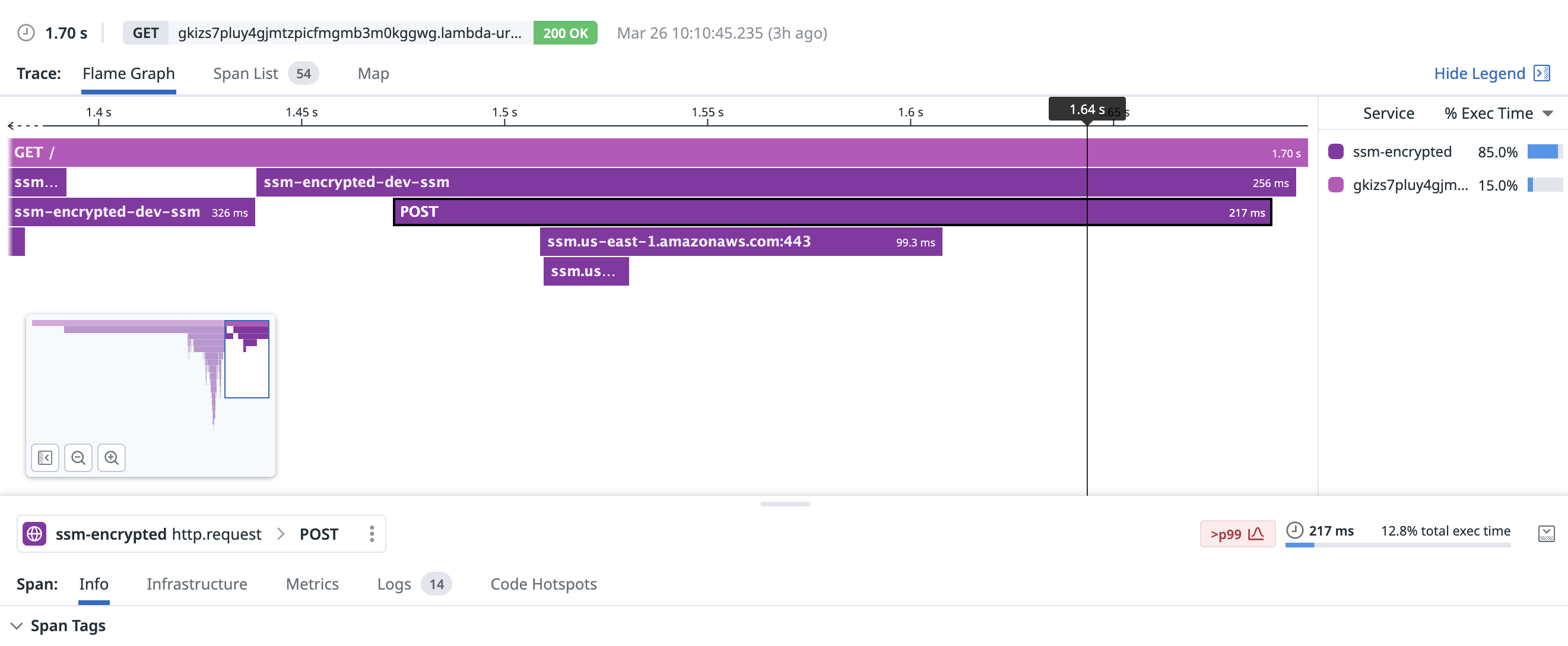
<span class="image fit"><a href="/assets/images/secrets/ssm_cold.png" target="_blank"><img src="/assets/images/secrets/ssm_cold.png" alt="Systems Manager Parameter Store cold request" /></a></span></p>

<p>With an existing connection, fetching the parameter took around 39.3ms:
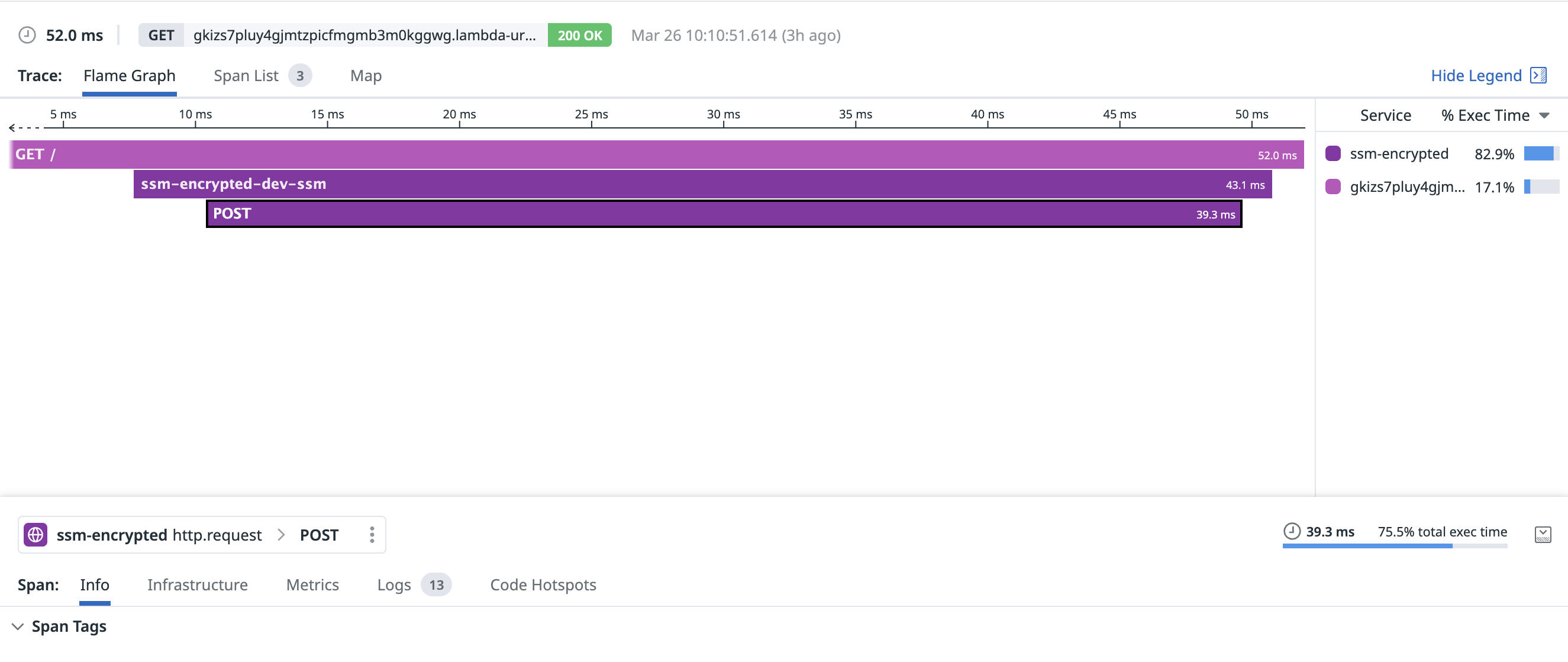
<span class="image fit"><a href="/assets/images/secrets/ssm_warm.png" target="_blank"><img src="/assets/images/secrets/ssm_warm.png" alt="Systems Manager Parameter Store warm request" /></a></span></p>

<h2 id="aws-secrets-manager">AWS Secrets Manager</h2>
<p>Secrets Manager is purpose-built for encrypting and storing secrets for your application. It also has the largest cost at $0.40 per secret per month. This cost is multiplied by the number of regions you choose to replicate each secret to, so this can add up quickly. Fetching a secret costs $0.05 per 10,000 API calls, and there is a free 30-day trial.</p>

<p>The big features you’ll gain over Parameter Store are the ability to automatically replicate secrets across regions, automatically (or manually) rotate secrets. This feature often satisfies requirements for applications subject to regulations like PCI-DSS or HIPAA. If these are must-have features for your application, it makes sense to use Secrets Manager.</p>

<p>Secret values can be up to 65KB in size, which is far larger than environment variables or Parameter Store. Like Parameter Store, calls for <code class="language-plaintext highlighter-rouge">GetSecretValue</code> are logged in CloudTrail. The big advantage Secrets have over Parameter Store is the ability to simply rotate or change a secret everywhere it’s used. You can do this on a schedule if you’re in an environment which demands this, or ad-hoc.</p>

<h3 id="performance-1">Performance</h3>
<p>Similar to Parameter Store, it takes Secrets Manager a bit to warm up. 177ms was the duration to create this TCP connection and make the request:
<span class="image fit"><a href="/assets/images/secrets/secrets_manager_cold.png" target="_blank"><img src="/assets/images/secrets/secrets_manager_cold.png" alt="Secrets Manager cold request" /></a></span></p>

<p>With a warm connection, fetching a secret from Secrets Manager took only 29.4ms:
<span class="image fit"><a href="/assets/images/secrets/secrets_manager_warm.png" target="_blank"><img src="/assets/images/secrets/secrets_manager_warm.png" alt="Secrets Manager warm request" /></a></span></p>

<h2 id="key-management-service">Key Management Service</h2>
<p>AWS Key Management Service (KMS) is the system which underpins <em>all of these other services</em>. If you look carefully at either the documentation or CloudTrail logs, you’ll see KMS!</p>

<p>KMS allows us to create an encryption key, securely store it within AWS, and then use IAM to grant access to resource-based policies used by Lambda to decrypt the ciphertext when your function runs. Instead of passing around a reference to a secret, you’ll need to pass your Lambda function the encrypted ciphertext.</p>

<p>Storing and fetching the ciphertext can be implemented many ways, and should generally track the size of the encrypted blob. Small strings can be easily encrypted and stored as environment variables. If you need to share the same secret, you can store the ciphertext in DynamoDB. For large shared secrets, ciphertexts can be stored in S3.</p>

<p>Most often these secrets are decrypted during the initialization phase of a Lambda function. Fun fact, you don’t need to store or pass the ID of the key used to encrypt data. That key ID is <a href="https://docs.aws.amazon.com/kms/latest/APIReference/API_Decrypt.html">encoded</a> right along with the encrypted data in the ciphertext! Simply call <code class="language-plaintext highlighter-rouge">kms:Decrypt</code> on the blob, and KMS takes care of the rest. Neat!</p>

<p>KMS bills $1 per key per month. There is no charge for the keys created and used by Parameter Store, Secrets Manager, or AWS Lambda. You’re also charged $0.03 per 10,000 requests to <code class="language-plaintext highlighter-rouge">kms:Decrypt</code> (or other API actions). These calls are individually auditable in CloudTrail.</p>

<p>You’ll have to implement rotation yourself, but if you store ciphertexts in DynamoDB, this can be relatively straightforward and cheaper than either Parameter Store or Secrets Manager, especially if you want to distribute a secret across multiple regions.</p>

<p>I see KMS used most frequently to encrypt slowly changing items like certificates, .PEM files, or to securely store signing keys.</p>

<h3 id="performance-2">Performance</h3>
<p>Decrypting one small (~200b) ciphertext with KMS is notably faster than Parameter Store or Secrets Manager. This request took 64.4ms, including creating the TCP connection:
<span class="image fit"><a href="/assets/images/secrets/kms_cold.png" target="_blank"><img src="/assets/images/secrets/kms_cold.png" alt="KMS cold request" /></a></span></p>
<p>With a warm connection, KMS decrypted my secret in a blistering <strong>6.45ms</strong>: 
<span class="image fit"><a href="/assets/images/secrets/kms_warm.png" target="_blank"><img src="/assets/images/secrets/kms_warm.png" alt="KMS warm request" /></a></span></p>

<p>Presumably a big advantage here is that my ciphertext was already present in Lambda (as an environment variable) and didn’t need to be fetched from a remote datastore call. KMS merely needed to decrypt the ciphertext and return!</p>

<h2 id="aws-parameter-and-secrets-lambda-extension">AWS Parameter and Secrets Lambda Extension</h2>
<p>To more easily use either Parameter Store or Secrets Manager in Lambda, AWS has published a <a href="https://docs.aws.amazon.com/secretsmanager/latest/userguide/retrieving-secrets_lambda.html">Lambda extension</a> which handles API calls to the underlying services for you, along with caching and refreshing secrets. You can <a href="https://docs.aws.amazon.com/secretsmanager/latest/userguide/retrieving-secrets_lambda.html">tune</a> these parameters to your liking as well.</p>

<p>Your function interacts with this extension via a lightweight API running on <code class="language-plaintext highlighter-rouge">localhost</code>. It’s reasonably well designed, although I find it a bit clumsy overall. This really feels like the type of feature Lambda should implement themselves, and then <code class="language-plaintext highlighter-rouge">magically</code> make secrets appear in your function runtime. In contrast, ECS <a href="https://docs.aws.amazon.com/AmazonECS/latest/developerguide/specifying-sensitive-data.html">has this behavior built in</a> and I find the experience far superior compared to Lambda.</p>

<p>Furthermore, this extension isn’t open source. Because extensions are indistinguishable from your own function code, it leaves a bit of a foul taste in my mouth that I’m completely blessing a random extension with carte-blanche access to both my function code and secrets.</p>

<p>I’m of the firm opinion that we as users shouldn’t seriously consider any Lambda Extension unless the code is open source (and can be built/published to my own account if I choose). If AWS changes this behavior, I’ll happily update the post.</p>

<p>For these reasons, I prefer interacting with the Parameter Store or Secrets Manager APIs instead, using the <code class="language-plaintext highlighter-rouge">aws-sdk</code>. The (excellent) AWS Lambda <a href="https://github.com/aws-powertools">PowerTools project</a> also supports fetching parameters from <a href="https://docs.powertools.aws.dev/lambda/python/latest/utilities/parameters/">multiple sources</a> and is absolutely worth considering.</p>

<p>Now let’s consider three example secrets. We’ll look at the attack vectors, the blast radius for a leak/compromise, and identify the best cost/benefit solution for each.</p>

<h2 id="patterns-and-practices">Patterns and Practices</h2>

<h3 id="safely-securing-environment-variables">Safely securing environment variables</h3>
<p>Given that AWS Lambda environment variables are encrypted at rest - the biggest issue storing sensitive data in environment variables isn’t Lambda itself - it’s the AWS Console and CloudFormation (and your CI pipeline)! When your stack is created or updated, those environment variables <strong>are</strong> plaintext values in the CloudFormation stack template. Templates are also stored and retrievable in the CloudFormation UI, as well as in the AWS Lambda console.</p>

<p>Unfortunately you’re not able to use <a href="https://docs.aws.amazon.com/AWSCloudFormation/latest/UserGuide/dynamic-references.html">dynamic references</a> to pass a <em>reference</em> to your secret to CloudFormation, because they aren’t yet supported by Lambda environment variables. You should complain about this to your AWS TAM.</p>

<p>The downside is that your secrets are still viewable in the Lambda Console via <code class="language-plaintext highlighter-rouge">lambda:GetFunctionConfiguration</code>, and if you update your secret in Parameter Store, it won’t be updated in Lambda until you redeploy your functions.</p>

<h3 id="envelope-encryption">Envelope Encryption</h3>
<p>Consider a case where you may have ~100kb of secrets to store. A handful of signing keys, a couple tokens, maybe an mTLS certificate. Here’s where you can use a technique called <a href="https://docs.aws.amazon.com/kms/latest/developerguide/concepts.html#enveloping">envelope encryption</a> to secure your data.</p>

<ol>
  <li>Create a KMS key</li>
  <li>Generate 256-bit AES key for each customer, application, or secrets payload</li>
  <li>Encrypt all of your secrets with the AES key. This is the “envelope”</li>
  <li>Include the encrypted secrets in your function zip.</li>
  <li>Finally, encrypt the AES key with your KMS key and pass the encrypted key to your function in an environment variable.</li>
</ol>

<p>You’ve just encrypted an envelope, and passed the encrypted key to your Lambda Function securely! This also helps save money on KMS keys, as you can re-use one KMS key for multiple AES keys. This pattern is also useful if you need to secure keys for customers in a multi-tenant environment, but laying that out is beyond the scope of this post.</p>

<h2 id="sensitive-data-exercise">Sensitive Data Exercise</h2>
<p>We’ve covered the fundamental building blocks for securing sensitive information within AWS and using it within Lambda. We’ve also composed a few patterns you can use to reduce costs or handle specific use cases.</p>

<p>Now, let’s consider 4 common secrets used in Lambda and think about how best to secure them.</p>

<h3 id="telemetry-api-key">Telemetry API Key</h3>
<p>First up is a telemetry API key. Consider an ELK stack, or any provider you prefer. These keys are free to create, so it’s best to create one key per application to limit blast radius and, as a bonus - better track costs. Telemetry keys are also usually write-only. Leaking this key can only cause an attacker to send additional data to the API.</p>

<p>With this in mind, <em>environment variables</em> are likely a good enough option here. They have minimal performance overhead, no cost, and minimal blast radius.</p>

<p>Keys can be easily created for exactly one Lambda function, or CloudFormation stack. If someone peers over your shoulder at a coffee shop, or inadvertently leaks the environment variable - it’s simple to change with a few clicks and a re-deploy.</p>

<p>You can also use <a href="#safely-securing-environment-variables">dynamic references</a> and limit the read permissions for console users or 3rd party roles to further prevent access.</p>

<p>Using a SecureString with Parameter Store would also be a good option as it would likely be free - especially if your application doesn’t have any users.</p>

<p>In this case, the blast-radius is small, the rotation complexity is easy, and a key encrypted at rest is likely more than suitable for our use case.</p>

<h3 id="database-username-and-password">Database Username and Password</h3>
<p>Your RDBMs may only allow one username and password string, to be shared across all applications - or maybe you just need to share a secret for the sake of simplicity. If you’re not using a stateful connection pooler (like <code class="language-plaintext highlighter-rouge">pgbouncer</code>), you may need to share this secret with all your functions.</p>

<p>Here’s where Parameter Store is probably also a great fit. If you ever have to change it, your functions can reference an unversioned Parameter and get the latest key. For one key, it’s pretty affordable. However this math changes if you have a larger bundle of secrets, which exceed the 4KB or 8KB size limits of Parameter Store.</p>

<h3 id="github-application-private-key">GitHub Application Private Key</h3>
<p>For our second example, consider building and deploying a GitHub Application. Authenticating as a GitHub Application is not quite as simple as a 128bit UUID.</p>

<p>Instead, you must download and save an <a href="https://docs.github.com/en/apps/creating-github-apps/authenticating-with-a-github-app/managing-private-keys-for-github-apps">application key in PEM format</a>. These keys can be a bit large, around ~2KB which may push you close to the 4KB environment variable limit.</p>

<p>You <em>can</em> create multiple keys for the same application at no cost, so deploying one key per stack is still tenable.</p>

<p>If the key were to be leaked, someone could conceivably authenticate as your application and access <strong>ANY</strong> of the repositories your application is installed into (with whatever permissions your application is configured to use). This is risky!</p>

<p>In this case, you’d probably want to use something like Parameter Store if you choose to create multiple keys and rotate them yourself. You’ll help avert the size limit for Lambda environment variables, but it won’t be too costly.</p>

<p>If you’re dealing with a larger key but don’t want to eat the cost of Secrets Manager, KMS or DynamoDB can make sense as well.</p>

<p>I’d be remiss if I didn’t mention that like Lambda environment variables, DynamoDB records are also <a href="https://docs.aws.amazon.com/amazondynamodb/latest/developerguide/EncryptionAtRest.html">encrypted at rest</a>, optionally with your own consumer-managed key. I assume this is mostly at the hardware (disk) level, so data in memory may not be encrypted. But generally if you’re also concerned with someone peeking over your shoulder as you browse DynamoDB items in the AWS console, you could also encrypt them with your own key.</p>

<h3 id="pci-dss-or-hipaa-credential-rotation">PCI-DSS or HIPAA credential rotation</h3>
<p>If you’re in a regulated environment with mandated credential rotation, Secrets Manager makes this so easy. As this post has mentioned several times, it’s certainly possible to build this yourself. However - it’s often worth the cost of $0.40 per secret to have the peace of mind that Secrets Manager will automatically rotate your secrets on a regular cadence. Your auditor will thank you as well.</p>

<h2 id="wrapping-up">Wrapping up</h2>
<p>My hot take after writing this guide is that Lambda environment variables are generally fine for a one-off API key with a small blast radius. They’re fast, free, and easy to use.</p>

<p>For secrets with larger blast radii, use SecureStrings from Parameter Store. If you’re working in a regulated environment or you’d like to regularly rotate a secret, it’s probably easiest to use Secrets Manager.</p>

<p>Reach for KMS and another storage mechanism if your use case doesn’t quite fit into these boxes, or if doing so would be prohibitively expensive.</p>

<p>Ultimately security is a balancing act. I realize best practices are all about limiting risks at every turn, but it still feels wrong to crow about environment variables when so many developers run around with <code class="language-plaintext highlighter-rouge">Administrator</code> IAM roles (and can easily read any secret anyway).</p>

<p>At the same time, AWS should do more to restrict the values of environment variables to a permission more restricted than <code class="language-plaintext highlighter-rouge">lambda:getFunctionConfiguration</code>.</p>

<p>This post would not exist without <a href="https://speedrun.nobackspacecrew.com/blog/index.html">David Behroozi</a> challenging me to finish it, and helping out with his CloudTrail digging. You should follow him on <a href="https://twitter.com/rooToTheZ">twitter</a>. Thanks, David!</p>

<p><a href="https://twitter.com/Frichette_n">Nick Frichette</a>, <a href="https://twitter.com/alexbdebrie">Alex DeBrie</a>, and <a href="http://awsteele.com/">Aidan Steele</a> also helped review this, thanks friends!</p>

<p>If you like this type of content please subscribe to my <a href="https://aaronstuyvenberg.com">blog</a> or follow me on <a href="https://twitter.com/astuyve">twitter</a> and send me any questions or comments. You can also ask me questions directly if I’m <a href="twitch.tv/aj_stuyvenberg">streaming on Twitch</a> or <a href="https://www.youtube.com/channel/UCsWwWCit5Y_dqRxEFizYulw">YouTube</a>.</p>]]></content><author><name>AJ Stuyvenberg</name></author><category term="posts" /><summary type="html"><![CDATA[Securing your API Keys, database passwords, or SSH keys for Lambda Functions is tricky. This post compares Systems Manager, Secrets Manager, Key Management Service, and environment variables for handling your secrets in Lambda. We'll cover costs, features, performance, and more. Then we'll lay out a framework for considering the risk of your particular secret, so that you know what's best for your application's secrets.]]></summary><media:thumbnail xmlns:media="http://search.yahoo.com/mrss/" url="https://aaronstuyvenberg.com/assets/images/secrets/secrets_in_lambda.png" /><media:content medium="image" url="https://aaronstuyvenberg.com/assets/images/secrets/secrets_in_lambda.png" xmlns:media="http://search.yahoo.com/mrss/" /></entry><entry><title type="html">How Lambda starts containers 15x faster (deep dive)</title><link href="https://aaronstuyvenberg.com/posts/containers-on-lambda-pt-two" rel="alternate" type="text/html" title="How Lambda starts containers 15x faster (deep dive)" /><published>2024-01-09T00:00:00+00:00</published><updated>2024-01-09T00:00:00+00:00</updated><id>https://aaronstuyvenberg.com/posts/containers-on-lambda-pt-two</id><content type="html" xml:base="https://aaronstuyvenberg.com/posts/containers-on-lambda-pt-two"><![CDATA[<p>In the <a href="https://aaronstuyvenberg.com/posts/containers-on-lambda">first post</a> of this series, we demonstrated that container-based Lambda functions can initialize as fast or faster than zip-based functions. This is counterintuitive as zip-based functions are usually much smaller (up to 250mb), while container images typically contain far more data and are supported up 10gb in size. So how is this technically possible?</p>

<p>“On demand container loading on AWS Lambda” was <a href="https://arxiv.org/abs/2305.13162">published</a> on May 23rd, 2023 by Marc Brooker et al. I suggest you read the full paper, as it’s quite approachable and extremely interesting, but I’ll break it down here.</p>

<p>The key to this performance improvement can be summarized in four steps, all performed during <strong>function creation</strong>.</p>

<ol>
  <li>Deterministically serialize container layers (which are tar.gz files) onto an ext4 file system</li>
  <li>Divide filesystem into 512kb chunks</li>
  <li>Encrypt each chunk</li>
  <li>Cache the chunks and share them <em>across all customers</em></li>
</ol>

<p>With these chunks stored and shared safely in a multi-tier cache, they can be fetched more quicky during <strong>function cold start</strong>.</p>

<p>But how can one safely encrypt, cache, and share actual bits of a container image <em>between</em> users?!</p>

<h2 id="container-images-are-sparse">Container images are sparse</h2>
<p>One interesting fact about container images is that they’re an objectively inefficient method for distributing software applications. It’s true!</p>

<p>Container images are sparse blobs, with only a fraction of the contained bytes required to actually run the packaged application. <a href="https://www.usenix.org/conference/fast16/technical-sessions/presentation/harter">Harter et al</a> found that only 6.5% of bytes on average were needed at startup.</p>

<p>When we consider a collection of container images, the frequency and quantity of similar bytes is very high between images. This means there are lots of duplicated bytes copied over the wire every time you push or pull an image!</p>

<p>This is attributed to the fact that container images include a ton of stuff that doesn’t vary between us as users. These are things like the kernel, the operating system, system libraries like libc or curl, and runtimes like the jvm, python, or nodejs.</p>

<p>Not to mention all of the code in your app which you copied from Chat GPT (like everyone else).</p>

<p>The reality is that we’re all shipping ~80% of the same code.</p>

<h2 id="deterministic-serialization-onto-ext4">Deterministic serialization onto ext4</h2>
<p>Container images are stacks of tarballs, layered on top of each other to form a filesystem like the one on your own computer. This process is typically done at container runtime, using a <a href="https://docs.docker.com/storage/storagedriver/">storage driver</a> like <a href="https://docs.docker.com/storage/storagedriver/overlayfs-driver/">overlayfs</a>.</p>

<p><span class="image fit"><a href="/assets/images/lambda_containers/container_layers.png" target="_blank"><img src="/assets/images/lambda_containers/container_layers.png" alt="Containers are layers of tarballs" /></a></span></p>

<p>In a typical filesystem, this process of copying files from the tar.gz file to the filesystem’s underlying block device is <em>nondeterministic</em>. Files always land in the same directory, but those locations <em>on disk</em> may land on different parts of the block device over the course of multiple instantiations of the container.<br />
This is a concurrency-based performance optimization used by filesystems, which introduces nondeterminism.</p>

<p>In order to de-duplicate and cache function container images, Lambda also needs a filesystem. This process is done when a function is created or updated. But for Lambda to efficiently cache chunks of a function container image, this process needed to be deterministic. So they made filesystem creation a serial operation, and thus the creation of Lambda filesystem blocks are deterministic.</p>

<p><span class="image fit"><a href="/assets/images/lambda_containers/lambda_filesystem.png" target="_blank"><img src="/assets/images/lambda_containers/lambda_filesystem.png" alt="An example filesystem created by the tarballs" /></a></span></p>

<h2 id="filesystem-chunking">Filesystem chunking</h2>
<p>Now that each byte of a container image will land in the same block each time a function is created, Lambda can divide the blocks into 512kb chunks. They specifically call out that larger chunks reduce metadata duplication, and smaller chunks lead to better deduplication and thus cache hit rate, so they expect this exact value to change over time.</p>

<p><span class="image fit"><a href="/assets/images/lambda_containers/chunked_filesystem.png" target="_blank"><img src="/assets/images/lambda_containers/chunked_filesystem.png" alt="The Lambda filesystem divided into chunks and hashed" /></a></span></p>

<p>The next two steps are the most important.</p>

<h2 id="convergent-encryption">Convergent encryption</h2>
<p>Lambda code is considered unsafe, as any customer can upload anything they want. But then how can AWS deduplicate and share chunks of function code between customers?<br />
The answer is something called Convergent Encryption, which sounds scarier than it is:</p>
<ol>
  <li>Hash each 512kb chunk, and from that, derive an encryption key.</li>
  <li>Encrypt each block with the derived key.</li>
  <li>Create a manifest file containing a SHA256 hash of each chunk, the key, and file offset for the chunk.</li>
  <li>Encrypt the keys list in the manifest file using a per-customer key managed by KMS.</li>
</ol>

<p><span class="image fit"><a href="/assets/images/lambda_containers/encrypted_manifest.png" target="_blank"><img src="/assets/images/lambda_containers/encrypted_manifest.png" alt="The encrypted chunks and manifest file for a Lambda container function" /></a></span></p>

<p>These chunks are then de-duplicated and stored in a s3 when a Lambda function is created.</p>

<p>Now that each block is hashed and encrypted, they can be efficiently de-duplicated and shared across customers. The manifest and chunk key list are decrypted by the Lambda worker during a cold start, and only chunks matching those keys are downloaded and decrypted.<br />
This is safe because for any customer’s manifest to contain a chunk hash (and the key derived from it) in the manifest file, that customer’s function must have created and sent that chunk of bytes to Lambda.</p>

<p>Put another way, all users with an identical chunk of bytes also all share the identical key.</p>

<p>This is key to sharing chunks of container images without trust. Now if you and I both run a node20.x container on Lambda, the bytes for nodejs itself (and it’s dependencies like libuv) can be shared, so they may already be on the worker before my function runs or is even created!</p>

<h2 id="multi-tiered-cache-strategy">Multi-tiered cache strategy</h2>
<p>The last component to this performance improvement is creating a multi-tiered cache. Tier three is the source cache, and lives in an S3 bucket controlled by AWS.</p>

<p>The second tier is an AZ-level cache, which is replicated and separated into an in-memory system for hot data, and flash storage for colder chunks.
Fun fact - to reduce p99 outliers, this cache data is stored using erasure coding in a 4-of-5 code strategy. This is the same sharding technique <a href="https://youtu.be/v3HfUNQ0JOE?t=508">used in s3</a>.</p>

<p>This allows workers to make redundant requests to this cache while fetching chunks, and abandon the slowest request as soon as 4 of the 5 chunks return. This is a <a href="https://dl.acm.org/doi/10.1145/2796314.2745873">common pattern</a>, which AWS also uses when fetching zip-based Lambda function code from s3 (among many other applications).</p>

<p>Finally the tier-one cache lives on each Lambda worker and is entirely in-memory. This is the fastest cache, and most performant to read from when initializing a new Lambda function.</p>

<p>In a given week, 67% of chunks were served from on-worker caches!
<span class="image fit"><a href="/assets/images/lambda_containers/cache_level_comparison.png" target="_blank"><img src="/assets/images/lambda_containers/cache_level_comparison.png" alt="For a given week, 67% of chunks were served from the worker" /></a></span></p>

<h2 id="putting-it-together">Putting it together</h2>
<p>During a cold start, these chunk IDs are looked up using the manifest, and then fetched from the cache(s) and decrypted. The Lambda worker reassembles the chunks and then the function initialization begins. It doesn’t matter who uploaded the chunk, they’re all shared safely!</p>

<p><span class="image fit"><a href="/assets/images/lambda_containers/cold_start_cache.png" target="_blank"><img src="/assets/images/lambda_containers/cold_start_cache.png" alt="The encrypted chunks fetched from the cache during a cold start and reassembled." /></a></span></p>

<h2 id="crazy-stat">Crazy stat</h2>
<p>This leads to a staggering statistic. If (after subscribing and sharing this post), you close this page and create a brand new container-based Lambda function right now, there is an <strong>80% chance</strong> that new container image will contain <em>zero unique bytes</em> compared to what Lambda already has seen.</p>

<p>AWS has seen the code and dependencies you are likely to deploy before you have even deployed it.</p>

<h2 id="wrapping-up">Wrapping up</h2>
<p>The whole paper is excellent and includes many other interesting topics like cache eviction, and how this was implemented (in Rust!), so I suggest you <a href="https://arxiv.org/abs/2305.13162">read the full paper</a> to learn more. The Lambda team even had to contend with some cache fragements being <strong>too popular</strong>, so they had to salt the chunk hashes!</p>

<p>It’s interesting to me that the Fargate team went a totally different direction here with <a href="https://aws.amazon.com/about-aws/whats-new/2023/07/aws-fargate-container-startup-seekable-oci/">SOCI</a>. My understanding is that SOCI is less effective for images smaller than 1GB, so I’d be curious if some lessons from this paper could further improve Fargate launches.</p>

<p>At the same time, I’m curious if this type of multi-tenant cache would make sense to improve launch performance of something like GCP Cloud Run, or Azure Container Instances.</p>

<p>If you like this type of content please subscribe to my <a href="https://aaronstuyvenberg.com">blog</a> or reach out on <a href="https://twitter.com/astuyve">twitter</a> with any questions. You can also ask me questions directly if I’m <a href="twitch.tv/aj_stuyvenberg">streaming on Twitch</a> or <a href="https://www.youtube.com/channel/UCsWwWCit5Y_dqRxEFizYulw">YouTube</a>.</p>]]></content><author><name>AJ Stuyvenberg</name></author><category term="posts" /><summary type="html"><![CDATA[We've seen how containers on Lambda initialize as fast or faster than their zip-based counterparts. This post examines exactly how the Lambda team did this, and the performance advantages of everyone shipping the same code.]]></summary><media:thumbnail xmlns:media="http://search.yahoo.com/mrss/" url="https://aaronstuyvenberg.com/assets/images/lambda_containers/containers_deep_dive.png" /><media:content medium="image" url="https://aaronstuyvenberg.com/assets/images/lambda_containers/containers_deep_dive.png" xmlns:media="http://search.yahoo.com/mrss/" /></entry><entry><title type="html">The case for containers on Lambda (with benchmarks)</title><link href="https://aaronstuyvenberg.com/posts/containers-on-lambda" rel="alternate" type="text/html" title="The case for containers on Lambda (with benchmarks)" /><published>2024-01-02T00:00:00+00:00</published><updated>2024-01-02T00:00:00+00:00</updated><id>https://aaronstuyvenberg.com/posts/containers-on-lambda</id><content type="html" xml:base="https://aaronstuyvenberg.com/posts/containers-on-lambda"><![CDATA[<p>Note: the second part of this post is available <a href="https://aaronstuyvenberg.com/posts/containers-on-lambda-pt-two">here</a>.</p>

<p>When AWS Lambda first introduced support for container-based functions, the initial reactions from the community were mostly negative. Lambda isn’t meant to run large applications, it is meant to run small bits of code, scaled widely by executing many functions simultaneously.</p>

<p>Containers were not only antithetical to the philosophy of Lambda and the serverless mindset writ large, they were also far slower to initialize (or cold start) compared with their zip-based function counterparts.</p>

<p>If we’re being honest, I think the <strong>biggest roadblock to adoption</strong> was the cold start performance penalty associated with using containers. That penalty has now all but evaporated.</p>

<p>The AWS Lambda team put in tremendous amounts of work and improved the cold-start times by a shocking <strong>15x</strong>, according to the paper and <a href="https://www.youtube.com/watch?v=Wden61jKWvs">talk given by Marc Brooker</a>.</p>

<p>This post focuses on analyzing the performance of container-based Lambda functions with simple, reproducible tests. It also lays out the pros and cons for containers on Lambda. The next post will delve into how the Lambda team pulled off this performance win.</p>

<h2 id="performance-tests">Performance Tests</h2>
<p>I set off to test this new container image strategy by creating several identical functions across zip and container-based packaging schemes. These varied from 0mb of additional dependencies, up to the 250mb limit of zip-based Lambda functions. I’m <strong>not</strong> directly comparing the size of the final image with the size of the zip file, because containers include an OS and system libraries, so they are natively much larger than zip files.</p>

<p>As usual, I’m testing the <strong>round trip</strong> request time for a cold start from within the same region. I’m not using init duration, which <a href="https://youtu.be/2EDNcPvR45w?t=1421">does not include the time to load bytes into the function sandbox</a>.</p>

<p>I created a cold start by updating the function configuration (setting a new environment variable), and then sending a simple test request. The code for this project is <a href="https://github.com/astuyve/cold-start-benchmarker">open source</a>. I also streamed this entire process <a href="https://twitch.tv/aj_stuyvenberg">live on twitch</a>.</p>

<p>These results were based on the p99 response time, but I’ve included the p50 times for python below.</p>

<p>This first test contains a set of NodeJS functions running Node18.x. After several days and thousands of invocations, we see the final result. The top row represents zip-based Lambda functions, and the bottom row reports container-based Lambda functions (lower is better):
<span class="image fit"><a href="/assets/images/lambda_containers/container_metrics.png" target="_blank"><img src="/assets/images/lambda_containers/container_metrics.png" alt="Round trip cold start request time for thousands of invocations over several days" /></a></span>
An earlier version of this post reversed the rows. I’ve changed this to be consistent with the python result format. Thanks to those who corrected me!</p>

<p>It’s easier to read a bar chart:
<span class="image fit"><a href="/assets/images/lambda_containers/container_bar_chart.png" target="_blank"><img src="/assets/images/lambda_containers/container_bar_chart.png" alt="Round trip cold start request time for thousands of invocations over several days, as a bar chart" /></a></span></p>

<p>The second test was similar and performed with Python functions running Python 3.11. We see a very similar pattern, with slightly more variance and overlap on the lower end of function sizes. Here is the p99:
<span class="image fit"><a href="/assets/images/lambda_containers/python_container_p99.png" target="_blank"><img src="/assets/images/lambda_containers/python_container_p99.png" alt="Round trip cold start request time for python functions, p99" /></a></span></p>

<p>and here is the p50:
<span class="image fit"><a href="/assets/images/lambda_containers/python_container_p50.png" target="_blank"><img src="/assets/images/lambda_containers/python_container_p50.png" alt="Round trip cold start request time for python functions, p50" /></a></span></p>

<p>Here it is in chart form, once again looking at p99 over a week:
<span class="image fit"><a href="/assets/images/lambda_containers/python_rtt_chart.png" target="_blank"><img src="/assets/images/lambda_containers/python_rtt_chart.png" alt="Round trip cold start request time for python functions, p99, in chart form" /></a></span></p>

<p>We can see the closer variance at the 100mb and 150mb marks. For the 150mb test I was using Pandas, Flask, and PsycoPG as dependencies. I’m not familiar with the internals of these libraries, so I don’t want to speculate on why these results are slightly unexpected.</p>

<p>My simplest answer is that this is a “real world” test using real dependencies. On top of a managed service like Lambda as well as some amount of network latency in a shared multi-tenant system - many variables could be confounding here.</p>

<h2 id="performance-takeaways">Performance Takeaways</h2>
<p>For NodeJS, beyond ~30mb, container images <em>outperform</em> zip based Lambda functions in cold start performance.</p>

<p>For Python, container images <strong>vastly outperform</strong> zip based Lambda functions beyond 200mb in size.</p>

<p>This result is incredible, because Lambda container images (in total) are much much larger than the comparative zip files.</p>

<p>I want to stress that the size of dependencies is only one factor that plays into cold starts. Besides size, other factors impact static initialization time including:</p>
<ul>
  <li>Size and number of heap allocations</li>
  <li>Computations performed during init</li>
  <li>Network requests made during init</li>
</ul>

<p>These nuances are covered in my <a href="https://youtu.be/2EDNcPvR45w">talk at AWS re:Invent</a> if you want to dig deeper on the topic of cold starts.
All of these individual projects are <a href="https://github.com/astuyve/benchmarks">available on GitHub</a>.</p>

<h2 id="should-you-use-containers-on-lambda">Should you use containers on Lambda?</h2>
<p>I am not advocating that you choose containers as a packaging mechanism for your Lambda function based <em>solely</em> on cold start performance.</p>

<p>That said, <strong>you should be using containers on Lambda</strong> anyway. With these cold start performance improvements, there are very few reasons <em>not</em> to.</p>

<p>While it’s technically true that container images are objectively less efficient means of deploying software applications, container images should be the standard for Lambda functions going forward.</p>

<p>Pros:</p>
<ul>
  <li>Containers are ubiquitous in software development, and so many tools and developer workflows already revolve around them. It’s easy to find and hire developers who already know how to use containers.</li>
  <li>Multi-stage builds are clear and easy to understand, allowing you easily create the lightest and smallest image possible.</li>
  <li>Graviton on Lambda is quickly becoming the preferred architecture, and container images make x86/ARM cross-compilation easy. This is even more relevant now, as Apple silicon becomes a popular choice for developers.</li>
  <li>Base images for Lambda are updated frequently, and it’s easy enough to auto-deploy the latest image version containing security updates</li>
  <li>Containers allow support larger functions, up to 10gb</li>
  <li>You can use custom runtimes like Bun, Deno, as well as use new runtime versions more easily</li>
  <li>Using the excellent <a href="https://github.com/awslabs/aws-lambda-web-adapter">Lambda web adapter extension</a> with a container, you can very easily move a function from Lambda to Fargate or Apprunner if cost becomes an issue. This optionality is of high value, and shouldn’t be overlooked.</li>
  <li>AWS and the broader software development community continues to invest heavily in the container image standard. These improvements to Lambda represent the result of this investment, and I expect that to continue.</li>
</ul>

<p>Cons:</p>
<ul>
  <li>To update dependencies managed by Lambda runtimes, you’ll need to re-build your container image and re-deploy your function occasionally. This is something dependabot can easily do, but it could be painful if you have thousands of functions. These updates come free with managed runtimes anyway.</li>
  <li>You do pay for the init duration. Today, Lambda documentation claims that init duration is <a href="https://aws.amazon.com/lambda/pricing/">always billed</a>, but in practice we see that init duration for managed runtimes is not included in the billed duration, logged in the REPORT log line at the end of every execution.</li>
  <li>Slower deployment speeds</li>
  <li>The very first cold start for a new function or function update seems to be quite slow (p99 ~5+ seconds for a large function). This makes the iterate + test loop feel slow. In any production environment, this should be mitigated by invoking an alias (other than <code class="language-plaintext highlighter-rouge">$LATEST</code>). In practice I’ve noticed this goes away if I wait a bit between deployment and invocation. This isn’t great and ideally the Lambda team fixes it soon, but in production it shouldn’t be a problem.</li>
</ul>

<p>If all of your functions are under 30mb and you’re team is comfortable with zip files, then it may be worth continuing with zip files.
For me personally, all new Lambda-backed APIs I create are based on container images using the Lambda web adapter.</p>

<p>Ultimately your team and anyone you hire likely <strong>already knows how to use containers</strong>. Containers start as fast or faster than zip functions, have more powerful build configurations, and more easily support existing workflows. Finally, containers make it easy to optionally move your application to something like Fargate or AppRunner if costs become a primary concern.</p>

<p>It’s time to use containers on Lambda.</p>

<h2 id="thanks-for-reading">Thanks for reading!</h2>
<p>The next post in this series explores how this performance improvement was designed. It’s an example of excellent systems engineering work, and it represents why I’m so bullish on serverless in the long term.</p>

<p>If you like this type of content please subscribe to my <a href="https://aaronstuyvenberg.com">blog</a> or reach out on <a href="https://twitter.com/astuyve">twitter</a> with any questions. You can also ask me questions directly if I’m <a href="twitch.tv/aj_stuyvenberg">streaming on Twitch</a> or <a href="https://www.youtube.com/channel/UCsWwWCit5Y_dqRxEFizYulw">YouTube</a>.</p>]]></content><author><name>AJ Stuyvenberg</name></author><category term="posts" /><summary type="html"><![CDATA[Lambda recently improved the cold start performance of container images by up to 15x, but this isn't the only reason you should use them. The tooling, ecosystem, and entire developer culture has moved to container images and you should too.]]></summary><media:thumbnail xmlns:media="http://search.yahoo.com/mrss/" url="https://aaronstuyvenberg.com/assets/images/lambda_containers/containers_on_lambda.png" /><media:content medium="image" url="https://aaronstuyvenberg.com/assets/images/lambda_containers/containers_on_lambda.png" xmlns:media="http://search.yahoo.com/mrss/" /></entry><entry><title type="html">You shouldn’t use Lambda layers</title><link href="https://aaronstuyvenberg.com/posts/why-you-should-not-use-lambda-layers" rel="alternate" type="text/html" title="You shouldn’t use Lambda layers" /><published>2023-11-08T00:00:00+00:00</published><updated>2023-11-08T00:00:00+00:00</updated><id>https://aaronstuyvenberg.com/posts/why-you-should-not-use-lambda-layers</id><content type="html" xml:base="https://aaronstuyvenberg.com/posts/why-you-should-not-use-lambda-layers"><![CDATA[<h2 id="why-you-shouldnt-use-lambda-layers">Why you shouldn’t use Lambda layers</h2>
<p><a href="https://docs.aws.amazon.com/lambda/latest/dg/chapter-layers.html">Lambda layers</a> are a special packaging mechanism provided by AWS Lambda to manage dependencies for zip-based Lambda functions. Layers themselves are nothing more than a <em>sparkling</em> zip file, but they have a few interesting properties which prove useful in some cases. Unfortunately Lambda layers are also difficult to work with as a developer, tricky to deploy safely, and typically don’t offer benefits over native package managers. These downsides frequently outweigh the upsides, and we’ll examine both in detail.</p>

<p>By the end of this post, you’ll understand the pitfalls of general Lambda layer use as well as the niche cases where layers may make sense.</p>

<h2 id="busting-lambda-layer-myths">Busting Lambda layer Myths</h2>
<p>When I ask developers why they are using Lambda layers I often learn the underlying reasons are misguided. It’s not their fault entirely, the <a href="https://docs.aws.amazon.com/lambda/latest/dg/chapter-layers.html">documentation</a> makes some imprecise claims which may perpetuate these myths.</p>

<h3 id="lambda-layers-do-not-circumvent-the-250mb-size-limit">Lambda layers do not circumvent the 250mb size limit</h3>
<p>I frequently hear folks say they are leveraging Lambda layers to “raise the 250mb limit placed on zip-based Lambda functions”. That’s simply <em>not true</em>. The size of the unzipped function <em>and all attached layers</em> <a href="https://docs.aws.amazon.com/lambda/latest/dg/gettingstarted-limits.html">must be less than 250mb</a>.</p>

<p>This misunderstanding springs from the very first point in the documentation which states that Lambda layers “reduce the size of your deployment packages”. While technically it is true that the specific <em>function code</em> you deploy can be reduced with layers, the overall size of the function when it runs in Lambda does not change.</p>

<p>This leads me to my next point.</p>

<h3 id="lambda-layers-do-not-improve-or-reduce-cold-start-initialization-duration">Lambda layers do not improve or reduce cold start initialization duration</h3>
<p>Developers often mistake that a “reduced deployment package” size will reduce cold start latency. This is also untrue, as we already know that the <a href="https://twitter.com/astuyve/status/1716125268060860768">code you load</a> is the single largest contributor to cold start latency. Whether or not these bytes come from a layer or simply the function zip itself is irrelevant to the resulting initialization duration.</p>

<h2 id="development-pain-with-layers">Development pain with Layers</h2>
<p>One of the biggest challenges for developers leveraging Lambda layers is that they appear <code class="language-plaintext highlighter-rouge">magically</code> when a handler executes. While that feat is impressive technically, it poses an issue for developers as text editors and IDEs expect dependencies to be locally available, as do bundlers, test runners, and lint tools. If you run your function code locally or use an emulator, only a subset of those tools cooperate with layers. Although solving these issues is possible, external dependencies provided by Lambda layers require special consideration and handling for limited benefit.</p>

<p>Often, the process of building and deploying Layers separately is enough to avoid them, but there are other reasons to avoid Lambda layers.</p>

<h2 id="cross-architecture-woes">Cross-architecture woes</h2>
<p>We’re writing software for a world which is increasingly powered by ARM chips. It may be your shiny new M3 laptop, or Amazon’s own (admittedly excellent) <a href="https://aws.amazon.com/blogs/aws/aws-lambda-functions-powered-by-aws-graviton2-processor-run-your-functions-on-arm-and-get-up-to-34-better-price-performance/">Graviton</a> processor. Your Lambda functions are likely running on x86 or a combination of ARM and x86 processors today.</p>

<p>Lambda layers <em>do</em> support metadata attributes called “supported runtimes” and “supported architectures”, but these are merely <em>labels</em>. They don’t prevent or enforce any runtime or deployment time compatibility. Imagine your surprise when you attach a binary compiled for x86 to your arm-based Lambda function and receive <code class="language-plaintext highlighter-rouge">exec format</code> errors!</p>

<p><a href="https://youtu.be/LrenCkwFhZs?t=4917">I demonstrated this failure live</a></p>

<h2 id="deployment-difficulties">Deployment difficulties</h2>
<p>Lambda layers do not support semantic versioning. Instead, they are immutable and versioned incrementally. While this does help prevent unintentional upgrading, incremental versioning offers no clues as to backwards compatibility or changes in the updated layer package. Additionally, Lambda layers are completely runtime agnostic and offer no manifest, lockfile, or packaging hints. Layers don’t provide a <code class="language-plaintext highlighter-rouge">package.json</code>, <code class="language-plaintext highlighter-rouge">pyproject.toml</code>, or <code class="language-plaintext highlighter-rouge">gemspec</code> file to ensure adequate dependency resolution. Instead it’s incumbant on the authors to only package compatible code.</p>

<p>One of the main selling points of Lambda layers is that they can share common dependencies between many functions, which is great if every function requires exactly the same compatible version of a dependency. But what happens when you want to upgrade a major version?</p>

<p>You’ll need to release a new version of the layer with the new major version, ensure that no developer accidentally applies the incrementally-adjusted layer (remember – no semantic versioning, manifest files, or lockfiles!), and then simultaneously upgrade the Lambda function code and layer at the same time.</p>

<p>But even <em>that</em> doesn’t work out automatically, as I’ve <a href="https://aaronstuyvenberg.com/posts/lambda-arch-switch">already documented</a>. Deploying a function + layer results in two separate, asynchronous API calls. <code class="language-plaintext highlighter-rouge">updateFunction</code> updates the function <em>code</em> while <code class="language-plaintext highlighter-rouge">updateFunctionConfiguration</code> updates the <em>configured layers</em>, and both of these are <em>separate</em> control plane operations which can happen in parallel. This means that invoking <code class="language-plaintext highlighter-rouge">$LATEST</code> will fail until both calls complete. To avoid this you’ll need to create a new function <em>version</em>, apply the new layer, and then update your integration (eg: ApiGateway) to point to the new alias, after both steps are complete.</p>

<p>Now semantic versioning is not perfect, and flexible specification (eg: <code class="language-plaintext highlighter-rouge">~</code> or <code class="language-plaintext highlighter-rouge">^</code> for relative versions) means that the combination of bits executing your Lambda function may run together for the very first time in a staging or production environment. This has caused enough issues that package managers have solutions like <code class="language-plaintext highlighter-rouge">npm shrinkwrap</code>, but this can be even worse with Lambda layers.</p>

<p>And that’s the gist of my point – this is what your package manager should be doing.</p>

<h2 id="dependency-collisions">Dependency collisions</h2>
<p>Lambda layers can cause a particular nasty bug and it stems from how Lambda creates a filesystem from your deployment artifacts. If you’ve followed this blog, you know that <a href="https://aaronstuyvenberg.com/posts/impossible-assumptions">zip archives themselves</a> can already create interesting edge cases when unpacking a zip file onto a file system, and Lambda is not immune to that. When a Lambda function sandbox is created, the main function package is copied into the sandbox and then each layer is copied <a href="https://docs.aws.amazon.com/lambda/latest/dg/adding-layers.html">in order</a> into the same filesystem directory. This means that layers containing files with the same path and filename are squashed.</p>

<p>Although Lambda handler code is copied into a different directory than layer code, the runtime will decide where to look <em>first</em> for dependencies. This is typically handled by the order of directories listed in the <code class="language-plaintext highlighter-rouge">PATH</code> environment variable, or the runtime-specific variant like <code class="language-plaintext highlighter-rouge">NODE_PATH</code>, Ruby’s <code class="language-plaintext highlighter-rouge">GEM_PATH</code>, or Java’s <code class="language-plaintext highlighter-rouge">CLASS_PATH</code> as <a href="https://docs.aws.amazon.com/lambda/latest/dg/packaging-layers.html">documented here</a>.</p>

<p>Consider a Lambda function and two layers which all depend on different versions of the same library. Layers don’t provide lockfiles or content metadata, so as a developer you may not be aware of this dependency conflict at build time or deployment time.
<span class="image fit"><a href="/assets/images/lambda_layers/layer_deploy_time.png" target="_blank"><img src="/assets/images/lambda_layers/layer_deploy_time.png" alt="Lambda function code requiring A @ 1.0, layer 1 requiring A @ 2.0, and layer 2 requiring A @ 3.0" /></a></span></p>

<p>At runtime, the layer code and function code are copied to their respective directories, but when the handler begins processing a request; it crashes with a syntax error! But your code ran fine locally?! What happened?</p>

<p>The code and dependencies in the Lambda layer expect to have access to version 2 of library ABC, but the runtime has already loaded version 1 of library ABC from the function zip file!
<span class="image fit"><a href="/assets/images/lambda_layers/layer_run_time.png" target="_blank"><img src="/assets/images/lambda_layers/layer_run_time.png" alt="Lambda function code loading library A @ 3.0!" /></a></span></p>

<p>If this seems farfetched, it can happen to you – because it <a href="https://github.com/DataDog/serverless-plugin-datadog/issues/321#issuecomment-1349044506">happened to me</a>.</p>

<h2 id="what-lambda-layers-can-do-for-you">What Lambda layers can do for you</h2>

<h3 id="lambda-layers-can-improve-function-deployment-speeds-but-so-can-your-ci-pipeline">Lambda layers <em>can</em> improve function deployment speeds (but so can your CI pipeline)</h3>
<p>Consider two Lambda functions of identical dependencies, one with using layers (A), and one without (B).
It’s true that you can expect relatively shorter deployments for A, if you aren’t also modifying and deploying the associated layer(s). However the vast majority of CI/CD pipelines support dependency caching, so most users have clear paths towards fast deployments regardless of their use of layers. Yes, your CloudFormation deployment will be a bit longer but ultimately there is not a distinct advantage here.</p>

<h3 id="lambda-layers-can-share-code-across-functions">Lambda layers can share code across functions</h3>
<p>Within the same region, one layer can be used across different Lambda functions. This admittedly can be super useful to share libraries for authentication or other cross-functional dependencies. This is especially useful if you (like me) need to <a href="https://github.com/datadog/datadog-lambda-extension">share layers</a> for other users, even publicly.</p>

<p>I don’t really agree with the other two points in the <a href="https://docs.aws.amazon.com/lambda/latest/dg/chapter-layers.html">documentation</a>. Layers may “separate core function logic from dependencies”, but only as much as putting that dependency in another file and <code class="language-plaintext highlighter-rouge">import</code>ing it. Your runtime does this already so this point falls a bit flat.</p>

<p>Finally, I don’t think it’s best to edit your production Lambda function code live in the console editor, and I <em>especially</em> don’t think you should modify your software development process to support this. (Cloud9 IDE is a good product, just don’t use the version in the Lambda console.)</p>

<h2 id="where-you-should-use-lambda-layers">Where you should use Lambda layers</h2>
<p>Lambda layers aren’t all bad, they’re a tool with some sharp edges (which AWS should fix!). There are a couple exceptions which you can and should use Lambda layers.</p>

<ul>
  <li>Shared binaries</li>
</ul>

<p>If you have a commonly used binary like <code class="language-plaintext highlighter-rouge">ffmpeg</code> or <code class="language-plaintext highlighter-rouge">sharp</code>, it may be easier to compile those projects once and deploy them as a layer. It’s handy to share them across functions, and this specific layer will rarely need to be rebuilt and updated. Layers are best with established binaries containing solid API contracts, so you won’t need to deal with the deployment difficulties I listed earlier pertaining to major version upgrades.</p>

<ul>
  <li>Custom runtimes</li>
</ul>

<p>The immensely popular <a href="https://bref.sh/docs/runtimes#aws-lambda-layers">Bref</a> PHP runtime is available as a Layer. Bref is available precompiled for both arm and x86, so it can make sense to use as a layer. The same is true for the <a href="https://bun.sh">Bun</a> javascript runtime. That being said - container images have become <a href="https://twitter.com/astuyve/status/1715789135804354734">far more performant</a> recently and are worth reconsidering, but that’s a subject for another post.</p>

<ul>
  <li>Lambda Extensions</li>
</ul>

<p>Extensions are a special type of Layer but have access to extra lifecycle events, async work, and post processing which regular Lambda handlers cannot access. Extensions can perform work asynchronously from the main handler function, and can execute code <em>after</em> the handler has returned a result to the caller. This makes Lambda Extensions a worthwhile exception to the above risks, especially if they are also pre-compiled, statically linked binary executables which won’t suffer from dependency collisions.</p>

<h2 id="wrapping-up">Wrapping up</h2>
<p>In specific cases it can be worthwhile to use Lambda layers. Specifically for Lambda extensions, or heavy compiled binaries. However Lambda layers should not replace the runtime-specific packaging and ecosystem you already have. Layers don’t offer semantic versioning, make breaking changes difficult to synchronize, cause headaches during development, and leave your software susceptible to dependency collisions.</p>

<p>If or when AWS offered semantic versioning, support for layer lockfiles, and integration with native package managers, I’ll happily reconsider these thoughts.</p>

<p>Use your package manager wherever you can, it’s a more capable tool and already solves these issues for you.</p>

<p>If you like this type of content please subscribe to my <a href="https://aaronstuyvenberg.com">blog</a> or reach out on <a href="https://twitter.com/astuyve">twitter</a> with any questions. You can also ask me questions directly if I’m <a href="twitch.tv/aj_stuyvenberg">streaming on Twitch</a> or <a href="https://www.youtube.com/channel/UCsWwWCit5Y_dqRxEFizYulw">YouTube</a>.</p>]]></content><author><name>AJ Stuyvenberg</name></author><category term="posts" /><summary type="html"><![CDATA[AWS Lambda layers can help in certain, narrow use cases. But they don't help reduce overall function size, they don't improve cold starts, and they leave you vulnerable to a particularly nasty bug.]]></summary><media:thumbnail xmlns:media="http://search.yahoo.com/mrss/" url="https://aaronstuyvenberg.com/assets/images/lambda_layers/lambda_layers_title.png" /><media:content medium="image" url="https://aaronstuyvenberg.com/assets/images/lambda_layers/lambda_layers_title.png" xmlns:media="http://search.yahoo.com/mrss/" /></entry><entry><title type="html">Understanding AWS Lambda Proactive Initialization</title><link href="https://aaronstuyvenberg.com/posts/understanding-proactive-initialization" rel="alternate" type="text/html" title="Understanding AWS Lambda Proactive Initialization" /><published>2023-07-13T00:00:00+00:00</published><updated>2023-07-13T00:00:00+00:00</updated><id>https://aaronstuyvenberg.com/posts/understanding-proactive-initialization</id><content type="html" xml:base="https://aaronstuyvenberg.com/posts/understanding-proactive-initialization"><![CDATA[<p>This post is both longer and more popular than I anticipated, so I’ve decided to add a quick summary:</p>

<h2 id="tldr">TL;DR</h2>
<ul>
  <li>Lambda occasionally pre-initializes execution environments to reduce the number of cold start invocations.</li>
  <li>This does <em>NOT</em> mean you’ll never have a cold start</li>
  <li>The percentage of true cold start initializations to proactive initializations varies depending on many factors, but you can clearly observe it.</li>
  <li>Depending on your workload and latency tolerences, you may need Provisioned Concurrency.</li>
</ul>

<h2 id="lambda-proactive-initialization">Lambda Proactive Initialization</h2>

<p>In March 2023, AWS updated the documentation for the <a href="https://docs.aws.amazon.com/lambda/latest/dg/lambda-runtime-environment.html">Lambda Function Lifecycle</a>, and included this interesting new statement:</p>

<p>“For functions using unreserved (on-demand) concurrency, Lambda may proactively initialize a function instance, even if there’s no invocation.”</p>

<p>It goes on to say:</p>

<p>“When this happens, you can observe an unexpected time gap between your function’s initialization and invocation phases. This gap can appear similar to what you would observe when using provisioned concurrency.”</p>

<p>This sentence, buried in the docs, indicates something not widely known about AWS Lambda; that AWS may warm your functions to reduce the impact and frequency of cold starts, even when used on-demand!</p>

<p>Today, July 13th - they clarified this <a href="https://docs.aws.amazon.com/lambda/latest/dg/troubleshooting-invocation.html#troubleshooting-invocation-initialization-gap">further</a>:
“For functions using unreserved (on-demand) concurrency, Lambda occasionally pre-initializes execution environments to reduce the number of cold start invocations. For example, Lambda might initialize a new execution environment to replace an execution environment that is about to be shut down. If a pre-initialized execution environment becomes available while Lambda is initializing a new execution environment to process an invocation, Lambda can use the pre-initialized execution environment.”</p>

<p>This update is no accident. In fact it’s the result of several months I spent working closely with the AWS Lambda service team:</p>

<p><span class="image fit"><a href="/assets/images/proactive_init/proactive_init_support_ticket.png" target="_blank"><img src="/assets/images/proactive_init/proactive_init_support_ticket.png" alt="Screenshot of a support ticket I filed with AWS, showing that they've added documentation about Proactive Initialization" /></a></span></p>

<p><a href="https://docs.aws.amazon.com/lambda/latest/dg/lambda-runtime-environment.html">1 - Execution environments (see ‘Init Phase’ section)</a>, and <a href="https://docs.aws.amazon.com/lambda/latest/dg/troubleshooting-invocation.html#troubleshooting-invocation-initialization-gap">2 - Invocation Initialization gap</a></p>

<p>In this post we’ll define what a Proactively Initialized Lambda Sandbox is, how they differ from cold starts, and measure how frequently they occur.</p>

<h2 id="distributed-tracing--aws-lambda-proactive-initialization">Distributed Tracing &amp; AWS Lambda Proactive Initialization</h2>

<p>This adventure began when I noticed what appeared to be a bug in a distributed trace. The trace correctly measured the Lambda initialization phase, but appeared to show the first invocation occurring several minutes after initialization. This can happen with SnapStart, or Provisioned Concurrency - but this function wasn’t using either of these capabilities and was otherwise entirely unremarkable.</p>

<p>Here’s what the flamegraph looks like:</p>

<p><span class="image fit"><a href="/assets/images/proactive_init/flamegraph.png" target="_blank"><img src="/assets/images/proactive_init/flamegraph.png" alt="Screenshot of a flamegraph showing a large gap between initialization and invocation" /></a></span></p>

<p>We can see a massive gap between function initialization and invocation - in this case the invocation request wasn’t even made by the client until ~12 seconds after the sandbox was warmed up.</p>

<p>We’ve also observed cases where Initialization occurs several minutes before the first invocation, in this case the gap was nearly 6 minutes:</p>

<p><span class="image fit"><a href="/assets/images/proactive_init/flamegraph_long.png" target="_blank"><img src="/assets/images/proactive_init/flamegraph_long.png" alt="Screenshot of a flamegraph showing an even larger gap between initialization and invocation" /></a></span></p>

<p>After much discussion with the AWS Lambda Support team - I learned that I was observing a Proactively Initialized Lambda Sandbox.</p>

<p>It’s difficult to discuss Proactive Initialization at a technical level without first defining a cold start, so let’s start there.</p>

<h2 id="defining-a-cold-start">Defining a Cold Start</h2>
<p>AWS Lambda defines a cold start in the <a href="https://aws.amazon.com/blogs/compute/operating-lambda-performance-optimization-part-1/">documentation</a> as the time taken to download your application code and start the application runtime.</p>

<p><span class="image fit"><a href="/assets/images/proactive_init/cold_start_diagram.png" target="_blank"><img src="/assets/images/proactive_init/cold_start_diagram.png" alt="AWS's diagram showing the Lambda initialization phase" /></a></span></p>

<p>Until now, it was understood that cold starts would happen for any function invocation where there is no idle, initialized sandbox ready to receive the request (absent using SnapStart or Provisioned Concurrency).</p>

<p>When a function invocation experiences a cold start, users experience something ranging from 100ms to several additional seconds of latency, and developers observe an <code class="language-plaintext highlighter-rouge">Init Duration</code> reported in the CloudWatch logs for the invocation.</p>

<p>With cold starts defined, let’s expand this to understand the definition of Proactive Initialization.</p>

<h2 id="technical-definition-of-proactive-initialization">Technical Definition of Proactive Initialization</h2>
<p>Proactive Initialization occurs when a Lambda Function Sandbox is initialized without a pending Lambda invocation.</p>

<p>As a developer this is desirable, because each proactively initialized sandbox means one less painful cold start which otherwise a user would experience.</p>

<p>As a user of the application powered by Lambda, it’s as if there were never any cold starts at all.</p>

<p>When a function is proactively initialized, the user making the first request to the sandbox does not experience a cold start (similar to Provisioned Concurrency, but for free).</p>

<h2 id="aligned-interests-in-the-shared-responsibility-model">Aligned interests in the Shared Responsibility Model</h2>
<p>Proactive Initialization serves the interests of both the team running AWS Lambda and developers running applications on Lambda.</p>

<p>We know that from an economic perspective, AWS Lambda wants to run as many functions on the same server as possible (yes, serverless has servers…). We also know that developers want their cold starts to be as infrequent and fast as possible.</p>

<p>Understanding the fact that cold starts absorb valuable CPU time in a shared, multi-tenant system, (time which is currently not billed) it’s clear that any option AWS has to minimize this time is mutually beneficial.</p>

<p>AWS Lambda is a distributed service. Worker fleets need to be redeployed, scaled out, scaled in, and respond to failures in the underlying hardware. After all - <a href="/assets/images/proactive_init/vogels.png">everything fails all the time</a>.</p>

<p>This means that even with steady-state throughput, Lambda will need to rotate function sandboxes for users over the course of hours or days. AWS does not publish minimum or maximum lease durations for a function sandbox, although in practice I’ve observed ~7 minutes on the low side and several hours on the high side.</p>

<blockquote>
  <p>Update: An <a href="https://docs.aws.amazon.com/pdfs/whitepapers/latest/security-overview-aws-lambda/security-overview-aws-lambda.pdf">AWS whitepaper</a> states that the maximum lease lifetime for a worker sandbox is 14 hours. Thanks to <a href="https://twitter.com/philandstuff/status/1693579220021108817">Philip Potter</a> for pointing this out!</p>
</blockquote>

<p>The service also needs to run efficiently, combining as many functions onto one machine as possible. In distributed systems parlance, this is known as <code class="language-plaintext highlighter-rouge">bin packing</code> (aka shoving as much stuff as possible into the same bucket).</p>

<p>The less time spent initializing functions which AWS <em>knows</em> will serve invocations, the better for everyone.</p>

<h2 id="when-lambda-will-proactively-initialize-your-function">When Lambda will Proactively Initialize your function</h2>
<p>There are some logical conditions which can lead to Proactive Initialization - deployments and eager assignments.</p>

<p>Consider we’re working with a function which at steady state experiences 100 concurrent invocations. When you deploy a change to your function (or function configuration), AWS can make a pretty reasonable guess that you’ll continue to invoke that same function 100 times concurrently after the deployment finishes.</p>

<p>Instead of waiting for each invocation to trigger a cold start, AWS will automatically re-provision (roughly) 100 sandboxes to absorb that load when the deployment finishes. Some users will still experience the full cold start duration, but some won’t (depending on the request duration and when requests arrive).</p>

<p>This can similarly occur when Lambda needs to rotate or roll out new Lambda Worker hosts.</p>

<p>These aren’t novel optimizations in the realm of distributed systems, but this is the first time AWS has confirmed they make these optimizations.</p>

<h2 id="proactive-initialization-due-to-eager-assignments">Proactive Initialization due to Eager Assignments</h2>
<p>In certain cases, Proactive Initialization is a consequence of natural traffic patterns in your application where an internal system called the AWS Lambda Placement Service will assign pending lambda invocation requests to sandboxes as they become available.</p>

<p>Here’s how it works:</p>

<p>Consider a running Lambda function which is currently processing a request. In this case, only one sandbox is running. When a new request triggers a Lambda function, AWS’s Lambda Control Plane will check for available <code class="language-plaintext highlighter-rouge">warm</code> sandboxes to run your request.</p>

<p>If none are available, a new sandbox is initialized by the Control Plane:</p>

<p><span class="image fit"><a href="/assets/images/proactive_init/proactive_seq_1.png" target="_blank"><img src="/assets/images/proactive_init/proactive_seq_1.png" alt="Step one where the Lambda control plane has assigned a pending request to a warm sandbox" /></a></span></p>

<p>However it’s possible that in this time that a warm sandbox completes a request and is ready to receive a new request.
In this case, Lambda will assign the request to the newly-free warm sandbox.</p>

<p><span class="image fit"><a href="/assets/images/proactive_init/proactive_seq_2.png" target="_blank"><img src="/assets/images/proactive_init/proactive_seq_2.png" alt="Step two where the Lambda control plane has assigned a pending request to a newly-freed sandbox" /></a></span></p>

<p>The new sandbox which was created now has no request to serve. It is still kept warm, and can serve new requests - but a user did not wait for the sandbox to warm up.</p>

<p><span class="image fit"><a href="/assets/images/proactive_init/proactive_seq_3.png" target="_blank"><img src="/assets/images/proactive_init/proactive_seq_3.png" alt="Proactive init after being assigned a warm sandbox!" /></a></span></p>

<p>This is a proactive initialization.</p>

<p>When a new request arrives, it can be routed to this warm container with no delay!</p>

<p>Request B did spend some time waiting for a sandbox (but less than the full duration of a cold start). This latency is not reflected in the duration metric, which is why it’s important to monitor the end to end latency of any synchronous request through the calling service! (Like API Gateway)</p>

<h2 id="detecting-proactive-initializations">Detecting Proactive Initializations</h2>
<p>We can leverage the fact that AWS Lambda functions must <a href="https://docs.aws.amazon.com/lambda/latest/dg/lambda-runtime-environment.html">initialize within 10 seconds</a>, otherwise the Lambda runtime is re-initialized from scratch. Using this fact, we can safely infer that a Lambda Sandbox is proactively initialized when:</p>
<ol>
  <li>Greater than 10 seconds has passed between the earliest part of function initialization first invocation processed
and</li>
  <li>We’re processing the first invocation for a sandbox.</li>
</ol>

<p>Both of these are easily tested, here’s the code for Node:</p>
<div class="language-javascript highlighter-rouge"><div class="highlight"><pre class="highlight"><code><span class="kd">const</span> <span class="nx">coldStartSystemTime</span> <span class="o">=</span> <span class="k">new</span> <span class="nb">Date</span><span class="p">()</span>
<span class="kd">let</span> <span class="nx">functionDidColdStart</span> <span class="o">=</span> <span class="kc">true</span>

<span class="k">export</span> <span class="k">async</span> <span class="kd">function</span> <span class="nx">handler</span><span class="p">(</span><span class="nx">event</span><span class="p">,</span> <span class="nx">context</span><span class="p">)</span> <span class="p">{</span>
  <span class="k">if</span> <span class="p">(</span><span class="nx">functionDidColdStart</span><span class="p">)</span> <span class="p">{</span>
    <span class="kd">const</span> <span class="nx">handlerWrappedTime</span> <span class="o">=</span> <span class="k">new</span> <span class="nb">Date</span><span class="p">()</span>
    <span class="kd">const</span> <span class="nx">proactiveInitialization</span> <span class="o">=</span> <span class="nx">handlerWrappedTime</span> <span class="o">-</span> <span class="nx">coldStartSystemTime</span> <span class="o">&gt;</span> <span class="mi">10000</span> <span class="p">?</span> <span class="kc">true</span> <span class="p">:</span> <span class="kc">false</span>
    <span class="nx">console</span><span class="p">.</span><span class="nx">log</span><span class="p">({</span><span class="nx">proactiveInitialization</span><span class="p">})</span>
    <span class="nx">functionDidColdStart</span> <span class="o">=</span> <span class="kc">false</span>
  <span class="p">}</span>
  <span class="k">return</span> <span class="p">{</span>
    <span class="na">statusCode</span><span class="p">:</span> <span class="mi">200</span><span class="p">,</span>
    <span class="na">body</span><span class="p">:</span> <span class="nx">JSON</span><span class="p">.</span><span class="nx">stringify</span><span class="p">({</span><span class="na">success</span><span class="p">:</span> <span class="kc">true</span><span class="p">})</span> 
  <span class="p">}</span>
<span class="p">}</span>
</code></pre></div></div>

<p>and for Python:</p>
<div class="language-python highlighter-rouge"><div class="highlight"><pre class="highlight"><code><span class="kn">import</span> <span class="nn">json</span>
<span class="kn">import</span> <span class="nn">time</span>

<span class="n">init_time</span> <span class="o">=</span> <span class="n">time</span><span class="p">.</span><span class="n">time_ns</span><span class="p">()</span> <span class="o">//</span> <span class="mi">1_000_000</span>
<span class="n">cold_start</span> <span class="o">=</span> <span class="bp">True</span>

<span class="k">def</span> <span class="nf">hello</span><span class="p">(</span><span class="n">event</span><span class="p">,</span> <span class="n">context</span><span class="p">):</span>
    <span class="k">global</span> <span class="n">cold_start</span>
    <span class="k">if</span> <span class="n">cold_start</span><span class="p">:</span>
        <span class="n">now</span> <span class="o">=</span> <span class="n">time</span><span class="p">.</span><span class="n">time_ns</span><span class="p">()</span> <span class="o">//</span> <span class="mi">1_000_000</span>
        <span class="n">cold_start</span> <span class="o">=</span> <span class="bp">False</span>
        <span class="n">proactive_initialization</span> <span class="o">=</span> <span class="bp">False</span>
        <span class="k">if</span> <span class="p">(</span><span class="n">now</span> <span class="o">-</span> <span class="n">init_time</span><span class="p">)</span> <span class="o">&gt;</span> <span class="mi">10_000</span><span class="p">:</span>
            <span class="n">proactive_initialization</span> <span class="o">=</span> <span class="bp">True</span>
            <span class="k">print</span><span class="p">(</span><span class="sa">f</span><span class="s">'{{proactiveInitialization: </span><span class="si">{</span><span class="n">proactive_initialization</span><span class="si">}</span><span class="s">}}'</span><span class="p">)</span>
    <span class="n">body</span> <span class="o">=</span> <span class="p">{</span>
        <span class="s">"message"</span><span class="p">:</span> <span class="s">"Go Serverless v1.0! Your function executed successfully!"</span><span class="p">,</span>
        <span class="s">"input"</span><span class="p">:</span> <span class="n">event</span>
    <span class="p">}</span>

    <span class="n">response</span> <span class="o">=</span> <span class="p">{</span>
        <span class="s">"statusCode"</span><span class="p">:</span> <span class="mi">200</span><span class="p">,</span>
        <span class="s">"body"</span><span class="p">:</span> <span class="n">json</span><span class="p">.</span><span class="n">dumps</span><span class="p">(</span><span class="n">body</span><span class="p">)</span>
    <span class="p">}</span>

    <span class="k">return</span> <span class="n">response</span>
</code></pre></div></div>

<h2 id="frequency-of-proactive-initializations">Frequency of Proactive Initializations</h2>
<p>At low throughput, there are virtually no proactive initializations for AWS Lambda functions. But I called this function over and over in an endless loop (thanks to AWS credits provided by the AWS Community Builder program), and noticed that almost <em>65%</em> of my cold starts were actually proactive initializations, and did not contribute to user-facing latency.</p>

<p>Here’s the query:</p>
<div class="language-plaintext highlighter-rouge"><div class="highlight"><pre class="highlight"><code>fields @timestamp, @message.proactiveInitialization
| filter proactiveInitialization == 0 or proactiveInitialization == 1
| stats count() by proactiveInitialization
</code></pre></div></div>

<p>Here’s the detailed breakdown, note that each bar reflects the sum of initializations:</p>

<p><span class="image fit"><a href="/assets/images/proactive_init/proactive_init_counts_1.png" target="_blank"><img src="/assets/images/proactive_init/proactive_init_counts_1.png" alt="Count of proactively initialized Lambda Sandboxes showing 56 proactive initializations and 33 cold starts." /></a></span></p>

<p>Running this query over several days across multiple runtimes and invocation methods, I observed between 50% and 75% of initializations were Proactive (versus 50% to 25% which were true Cold Starts):</p>

<p><span class="image fit"><a href="/assets/images/proactive_init/proactive_init_counts_2.png" target="_blank"><img src="/assets/images/proactive_init/proactive_init_counts_2.png" alt="Count of proactively initialized Lambda Sandboxes across node and python (including API Gateway)." /></a></span></p>

<p>We can see this reflected in the cumulative sum of invocations for a one day window. Here’s a python function invoked at a very high frequency:</p>

<p><span class="image fit"><a href="/assets/images/proactive_init/cumulative_sum_proactive_init.png" target="_blank"><img src="/assets/images/proactive_init/cumulative_sum_proactive_init.png" alt="Count of proactively initialized Lambda Sandboxes versus cold starts for a python function" /></a></span></p>

<p>We can see after one day, we’ve had 63 Proactively Initialized Lambda Sandboxes, with only 11 Cold Starts. 85% of initializations were proactive!</p>

<p>AWS Serverless Hero <a href="https://github.com/metaskills">Ken Collins</a> maintains a very popular <a href="https://github.com/rails-lambda">Rails-Lambda</a> package. After some discussion, he <a href="https://github.com/rails-lambda/lamby/pull/169">added the capability</a> to track Proactive Initializations and came to a similar conclusion - in his case after a 3-day test using Ruby with a custom runtime, 80% of initializations were proactive:</p>

<p><span class="image fit"><a href="/assets/images/proactive_init/lamby_count.png" target="_blank"><img src="/assets/images/proactive_init/lamby_count.png" alt="Count of proactively initialized Lambda Sandboxes versus cold starts for a ruby function" /></a></span></p>

<h2 id="confirming-what-we-suspected">Confirming what we suspected</h2>
<p>This post confirms what we’ve all speculated but never knew with certainty - AWS Lambda is warming your functions. We’ve demonstrated how you can observe this behavior, and followed this through until the public documentation was updated.</p>

<p>But that begs the question - what should you do about AWS Lambda Proactive Initialization?</p>

<h2 id="what-you-should-do-about-proactive-initialization">What you should do about Proactive Initialization</h2>
<p>Nothing.</p>

<p>This is the fulfillment of the promise of Serverless in a big way. You’ll get to focus on your own application while AWS improves the underlying infrastructure. Cold starts become something managed out by the cloud provider, and you never have to think about them.</p>

<p>We use Serverless services because we offload undifferentiated heavy lifting to cloud providers. Your autoscaling needs and my autoscaling needs probably aren’t that similar, but workloads taken in aggregate with millions of functions across thousands of customers, AWS can predictively scale out functions and improve performance for everyone involved.</p>

<h2 id="wrapping-it-up">Wrapping it up</h2>
<p>I hope you enjoyed this first look at Proactive Initialization, and learned a bit more about how to observe and understand your workloads on AWS Lambda. If you want to track metrics and/or APM traces for proactively initialized functions, it’s available for anyone using Datadog.</p>

<p>This was also my first post as an <a href="https://aws.amazon.com/developer/community/heroes/aj-stuyvenberg/">AWS Serverless Hero!</a> So if you like this type of content please subscribe to my <a href="https://aaronstuyvenberg.com">blog</a> or reach out on <a href="https://twitter.com/astuyve">twitter</a> with any questions.</p>]]></content><author><name>AJ Stuyvenberg</name></author><category term="posts" /><summary type="html"><![CDATA[AWS Lambda warms up your functions, such that 50%-85% of Lambda Sandbox initializations don't increase latency for users. In this article we'll define Proactive Initialization, observe its frequency, and help you identify invocations where your cold starts weren't really that cold.]]></summary><media:thumbnail xmlns:media="http://search.yahoo.com/mrss/" url="https://aaronstuyvenberg.com/assets/images/server_smile.png" /><media:content medium="image" url="https://aaronstuyvenberg.com/assets/images/server_smile.png" xmlns:media="http://search.yahoo.com/mrss/" /></entry><entry><title type="html">Thawing your Lambda Cold Starts with Lazy Loading</title><link href="https://aaronstuyvenberg.com/posts/lambda-lazy-loading" rel="alternate" type="text/html" title="Thawing your Lambda Cold Starts with Lazy Loading" /><published>2023-05-26T00:00:00+00:00</published><updated>2023-05-26T00:00:00+00:00</updated><id>https://aaronstuyvenberg.com/posts/lambda-lazy-loading</id><content type="html" xml:base="https://aaronstuyvenberg.com/posts/lambda-lazy-loading"><![CDATA[<p>If you’ve heard anything about Serverless Applications or AWS Lambda Functions, you’ve certainly heard of the dreaded Cold Start. I’ve written a lot about Cold Starts, and I spend a great deal of time measuring and comparing various <a href="https://aaronstuyvenberg.com/posts/aws-sdk-comparison">Cold Start Benchmarks</a>.</p>

<p>In this post we’ll recap what a Cold Start is, then we’ll define a technique called Lazy Loading, show you when and how to use it, and measure the outcome!</p>

<h2 id="what-is-a-cold-start">What is a Cold Start?</h2>
<p>Lambda sandboxes are created on demand when a new request arrives, but live for multiple sequential invocations of a function. When an application experiences an increase in traffic, Lambda must create additional sandboxes.</p>

<p>The additional latency caused by this sandbox creation (which the user also experiences) is known as a Cold Start:</p>

<p><span class="image fit"><a href="/assets/images/cold_start.jpg" target="_blank"><img src="/assets/images/cold_start.jpg" alt="Cold Start diagram" /></a></span></p>

<h2 id="sample-app">Sample App</h2>
<p>This application is a Todo list, which is built for multiple tenants. This application is built using AWS Lambda, API Gateway, and DynamoDB.</p>

<p>One particular user (we can pick on me, AJ, in this case), demands that he is notified by SNS any time a new <code class="language-plaintext highlighter-rouge">Todo item</code> is added to his list.
The architecture of this application looks like this:</p>

<p><span class="image fit"><a href="/assets/images/lazy_load_arch.jpg" target="_blank"><img src="/assets/images/lazy_load_arch.jpg" alt="Lazy Load Todo Architecture" /></a></span></p>

<h2 id="eager-loading">Eager Loading</h2>
<p>Eager loading happens when you load a dependency by calling <code class="language-plaintext highlighter-rouge">require</code>, or <code class="language-plaintext highlighter-rouge">import</code> at the top of your function code.</p>

<p>Normally, dependencies in your function are Eager loaded - or loaded during initialization. For Node, Python, and Ruby runtimes - your dependencies are loaded when the runtime begins reading your handler files and processing each <code class="language-plaintext highlighter-rouge">require</code> or <code class="language-plaintext highlighter-rouge">import</code> in the order they are written. If you’re writing Rust or Go, this is the default behavior as well because binaries are statically compiled into one file.</p>

<p>This code is very typical and you’ve probably seen it many times. At the top of the file, we load a DynamoDB client along with a SNS client, then we move on to process the payload:</p>

<div class="language-javascript highlighter-rouge"><div class="highlight"><pre class="highlight"><code><span class="dl">'</span><span class="s1">use strict</span><span class="dl">'</span><span class="p">;</span>

<span class="kd">const</span> <span class="p">{</span> <span class="nx">DynamoDBClient</span> <span class="p">}</span> <span class="o">=</span> <span class="nx">require</span><span class="p">(</span><span class="dl">"</span><span class="s2">@aws-sdk/client-dynamodb</span><span class="dl">"</span><span class="p">);</span>
<span class="kd">const</span> <span class="p">{</span> <span class="nx">DynamoDBDocumentClient</span><span class="p">,</span> <span class="nx">PutCommand</span> <span class="p">}</span> <span class="o">=</span> <span class="nx">require</span><span class="p">(</span><span class="dl">"</span><span class="s2">@aws-sdk/lib-dynamodb</span><span class="dl">"</span><span class="p">);</span>
<span class="kd">const</span> <span class="nx">dynamoClient</span> <span class="o">=</span> <span class="k">new</span> <span class="nx">DynamoDBClient</span><span class="p">({</span> <span class="na">region</span><span class="p">:</span> <span class="nx">process</span><span class="p">.</span><span class="nx">env</span><span class="p">.</span><span class="nx">AWS_REGION</span> <span class="p">});</span>
<span class="kd">const</span> <span class="nx">ddbClient</span> <span class="o">=</span> <span class="nx">DynamoDBDocumentClient</span><span class="p">.</span><span class="k">from</span><span class="p">(</span><span class="nx">dynamoClient</span><span class="p">);</span>

<span class="kd">const</span> <span class="p">{</span> <span class="nx">SNSClient</span><span class="p">,</span> <span class="nx">PublishBatchCommand</span> <span class="p">}</span> <span class="o">=</span> <span class="nx">require</span><span class="p">(</span><span class="dl">"</span><span class="s2">@aws-sdk/client-sns</span><span class="dl">"</span><span class="p">);</span>
<span class="kd">const</span> <span class="nx">snsClient</span> <span class="o">=</span> <span class="k">new</span> <span class="nx">SNSClient</span><span class="p">({</span> <span class="na">region</span><span class="p">:</span> <span class="nx">process</span><span class="p">.</span><span class="nx">env</span><span class="p">.</span><span class="nx">AWS_REGION</span> <span class="p">});</span>
<span class="kd">const</span> <span class="p">{</span> <span class="na">v4</span><span class="p">:</span> <span class="nx">uuidv4</span> <span class="p">}</span> <span class="o">=</span> <span class="nx">require</span><span class="p">(</span><span class="dl">"</span><span class="s2">uuid</span><span class="dl">"</span><span class="p">);</span>

<span class="c1">// handler code in gist</span>
</code></pre></div></div>

<p>The full code is available <a href="https://gist.github.com/astuyve/2e7fe4b39a7ffcfa0646deb9e147802d">here</a>.</p>

<h2 id="eager-loading-cold-start">Eager Loading Cold Start</h2>
<p>We can measure the duration of this Cold Start Trace and see that loading DynamoDB loads in around 360ms. The DynamoDB client also depends on the AWS STS client, which is true of SNS and most other services. The trace looks like this:</p>

<p><span class="image fit"><a href="/assets/images/eager_load_dynamodb.png" target="_blank"><img src="/assets/images/eager_load_dynamodb.png" alt="Eager Load DynamoDB Cold Start Trace" /></a></span></p>

<p>Further down the flamegraph we see SNS loads in another 50ms:</p>

<p><span class="image fit"><a href="/assets/images/eager_load_sns.png" target="_blank"><img src="/assets/images/eager_load_sns.png" alt="Eager Load SNS Cold Start Trace" /></a></span></p>

<h2 id="lazy-loading-to-improve-performance">Lazy Loading to improve performance</h2>
<p>If we have hundreds or thousands of users; AJ’s <code class="language-plaintext highlighter-rouge">todo</code> items may represent only 5% or 1% of calls to this endpoint. However we load the SNS client on <em>every single initialization</em>, regardless of if we’ll use SNS!</p>

<p>Let’s fix this!</p>

<p>To improve this performance we can move our <code class="language-plaintext highlighter-rouge">require</code> statement into a method which we’ll call only when a <code class="language-plaintext highlighter-rouge">Todo item</code> item from AJ is received. Don’t worry that we reassign this variable - in NodeJS, calls to <code class="language-plaintext highlighter-rouge">require</code> are cached so this module load will only occur once on the first call to <code class="language-plaintext highlighter-rouge">loadSns()</code>. We could also check if the snsClient variable is nil before calling the method, but brevity is preferred here.</p>

<p>This strategy is also effective for Ruby and Python (as well as Java and other languages).</p>

<div class="language-javascript highlighter-rouge"><div class="highlight"><pre class="highlight"><code><span class="dl">'</span><span class="s1">use strict</span><span class="dl">'</span><span class="p">;</span>

<span class="kd">const</span> <span class="p">{</span> <span class="nx">DynamoDBClient</span> <span class="p">}</span> <span class="o">=</span> <span class="nx">require</span><span class="p">(</span><span class="dl">"</span><span class="s2">@aws-sdk/client-dynamodb</span><span class="dl">"</span><span class="p">);</span>
<span class="kd">const</span> <span class="p">{</span> <span class="nx">DynamoDBDocumentClient</span><span class="p">,</span> <span class="nx">PutCommand</span> <span class="p">}</span> <span class="o">=</span> <span class="nx">require</span><span class="p">(</span><span class="dl">"</span><span class="s2">@aws-sdk/lib-dynamodb</span><span class="dl">"</span><span class="p">);</span>
<span class="kd">const</span> <span class="nx">dynamoClient</span> <span class="o">=</span> <span class="k">new</span> <span class="nx">DynamoDBClient</span><span class="p">({</span> <span class="na">region</span><span class="p">:</span> <span class="nx">process</span><span class="p">.</span><span class="nx">env</span><span class="p">.</span><span class="nx">AWS_REGION</span> <span class="p">});</span>
<span class="kd">const</span> <span class="nx">ddbClient</span> <span class="o">=</span> <span class="nx">DynamoDBDocumentClient</span><span class="p">.</span><span class="k">from</span><span class="p">(</span><span class="nx">dynamoClient</span><span class="p">);</span>

<span class="kd">let</span> <span class="nx">snsClient</span><span class="p">,</span> <span class="nx">PublishBatchCommand</span><span class="p">,</span> <span class="nx">SNSClient</span>
<span class="kd">const</span> <span class="p">{</span> <span class="na">v4</span><span class="p">:</span> <span class="nx">uuidv4</span> <span class="p">}</span> <span class="o">=</span> <span class="nx">require</span><span class="p">(</span><span class="dl">"</span><span class="s2">uuid</span><span class="dl">"</span><span class="p">);</span>

<span class="kd">const</span> <span class="nx">loadSns</span> <span class="o">=</span> <span class="p">()</span> <span class="o">=&gt;</span> <span class="p">{</span>
  <span class="p">({</span> <span class="nx">SNSClient</span><span class="p">,</span> <span class="nx">PublishBatchCommand</span> <span class="p">}</span> <span class="o">=</span> <span class="nx">require</span><span class="p">(</span><span class="dl">"</span><span class="s2">@aws-sdk/client-sns</span><span class="dl">"</span><span class="p">));</span>
  <span class="nx">snsClient</span> <span class="o">=</span> <span class="k">new</span> <span class="nx">SNSClient</span><span class="p">({</span> <span class="na">region</span><span class="p">:</span> <span class="nx">process</span><span class="p">.</span><span class="nx">env</span><span class="p">.</span><span class="nx">AWS_REGION</span> <span class="p">});</span>
<span class="p">}</span>

<span class="nx">module</span><span class="p">.</span><span class="nx">exports</span><span class="p">.</span><span class="nx">addItem</span> <span class="o">=</span> <span class="k">async</span> <span class="p">(</span><span class="nx">event</span><span class="p">)</span> <span class="o">=&gt;</span> <span class="p">{</span>
  <span class="kd">const</span> <span class="nx">body</span> <span class="o">=</span> <span class="nx">JSON</span><span class="p">.</span><span class="nx">parse</span><span class="p">(</span><span class="nx">event</span><span class="p">.</span><span class="nx">body</span><span class="p">);</span>
  <span class="kd">const</span> <span class="nx">promises</span> <span class="o">=</span> <span class="p">[]</span>
  <span class="kd">const</span> <span class="nx">newItemId</span> <span class="o">=</span> <span class="nx">uuidv4</span><span class="p">();</span>
  <span class="c1">// It's for AJ - load the SNS client!</span>
  <span class="k">if</span> <span class="p">(</span><span class="nx">body</span><span class="p">.</span><span class="nx">userId</span> <span class="o">===</span> <span class="dl">'</span><span class="s1">aj</span><span class="dl">'</span><span class="p">)</span> <span class="p">{</span>
    <span class="nx">loadSns</span><span class="p">();</span>
    <span class="c1">// ... rest of handler code in gist</span>
</code></pre></div></div>

<p>The full code is available <a href="https://gist.github.com/astuyve/94029d6206eaf144903579cb5d1ea843">here</a>.</p>

<p>Lazy Loading means that we only load the <code class="language-plaintext highlighter-rouge">SNS</code> client when we need it - so let’s take a look at the Cold Start Trace when a normal user creates a <code class="language-plaintext highlighter-rouge">Todo item</code>:</p>

<p><span class="image fit"><a href="/assets/images/lazy_load_dynamodb.png" target="_blank"><img src="/assets/images/lazy_load_dynamodb.png" alt="Lazy Load DynamoDB Cold Start Trace" /></a></span></p>

<p>We can see that the handler loads in 401ms compared to the previous 478ms - that’s a 16% decrease in latency for normal users experiencing a Cold Start!</p>

<p>So what happens when a <code class="language-plaintext highlighter-rouge">Todo item</code> is created for AJ? You can see that the ~80ms is shifted to the AWS Lambda Handler function span, where AJ has to wait for the SNS client to load:</p>

<p><span class="image fit"><a href="/assets/images/lazy_load_sns.png" target="_blank"><img src="/assets/images/lazy_load_sns.png" alt="Lazy Load SNS Cold Start Trace" /></a></span></p>

<p>Subsequent invocations for AJ won’t result in any additional latency, as modules are cached by the Node process (or Ruby, or Python), so subsequent calls to <code class="language-plaintext highlighter-rouge">loadSns()</code> are effectively a no-op. If additional <code class="language-plaintext highlighter-rouge">Todo items</code> are created for AJ after the initial load from <code class="language-plaintext highlighter-rouge">loadSns()</code>, we only see the parallel calls to SNS and DynamoDB in the trace:</p>

<p><span class="image fit"><a href="/assets/images/lazy_load_sns_second.png" target="_blank"><img src="/assets/images/lazy_load_sns_second.png" alt="Lazy Load SNS Cold Start Trace, second call" /></a></span></p>

<p>We could clean up the implementation to codify this behavior, but I think that exercise is best left to the reader.</p>

<h2 id="wrapping-up">Wrapping up</h2>
<p>Keen observers would point out that the <code class="language-plaintext highlighter-rouge">init</code> portion of a Lambda execution lifecycle is free. And they’re right! For now. AWS doesn’t promise that the init duration is free (although this is <a href="https://bitesizedserverless.com/bite/when-is-the-lambda-init-phase-free-and-when-is-it-billed/">widely observed</a> and has been for some time).</p>

<p>Cost in dollars shouldn’t really be a factor here, as the overall number of cold starts is limited and shifting this dependency to the user with a special case is worth saving everyone other use the initialization time.</p>

<p>This technique is especially applicable to <a href="https://aaronstuyvenberg.com/posts/monolambda-vs-individual-function-api">mono-lambda APIs</a> where dependencies can vary by route, or specific users like in this simple example. I’d also make a strong case that this type of atypical behavior ought to be refactored out into a separate Lambda Function, but that will be a topic for a different day.</p>

<p>As you embark on your Serverless journey, keep an eye out for opportunities to be lazy!</p>

<p>Hopefully you enjoyed this post. If you’re interested in other Serverless minutia, be sure to check out the rest of my <a href="https://aaronstuyvenberg.com">blog</a> and <a href="https://twitter.com/astuyve">twitter feed</a>!</p>]]></content><author><name>AJ Stuyvenberg</name></author><category term="posts" /><summary type="html"><![CDATA[This post will show you how to identify opportunities where Lazy Loading dependencies can help you reduce Cold Start Latency. We'll walk through a demo application and measure the performance impact of Lazy Loading in AWS Lambda!]]></summary><media:thumbnail xmlns:media="http://search.yahoo.com/mrss/" url="https://aaronstuyvenberg.com/assets/images/lazy_load_article.jpg" /><media:content medium="image" url="https://aaronstuyvenberg.com/assets/images/lazy_load_article.jpg" xmlns:media="http://search.yahoo.com/mrss/" /></entry></feed>